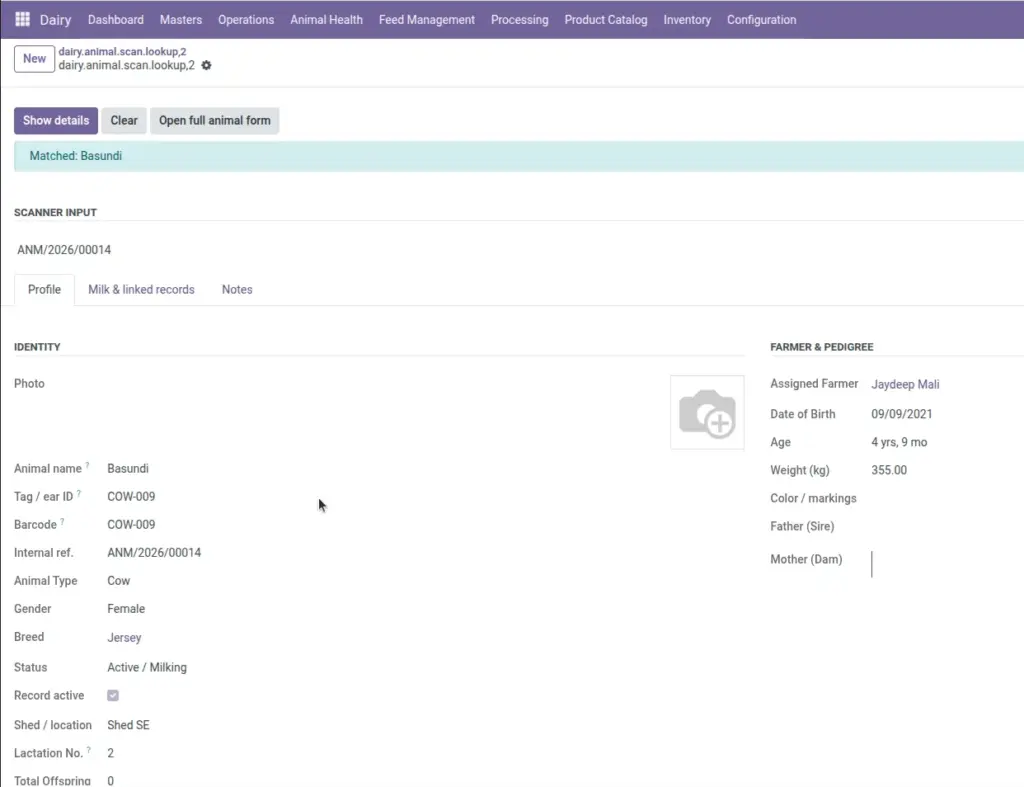
Scan any animal’s barcode or ear tag to instantly see its photo, farmer, milk history, health status, and jump to related records.
Overview
Animal Scan is different from Quick Milk. Quick Milk is for recording milk. Animal Scan is for looking up an animal – like a kiosk screen at the collection point when you need full details before accepting milk.
Scan a barcode, tag, reference number, or exact animal name. The screen shows the animal’s photo, breed, status, farmer, location, milk averages, and counts of health records, vaccinations, and pregnancies. You can then open the full animal record or jump to milk, health, or vaccination history.
How It Works
- Go to Dairy → Operations → Animal Scan (details). This opens a lookup screen – not a milk entry form.
- The system warns you if the animal is sick, pregnant, sold, or inactive, so collection staff can verify before pooling milk. Use the shortcut buttons to open milk collections, health records, vaccinations, or pregnancy records for that animal.
Step-by-Step Guide
- Go to Dairy → Operations → Animal Scan (details).
- Scan or type the barcode, ear tag, reference, or exact animal name.
- Click Lookup – the animal’s full details appear on screen.
- Read any status warning (e.g. animal is Sick or Pregnant).
- Use buttons to open the animal record, milk history, health, vaccinations, or pregnancies.
- Click Clear to scan the next animal.
Fields Table
| Field Name | Description | Example |
|---|---|---|
Scan barcode, tag or ID |
Enter scanned code or type tag, reference, or exact name. |
TAG-1042 |
Matched animal |
Animal found by the lookup. Read-only. |
Gauri |
Status notice |
Warning if animal is sick, pregnant, sold, or inactive. |
Status is “Sick” – verify before pooling milk |
Tag / Ear ID |
Physical ear tag number. |
TAG-1042 |
Assigned Farmer |
Farmer linked to this animal. |
Ramesh Patel |
Avg Daily Milk (L) |
Average litres per completed collection. |
8.5 L |
Total Milk Collected (L) |
Lifetime total from this animal. |
1,240 L |
Health Records |
Count of health visits on file. |
3 |
Vaccinations |
Count of vaccination records. |
5 |
Pregnancies |
Count of pregnancy/calving records. |
2 |
Field Explanations
Below is a detailed explanation of each field listed in the table above.
Scan barcode, tag or ID
Enter scanned code or type tag, reference, or exact name. For example: TAG-1042.
Matched animal
Animal found by the lookup. Read-only. For example: Gauri.
Status notice
Warning if animal is sick, pregnant, sold, or inactive. For example: Status is “Sick” – verify before pooling milk.
Tag / Ear ID
Physical ear tag number. For example: TAG-1042.
Assigned Farmer
Farmer linked to this animal. For example: Ramesh Patel.
Avg Daily Milk (L)
Average litres per completed collection. For example: 8.5 L.
Total Milk Collected (L)
Lifetime total from this animal. For example: 1,240 L.
Health Records
Count of health visits on file. For example: 3.
Vaccinations
Count of vaccination records. For example: 5.
Pregnancies
Count of pregnancy/calving records. For example: 2.
Tips
- Use before accepting milk from unknown animals: Scan first to confirm the animal is Active and not under milk withdrawal from treatment.
- Different from Quick Milk: Quick Milk records milk. Animal Scan only shows information – use both together at the collection yard.
Common Mistakes
- Using partial names – Lookup requires an exact name match if not using barcode/tag.
- Ignoring status warnings – A sick animal may be under medicine withdrawal; do not pool that milk.
- Expecting to record milk here – Use Quick Milk or Milk Collection to enter litres.
Image