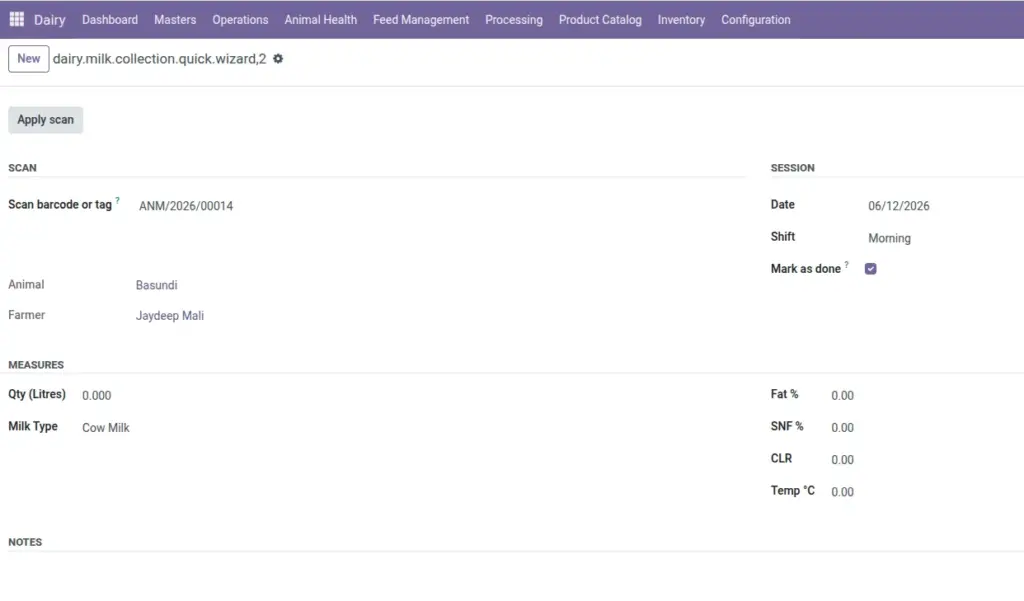
Scan an animal’s barcode at the collection yard, enter litres and fat – and move to the next cow in seconds.
Overview
Quick Milk is designed for fast-paced collection centres where staff scan animal barcode labels instead of searching records manually. Scan the code, enter quantity and quality readings, save – and the screen resets for the next animal.
This is ideal when you have a line of cows being milked and need to record each one quickly without opening full forms.
How It Works
- Go to Dairy → Operations → Quick Milk (Barcode). Scan or type the barcode, Tag ID, or animal reference. The system finds the animal, fills in the farmer, and lets you enter milk details.
- With Mark as done checked (default), each save automatically confirms and completes the collection – no extra clicks needed.
Step-by-Step Guide
- Go to Dairy → Operations → Quick Milk (Barcode).
- Scan the animal’s barcode label (or type Tag ID / reference) in the scan field.
- Press Enter or click Apply – the animal and farmer appear automatically.
- Enter Quantity (Litres), Fat %, and SNF %.
- Click Save & Next to record and start the next animal, or Save to close.
Fields Table
| Field Name | Description | Example |
|---|---|---|
Scan barcode or tag |
Scan field for barcode, ear tag, reference, or animal name. |
TAG-1042 |
Animal |
Auto-filled after scan. Read-only. |
Gauri |
Farmer |
Auto-filled from animal record. Read-only. |
Ramesh Patel |
Date |
Collection date. Defaults to today. |
10/06/2026 |
Shift |
Morning or Evening. |
Morning |
Qty (Litres) |
Litres collected. Required, must be > 0. |
8.5 |
Fat % |
Fat reading from analyser. |
4.1 |
SNF % |
SNF reading. |
8.5 |
Mark as done |
If checked, collection is confirmed and completed immediately. |
Checked |
Field Explanations
Below is a detailed explanation of each field listed in the table above.
Scan barcode or tag
Scan field for barcode, ear tag, reference, or animal name. For example: TAG-1042.
Animal
Auto-filled after scan. Read-only. For example: Gauri.
Farmer
Auto-filled from animal record. Read-only. For example: Ramesh Patel.
Date
Collection date. Defaults to today. For example: 10/06/2026.
Shift
Morning or Evening. For example: Morning.
Qty (Litres)
Litres collected. Required, must be > 0. For example: 8.5.
Fat %
Fat reading from analyser. For example: 4.1.
SNF %
SNF reading. For example: 8.5.
Mark as done
If checked, collection is confirmed and completed immediately. For example: Checked.
Tips
- Print labels in advance: From any animal record, use Print → Animal Barcode Label to generate scannable labels.
- Uncheck “Mark as done” for review: If a supervisor needs to verify entries later, leave collections in Draft by unchecking this option.
Common Mistakes
- Animal not active – Only Active or Dry animals can be scanned. Sick or sold animals are blocked.
- No farmer on animal – Assign a farmer to the animal before scanning.
- Duplicate entry – If milk was already recorded for this animal today in this shift, the system will show an error.
Image