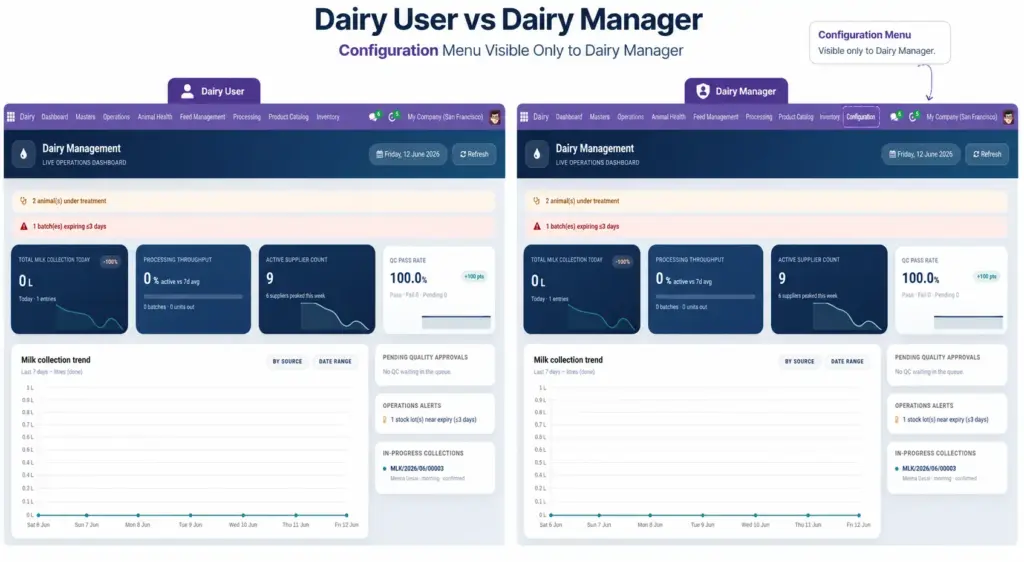
Understand who can see bank details, change settings, and delete records – Dairy User vs Dairy Manager.
Overview
The Dairy app has two access levels. Your administrator assigns the right role when creating your Odoo login.
- Dairy User – daily operations: collection, health, feed, quality, processing, stock
- Dairy Manager – everything a user can do, plus financial fields, configuration, and delete rights
How It Works
Dairy User can:
- View and use Dashboard, all Operations, Animal Health, Feed, Processing, Inventory, Product Catalog
- Create and edit animals, farmers, milk collections, health records, etc.
- Cannot see farmer bank account numbers
- Cannot access Dairy → Configuration menu
- Cannot delete farmer records
Dairy Manager can:
- Everything Dairy User can do
- See bank account numbers and sensitive financial data
- Access Configuration: routes, breeds, medicines, sample data import
- Delete records where allowed
System Administrator
Can also import sample data from Settings → Dairy Management (Odoo settings app).
Step-by-Step Guide
- Ask your IT administrator which role you have if menus are missing.
- If you need Configuration access, request Dairy Manager role.
- Collection staff should normally have Dairy User only – no need for manager access.
- Managers and accountants should have Dairy Manager for payments and setup.
Fields Table
| Field Name | Description | Example |
|---|---|---|
Dairy User |
Standard role for daily operational staff. |
Collection centre operator |
Dairy Manager |
Full access including config and bank details. |
Centre manager |
Configuration Menu |
Visible only to Dairy Manager. |
Routes, Breeds, Medicines |
Bank Account Number |
Visible only to Dairy Manager on farmer form. |
Hidden from users |
Delete Records |
Managers can delete; users cannot delete farmers. |
Manager only |
Field Explanations
Below is a detailed explanation of each field listed in the table above.
Dairy User
Standard role for daily operational staff. For example: Collection centre operator.
Dairy Manager
Full access including config and bank details. For example: Centre manager.
Configuration Menu
Visible only to Dairy Manager. For example: Routes, Breeds, Medicines.
Bank Account Number
Visible only to Dairy Manager on farmer form. For example: Hidden from users.
Delete Records
Managers can delete; users cannot delete farmers. For example: Manager only.
Tips
- Do not share manager logins: Bank details and configuration should stay with trusted supervisors only.
Common Mistakes
- Giving everyone manager access – Use Dairy User for floor staff; reserve manager for supervisors.
- Expecting config menu as regular user – It is hidden by design; request role change if needed.
Image