Summarize This Article With AI
Retrieval quality is the foundation of every successful RAG system. Most teams focus on prompts and model selection first, but in practice, a retrieval augmented generation application often succeeds or fails based on one thing: whether it retrieves the right context before generating an answer.
For most enterprise RAG systems, hybrid search combining semantic and keyword retrieval with re-ranking should be your default strategy. Here’s why:
- Semantic-first works best for natural language, paraphrased, “how do I…” queries
- Keyword-first works best for IDs, codes, SKUs, clauses, and version strings
- Hybrid search outperforms both single methods in mixed real-world workloads (support tickets, policies, logs, docs)
In production RAG systems deployed since 2023, vector-only demos often fail once real users start asking exact-code or policy-clause style questions. The demo looked impressive, but then someone pasted an error message or asked about “section 7.2.1” and the system returned nothing useful.
Retrieval quality—not prompts or model choice—is usually the number one driver of RAG success in enterprise environments.
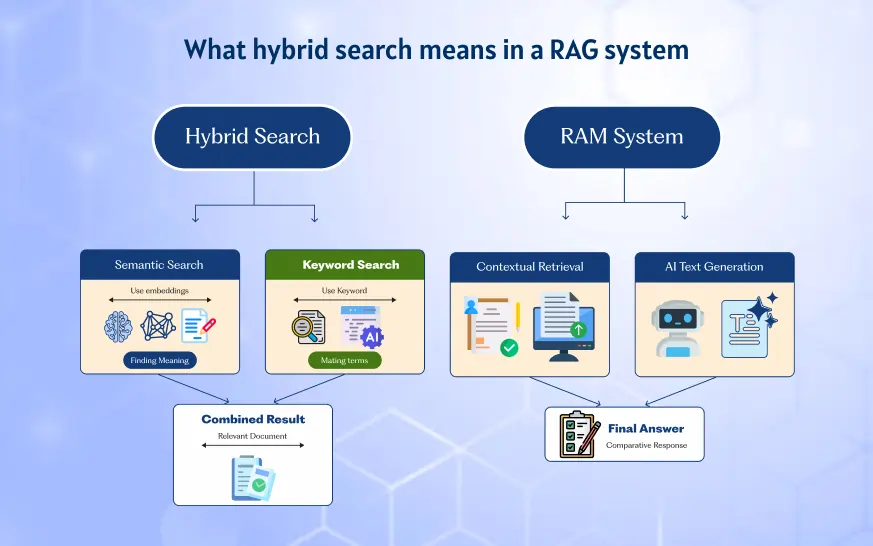
What hybrid search means in a RAG system
Retrieval-augmented generation work starts with a simple premise: an LLM retrieves relevant information from external knowledge sources (wikis, policies, tickets, Confluence, SharePoint, Git repos) and then generates answers grounded in that context. The model doesn’t rely solely on its training data. It pulls from your enterprise’s actual documents.
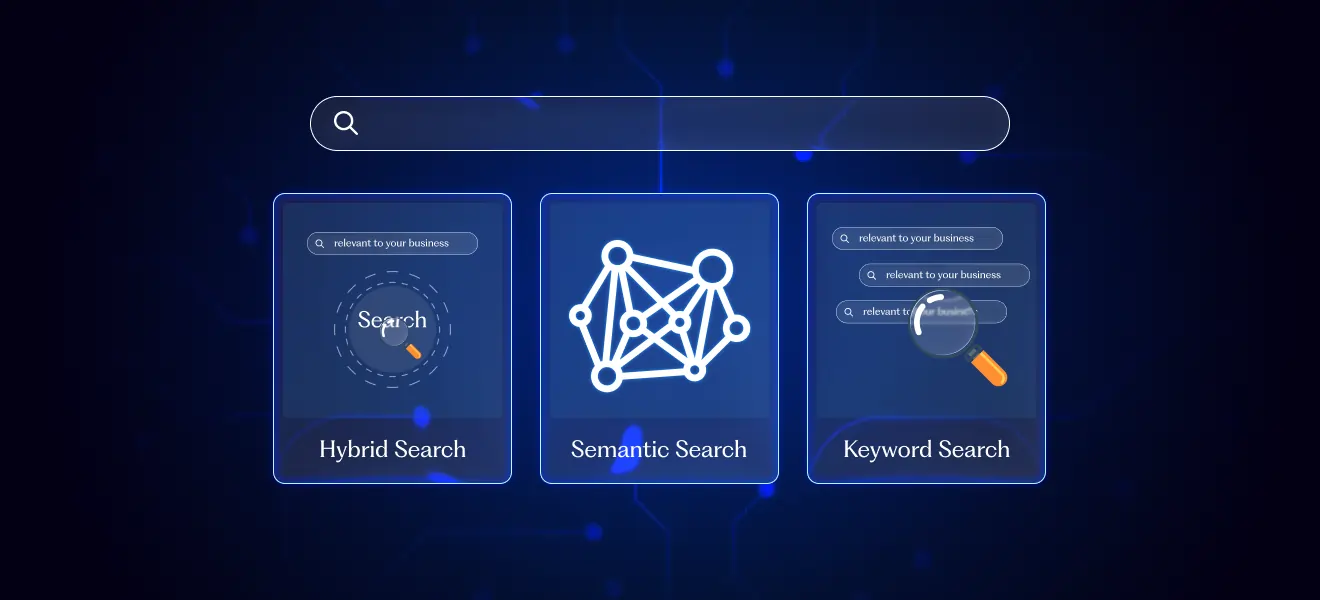
Hybrid search for RAG combines two retrieval approaches:
- Combine semantic search (vector similarity search using embeddings) and keyword search (lexical/BM25)
- Run both against the same permission-filtered corpus
- Merge, de-duplicate, and re-rank results before passing them to the LLM
This means you’re using both vector stores (Pinecone, Qdrant, Weaviate, pgvector) and lexical engines (Elasticsearch, OpenSearch, Solr, PostgreSQL full-text) together.
Here’s a quick example of how this plays out:
- User asks: “Show my latest SOC 2 vendor due diligence checklist”
- Hybrid search retrieves both policy docs via semantic similarity and a specific “SOC2-VENDOR-CHECKLIST-v2024.3” file via keyword matching
In RAG architecture, retrieval is a separate layer from the language model. Hybrid search is a design choice inside that layer—not a feature of the LLM itself. You’re making an engineering decision about how to find relevant documents before the model ever sees them.
Semantic search in RAG: strengths and limitations
Semantic search uses embedding models (like text-embedding-3-large, BGE, or instructor-xl) to encode queries and documents into dense vector embeddings. These numerical representations capture meaning in a high dimensional space, and retrieval happens by ranking results using cosine similarity or dot product calculations.
Where semantic search works well:
- Paraphrased questions (“How do we offboard external vendors?” matches policy documents using “third-party termination procedures”)
- Natural-language “how/why/what” queries where users describe symptoms conversationally
- Synonym-heavy internal jargon across departments
- Multilingual or cross-locale queries without explicit translation
- Broad concept matching where exact words don’t matter
Consider this scenario: an employee asks, “What’s our policy on BYOD phones?” but the document only uses the phrase “personally owned mobile devices.” Semantic search still connects them because it understands semantic similarity between concepts, not just exact matches.
Where semantic search breaks in RAG retrieval:
- Misses exact IDs like “AUTH-403-PRIV”, invoice “INV-2024-01983”, or SKU “PRO-EDGE-X12”
- Can over-retrieve vaguely related content, leading to noisy context windows
- Struggles with ultra-short queries (single code or 1–2 words)
- Domain-specific phrasing (internal acronym soup) may require fine-tuned embeddings or domain adaptation
- May retrieve semantically similar but non-authoritative content
In production, semantic-only RAG often fails when users paste exact error messages, contract clauses, or regulatory citations (e.g., “GDPR Article 28(3)”). The dense vector search finds things that feel related but misses the exact document the user needed.
Keyword search in RAG: where it still wins
Keyword search (also called lexical retrieval) relies on exact or near-exact token matching using inverted indexes and ranking algorithms like BM25 or BM25F. The BM25 algorithm scores relevance based on term frequency, inverse document frequency, and document length normalization—making it excellent at finding exact words and phrases.
Where keyword search excels in enterprise RAG:
- Precise term matching for product codes and SKUs (“SKU-ALPHA-5000”)
- Policy IDs and section numbers (“Policy HR-7.2.1”)
- Legal/regulatory clauses (“SOC 2 CC6.1”, “HIPAA §164.312”)
- Error messages and stack traces (“NullPointerException at line 143”)
- API field names (“customer_external_id”, “is_active_flag”)
- Deterministic, repeatable results that auditors and engineers can reproduce
Here’s a concrete example: a support engineer queries “AUTH-403-PRIV” and keyword search finds the exact runbook titled “AUTH-403-PRIV: Privileged access failure in SSO (v2024-01).” Dense vector search might have returned five documents about authentication in general—helpful, but not the answer the engineer needed.
Where keyword search falls short:
- Fails when users don’t know the exact terminology (searching “fire someone” when docs say “involuntary termination procedure”)
- Weak on synonyms, paraphrases, and multilingual content
- Ranking may surface documents that mention the term frequently but are not the authoritative source
Keyword search is not outdated. It’s still the best tool for compliance lookups, observability logs, and any workflow where a single token difference matters. For ambiguous queries where precision is critical, lexical matching often outperforms vector search.
Hybrid search for RAG: combining semantic and keyword retrieval
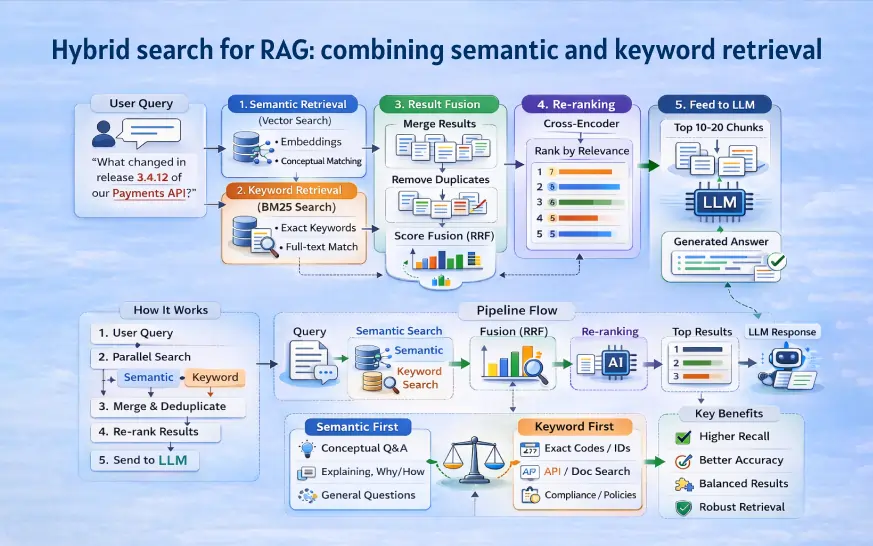
Hybrid search runs both semantic and keyword retrieval in parallel, combines the search results using score fusion or reciprocal rank fusion, and then re-ranks to surface the best passages for RAG. This approach lets you capture both conceptual relevance and exact matches in a single retrieval pipeline.
A typical hybrid retrieval pipeline looks like this:
- Accept user query (e.g., “What changed in release 3.4.12 of our payments API?”)
- Run semantic vector search over release notes and docs
- Run keyword/BM25 search emphasizing “3.4.12” and “payments API”
- Merge and de-duplicate retrieved chunks by document/chunk ID
- Apply a cross-encoder re-ranker (e.g., mxbai-rerank-xsmall, bge-reranker) on top candidates
- Send top N chunks (e.g., 10–20) into the LLM’s context window
Why hybrid works better in practice:
- Semantic side recovers paraphrased or loosely related explanations
- Keyword side guarantees exact identifiers and version strings are not lost
- Re-ranking balances both signals using the actual query
Many modern stacks already have native support for hybrid search:
- Elasticsearch / OpenSearch with dense vector + BM25
- Postgres with pgvector + full-text search
- Cloud-native offerings (Azure Cognitive Search hybrid, OpenSearch Serverless, Amazon Bedrock Knowledge Bases)
Milvus 2.5 and similar vector database implementations now include built-in RRF-fused semantic and BM25 retrieval. Benchmarks show hybrid recall rates 10-30% higher than vector-only approaches on diverse enterprise corpora.
In internal tests across real enterprise deployments, hybrid search drastically reduces “no-answer” or off-topic retrieval for logs, tickets, and policy queries compared to semantic-only systems. The improvement is especially noticeable when user queries mix conversational language with specific identifiers.
When semantic search should lead vs when keyword search should lead
Different use cases call for different retrieval weights. The “leading” method determines which retriever gets higher weight in score fusion—or which method provides the candidate pool before re-ranking.
When semantic search should lead:
- Internal knowledge assistants answering “how” and “why” questions (onboarding, HR FAQs, IT helpdesk)
- Policy interpretation (“Can I work remotely from another country?” where the policy is phrased differently)
- Customer support chatbots where customers use varied, informal language to answer user questions
- Cross-language search where employees might ask in Spanish but docs are in English
When keyword search should lead:
- Troubleshooting by error code / log message (DevOps, SRE, platform teams)
- Contract clause lookup (“show me section 9.3: Limitation of Liability”)
- Exact-protocol or API questions (“field X-Auth-Tenant-Id”, “/v1/payments/authorize”)
- Compliance lookups (“PCI DSS 3.2.1, requirement 12.3.3”)
The leading method controls which retriever gets higher weight in score fusion or which method provides the candidate pool before re-ranking.
Comparative example: The same system can serve HR (semantic-first) and legal/compliance (keyword-first) queries, but both still use a hybrid fallback. You’re not choosing one method forever—you’re tuning weights based on query patterns and use case requirements.
Designing a practical hybrid retrieval pipeline for RAG
Retrieval quality usually matters more than trying yet another LLM model in 2024–2025 RAG projects. Getting the retrieval layer right will often improve your results more than any prompt engineering or model upgrade.
Here’s a step-by-step hybrid pipeline for generating responses grounded in relevant content:
Step 1: Data preparation and indexing
Gather documents from all the documents in your enterprise: Confluence pages, PDF policies, Jira tickets, Zendesk cases, GitHub READMEs, text files, and unstructured data sources. Design chunking strategies adapted to content types—short chunks for logs, larger for policies. Store both vector embeddings and full-text indexes with metadata (department, owner, last_updated).
Step 2: Dual-mode retrieval (semantic + keyword)
Run both search methods against your data source simultaneously. Semantic search finds conceptually relevant results while keyword search captures exact matches. Both operate on the same permission-filtered corpus.
Step 3: Merge, de-duplicate, and re-rank
Combine results using weighted linear combination or reciprocal rank fusion (RRF). RRF sums inverse ranks from each list, avoiding the need to normalize unbounded BM25 scores against bounded cosine scores. Cross-encoder or LLM-based re-rankers (small transformer models) often improve retrieval 15-25% more than prompt tweaks alone.
Step 4: Apply business rules and permissions
- Prioritize authoritative sources (e.g., “/Policies/Official/2024” over Slack messages)
- Apply recency filters (e.g., “prefer docs updated after Jan 2024”)
- Implement permission-aware filtering (user’s role, group, region) to avoid data leakage
Step 5: Generate answers with grounded context and show citations
Send the curated top set (5–20 retrieved chunks) into the LLM’s context window. Avoid overloading with 50+ chunks. Include source citations so users can verify the retrieved information.
Common retrieval mistakes in RAG implementations
These patterns occur repeatedly in enterprise RAG projects, especially where teams rush from PoC to production. Here’s a checklist of failure modes seen in real pilots since late 2023:
| Mistake | What Goes Wrong | Fix |
|---|---|---|
| Vector-only prototypes | Look great in demos but fail when production users paste codes and regulatory text | Add lexical retrievers and hybrid fusion |
| Poor chunking | Splitting clauses across chunks so keyword search fails and semantic search loses context (“section 7.2.1” separated from its heading) | Design content-type-specific chunking strategies |
| Ignoring metadata | Treating outdated drafts and official policies equally, letting old or unapproved docs rank higher | Use metadata-aware ranking (source type, approval status, recency) |
| No evaluation of retrieval itself | Teams judge only final answers, not whether the right documents were retrieved | Implement retrieval metrics (recall, precision at k on a judged query set with ground truth labels) |
| Weak access control | A single vector store with no permission filters, leaking confidential HR or legal data across teams | Integrate permission-aware filtering before retrieval / before response generation |
The vector-only prototype problem is especially common. A demo system works beautifully with natural language questions, impressing stakeholders. Then it goes to production, and the first support engineer pastes an error code—and gets nothing useful back. By then, you’re scrambling to retrofit keyword search.
Relying solely on vector similarity search without lexical backup is one of the most common causes of RAG system failures in enterprise environments.
Choosing your RAG search strategy by use case
Here’s a decision framework for selecting your strategy mode:
Semantic-first hybrid (semantic weighted higher, keyword as safety net)
- Best-fit use cases: Internal Q&A, HR knowledge assistant, customer support, onboarding bots
- Typical query patterns: Long natural language questions, “how do I…” prompts, varied phrasing
- Risk profile: May miss exact codes; compensate with keyword fallback
Keyword-first hybrid (lexical weighted higher, semantic fills gaps)
- Best-fit use cases: Legal review, contract analysis, compliance lookups, ops troubleshooting
- Typical query patterns: Short ID lookups, pasted error messages, regulatory citations
- Risk profile: May miss paraphrased context; semantic layer provides conceptual backup
Balanced hybrid (weights roughly equal plus strong re-ranking)
- Best-fit use cases: Cross-department enterprise copilot spanning HR, IT, finance
- Typical query patterns: Mixed—some users ask broad questions, others paste exact terms
- Risk profile: Requires robust re-ranking to match queries to the right retrieval mode
Concrete mapping examples:
- HR / people ops knowledge assistant → semantic-first hybrid
- Legal contract analyzer → keyword-first hybrid
- Cross-department enterprise copilot spanning HR, IT, finance → balanced hybrid
Review real query logs periodically (from Zendesk, ServiceNow, internal search) to adjust strategy weights instead of guessing. Industry logs show roughly 40% of helpdesk queries are semantic-dominant, but this varies significantly by department and use case.
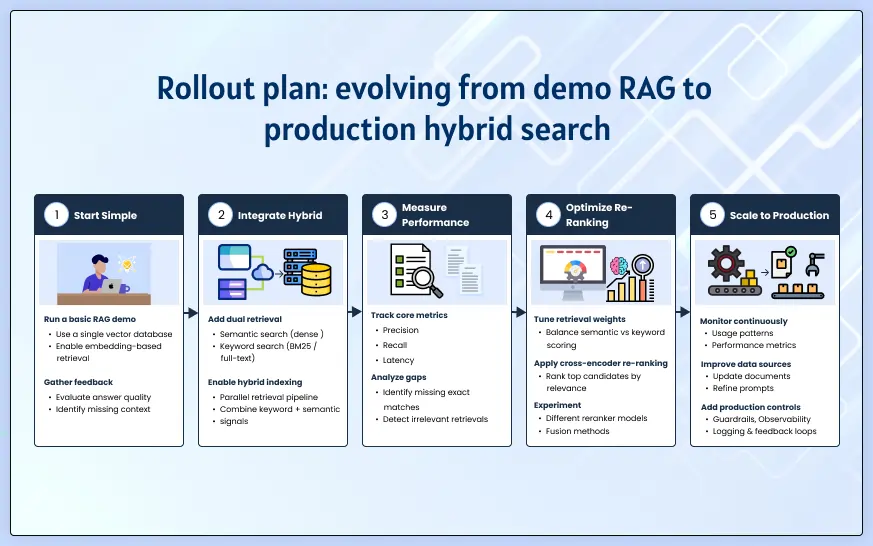
Rollout plan: evolving from demo RAG to production hybrid search
Many teams in 2024 start with a semantic-only RAG demo and then need a structured path to hybrid, production-ready retrieval. Here’s a four-phase rollout:
Phase 1: Collect and label real queries
- Gather at least a few hundred real queries from helpdesk tickets, chat logs, search logs between 2023–2024
- Tag each as: conceptual, exact lookup, troubleshooting, policy/process, or mixed
- This analysis reveals your actual query distribution—not what you assumed users would ask
Phase 2: Baseline retrieval experiments
Test three configurations on a held-out query set:
- Pure semantic (dense vector search only)
- Pure keyword (BM25/lexical only)
- Hybrid (simple fusion using weighted averaging or RRF)
Compare “did we retrieve the right doc in top 5 / top 10?” across query types. Target precision@5 above 0.8. You’ll likely see 20-40% gaps between methods depending on query type.
Phase 3: Add re-ranking and business rules
- Implement metadata filters, permission checks, recency windows
- Add cross-encoder re-ranking on top candidates
- Apply source prioritization (SOPs and policies over chat snippets)
- Retest with the same evaluation set
Phase 4: Monitor, evaluate, and iterate
Set up dashboards tracking:
- No-answer or low-confidence cases
- Manual escalations to humans
- Top missed queries that need better retrieval or data fixes
- Search mode performance by query type
Continuous monitoring typically improves retrieval performance 15-20% over static setups. Iterate on retrieval and content quality before jumping to new LLMs or heavy fine-tuning.
How search strategy fits into broader RAG architecture
Hybrid vs semantic vs keyword is only one part of a larger RAG architecture decision. Strong RAG implementations as generative AI solutions require attention to adjacent concerns:
- Data ingestion and transformation from PDFs, Office docs, ticketing systems
- Chunking and document structure preservation (headings, sections, tables)
- Choice of vector database or search engine and indexing strategy
- Prompt assembly (how retrieved chunks are formatted and ordered)
- Logging, observability, and governance (especially for regulated industries)
When RAG is preferable vs alternatives:
| Approach | Best For | Key Consideration |
|---|---|---|
| RAG | Answers rely on changing enterprise content (policies, product docs, support KB) | External knowledge stays current without retraining |
| Fine-tuning | Need better behavior/style or domain reasoning on stable data | More effort, requires training infrastructure |
| Prompting-only | Narrow, low-risk use cases or prototypes without strong factual dependence | Quick to implement but limited factual accuracy |
Frame RAG as a system design problem with multiple layers:
- Search strategy (this article’s focus)
- Data lifecycle (ingestion, updates, archival)
- Evaluation loop (retrieval metrics, answer quality, user feedback)
- User experience (citations, feedback buttons, escalation paths)
AI systems built with RAG benefit from this holistic view. The large language model is just one component—knowledge retrieval, machine learning for embeddings, and information retrieval design matter just as much for real world applications.
FAQs
What is hybrid search in a RAG system?
Hybrid search combines semantic search (vector similarity using embeddings) and keyword search (BM25 lexical matching) to retrieve relevant documents before generating responses. Results are merged using techniques like reciprocal rank fusion, then re-ranked. This gives you both conceptual matching and exact term precision—for example, finding policy documents about “privileged access” while also matching the exact code “AUTH-403-PRIV.”
Is semantic search alone enough for enterprise RAG?
No. Semantic search excels at paraphrases and natural language but misses exact matches on IDs, error codes, and regulatory citations. When a user pastes “GDPR Article 28(3)” or “SKU-PRO-X500,” semantic search often returns vaguely related content instead of the exact document. Add keyword search as a minimum baseline for production systems.
When does keyword search outperform semantic search in RAG?
Keyword search wins for error messages, version numbers, product codes, legal clauses, and any query where exact terms matter. A support engineer searching “NullPointerException at line 143” needs lexical precision, not semantic understanding. Keyword search also provides deterministic, auditable results that compliance teams can verify.
How do I know if my retrieval quality is good enough?
Measure retrieval directly—not just final answers. Use metrics like Hit Rate @k, MRR (Mean Reciprocal Rank), and NDCG on a labeled query set. Check: “Did we retrieve the authoritative source in the top 5 results?” Teams often find 20-40% gaps when they first measure this. The relevance score alone doesn’t tell you if you found the right document.
Do I still need fine-tuning if I use a strong hybrid retrieval pipeline?
Often not. Many use cases perform well with strong retrieval, better prompts, and re-ranking. Fine-tuning is usually considered when domain-specific behavior, style adaptation, or specialized reasoning is needed. For factual accuracy on enterprise content, improving retrieval and chunking strategies typically delivers more context and better results than fine-tuning.
How can I improve retrieval accuracy without changing the LLM model?
Focus on the retrieval layer: implement hybrid search if you’re using vector-only, add cross-encoder re-ranking (15-25% accuracy gains in benchmarks), improve chunking for your content types, add metadata-aware filtering, and create a retrieval evaluation framework. These changes in various contexts often outperform model upgrades for knowledge retrieval tasks. Retrieval decisions made in 2024–2025 will usually bring more ROI than marginal model upgrades for enterprise knowledge assistants. Teams planning a production-grade RAG assistant should prioritize hybrid search, evaluation, and governance over cosmetic UI changes. If you’re planning a production-grade knowledge assistant using retrieval augmented generation RAG, explore RAG Development Services or contact WebbyCrown Solutions to discuss your implementation needs.