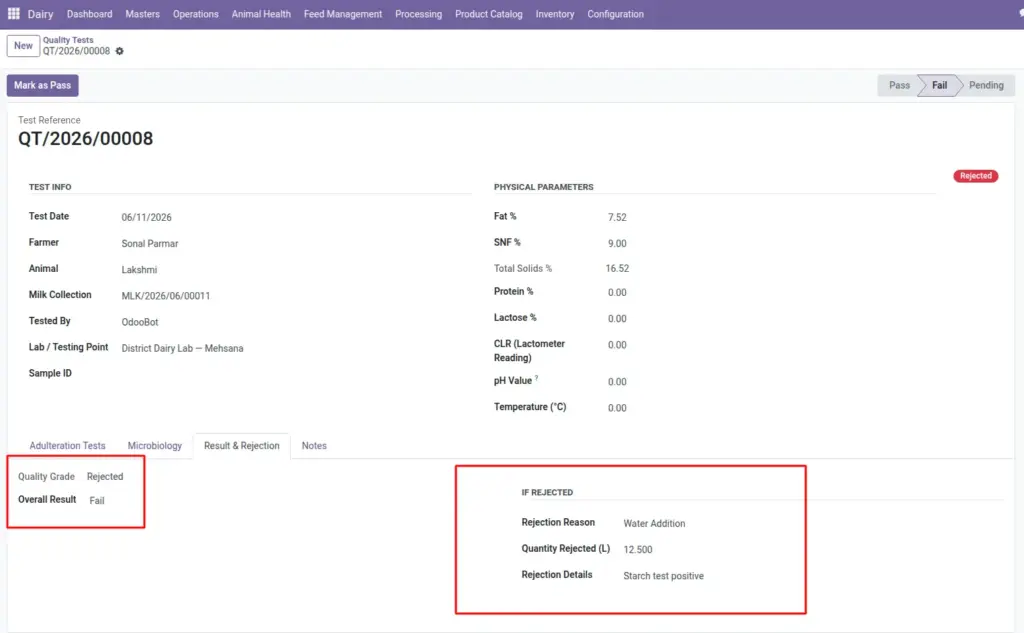
What to do when quality testing fails – reject the collection, document the reason, and reset or re-test if needed.
Overview
When milk fails quality testing (adulteration, low fat, antibiotics, etc.), the linked milk collection is marked Rejected. Rejected milk is not counted in farmer payments or processing input.
The workflow protects your plant from contaminated milk and ensures farmers are not paid for rejected quantities.
How It Works
- Rejection happens from the Quality Test screen when you click Fail. If the test is linked to a milk collection, that collection automatically moves to Rejected status.
- From a rejected collection, a supervisor can Reset to Draft if the rejection was a mistake and re-enter correct data or re-test.
Step-by-Step Guide
- Run the Quality Test with full lab and adulteration readings.
- If milk fails, click Fail and select a Rejection Reason (low fat, adulteration, antibiotics, etc.).
- Add Rejection Details notes for the farmer dispute record.
- Enter Quantity Rejected (L) if only part of the sample failed.
- The linked milk collection status changes to Rejected – it will not count in farmer payment.
- Inform the farmer and dispose of the rejected milk per your SOP.
- If rejection was an error, open the collection and click Reset to Draft, fix data, and re-test.
Fields Table
| Field Name | Description | Example |
|---|---|---|
Overall Result |
Pass, Fail, or Pending on the quality test. |
Fail |
Rejection Reason |
Low fat, adulteration, antibiotics, high bacteria, water added, etc. |
Adulteration Detected |
Rejection Details |
Free-text notes about the failure. |
Starch test positive |
Quantity Rejected (L) |
Litres rejected (if partial). |
12.5 |
Quality Grade |
Auto-set to Rejected when test fails. |
Rejected |
Collection Status |
Milk collection moves to Rejected when test fails. |
Rejected |
Reset to Draft |
Action to reopen a rejected collection for correction. |
Available on rejected entries |
Field Explanations
Below is a detailed explanation of each field listed in the table above.
Overall Result
Pass, Fail, or Pending on the quality test. For example: Fail.
Rejection Reason
Low fat, adulteration, antibiotics, high bacteria, water added, etc. For example: Adulteration Detected.
Rejection Details
Free-text notes about the failure. For example: Starch test positive.
Quantity Rejected (L)
Litres rejected (if partial). For example: 12.5.
Quality Grade
Auto-set to Rejected when test fails. For example: Rejected
Collection Status
Milk collection moves to Rejected when test fails. For example: Rejected.
Reset to Draft
Action to reopen a rejected collection for correction. For example: Available on rejected entries.
Tips
- Always document rejection reason: Farmers will ask why milk was rejected – the reason field is your official record.
- Never process rejected milk: Only Done collections should go into processing batches.
Common Mistakes
- Leaving rejected collection as Done – Failing the quality test should auto-reject; verify status.
- Paying farmer for rejected milk – Check farmer pending payment excludes rejected entries.
- Deleting instead of resetting – Use Reset to Draft to keep audit trail if correcting mistakes.
Image