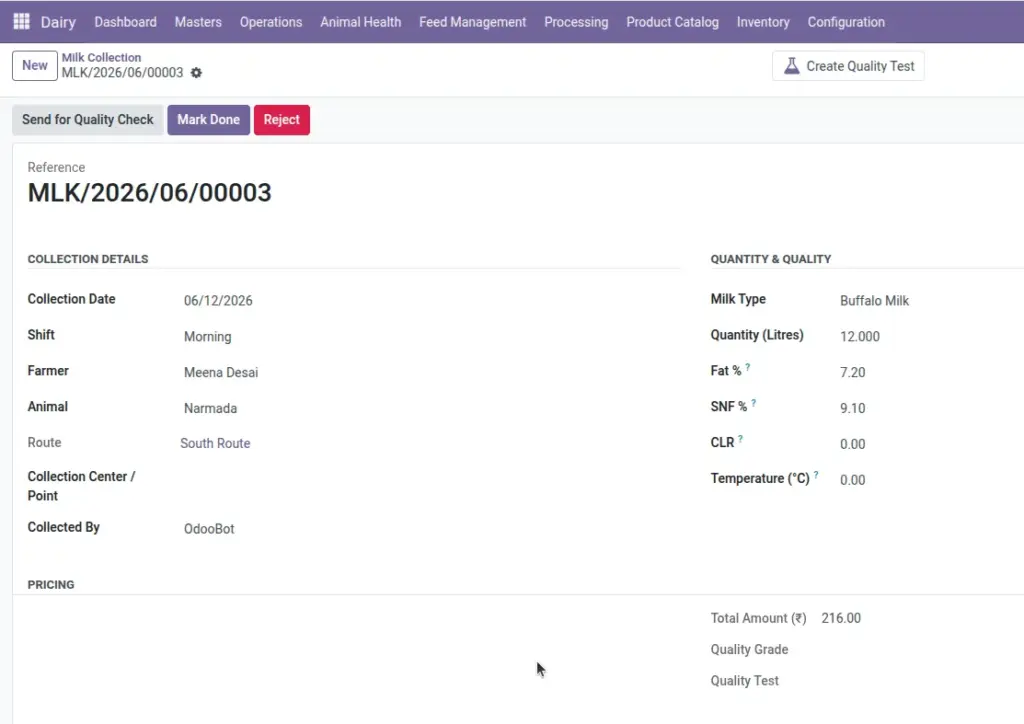
Log every morning and evening milk collection with quantity, fat %, SNF %, and automatic payment calculation.
Overview
Milk Collection is the heart of daily operations. Each entry records who supplied milk, from which animal, how many litres, quality readings (fat, SNF, CLR, temperature), and the payment amount.
Entries move through stages: Draft → Confirmed → Quality Check → Done (or Rejected). You can also link a quality test directly from a collection entry.
How It Works
Go to Dairy → Operations → Milk Collection for all entries, or Today’s Collection for a filtered view of today only.
When you select a farmer, the system fills in their default rate. If an animal is selected, milk type updates automatically. Total amount is calculated based on the farmer’s rate type – you never need to calculate manually.
Step-by-Step Guide
- Go to Dairy → Operations → Milk Collection and click Create.
- Select Collection Date and Shift (Morning or Evening).
- Choose the Farmer and optionally the Animal.
- Enter Quantity (Litres), Fat %, and SNF % from your milk analyser.
- Review the auto-calculated Total Amount.
- Click Confirm, then Done when ready – or send for Quality Check first.
Fields Table
| Field Name | Description | Example |
|---|---|---|
Reference |
Auto-generated collection number. |
MC/00128 |
Collection Date |
Date milk was collected. Cannot be in the future. |
10/06/2026 |
Shift |
Morning or Evening collection round. |
Morning |
Farmer |
Milk supplier. Required. |
Ramesh Patel |
Animal |
Specific animal (optional but recommended). |
Gauri |
Quantity (Litres) |
Litres collected. Must be greater than zero. |
12.5 |
Fat % |
Fat percentage from milk analyser (0–100). |
4.2 |
SNF % |
Solid Not Fat percentage. |
8.6 |
CLR |
Corrected Lactometer Reading. |
28.5 |
Temperature (°C) |
Milk temperature at collection. |
4.0 |
Milk Type |
Cow, Buffalo, Mixed, or Goat milk. |
Cow Milk |
Rate (₹/L) |
Per-litre rate (for fixed-rate farmers). |
₹42.00 |
Total Amount (₹) |
Auto-calculated payment amount. |
₹525.00 |
Status |
Draft, Confirmed, Quality Check, Done, or Rejected. |
Done |
Quality Grade |
Grade from linked quality test (A, B, C, Rejected). |
Grade A |
Field Explanations
Below is a detailed explanation of each field listed in the table above.
Reference
Auto-generated collection number. For example: MC/00128.
Collection Date
Date milk was collected. Cannot be in the future. For example: 10/06/2026.
Shift
Morning or Evening collection round. For example: Morning.
Farmer
Milk supplier. Required. For example: Ramesh Patel.
Animal
Specific animal (optional but recommended). For example: Gauri.
Quantity (Litres)
Litres collected. Must be greater than zero. For example: 12.5.
Fat %
Fat percentage from milk analyser (0–100). For example: 4.2.
SNF %
Solid Not Fat percentage. For example: 8.6.
CLR
Corrected Lactometer Reading. For example: 28.5.
Temperature (°C)
Milk temperature at collection. For example: 4.0.
Milk Type
Cow, Buffalo, Mixed, or Goat milk. For example: Cow Milk.
Rate (₹/L)
Per-litre rate (for fixed-rate farmers). For example: ₹42.00.
Total Amount (₹)
Auto-calculated payment amount. For example: ₹525.00.
Status
Draft, Confirmed, Quality Check, Done, or Rejected. For example: Done.
Quality Grade
Grade from linked quality test (A, B, C, Rejected). For example: Grade A.
Tips
- One entry per farmer/animal per shift per day: The system prevents duplicate entries for the same combination – edit the existing entry instead of creating a new one.
- Use Today’s Collection for speed: During busy collection hours, use Dairy → Operations → Today’s Collection to see only today’s records.
Common Mistakes
- Zero quantity – Quantity must be greater than zero.
- Missing fat/SNF for fat-based farmers – Payment will be ₹0 if fat or SNF is not entered for fat-based rate types.
- Future dates – Collection date cannot be set to a future date.
Image