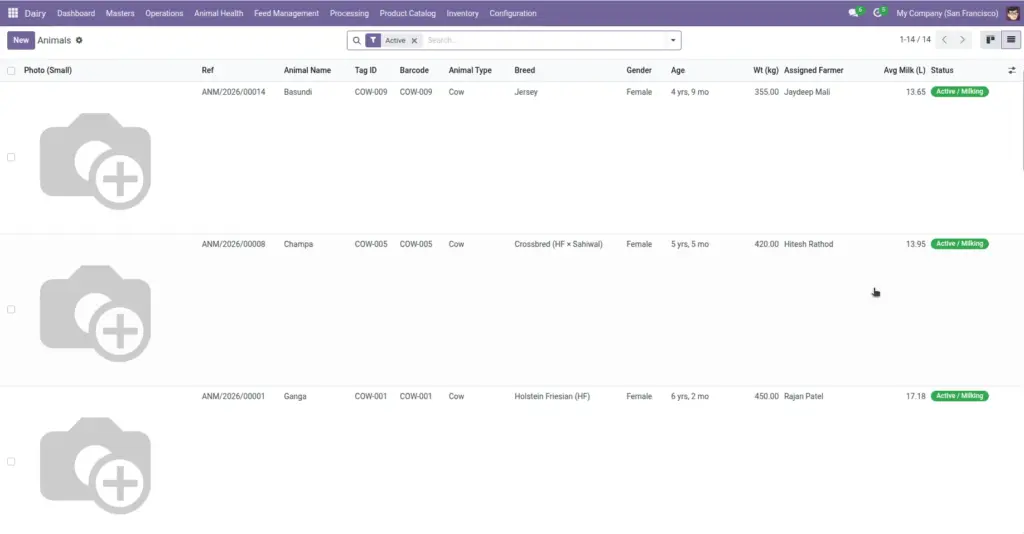
Create a profile for every animal in your herd — with ear tag, breed, farmer, status, and a barcode for fast milk recording.
Overview
Every cow, buffalo, goat, or sheep in your operation gets its own record. This is the foundation for milk collection, health tracking, pregnancy records, and feed management.
Each animal has a unique ear tag, optional photo, breed, lineage (mother and father), and a status like Active/Milking, Dry, Pregnant, or Sick. The system also tracks total milk collected and average daily yield per animal.
How It Works
Go to Dairy → Masters → Animals. Each animal links to one farmer and can have barcode labels printed for the Quick Milk screen.
When you record milk against an animal, the system updates that animal’s milk statistics automatically. Health records, vaccinations, pregnancies, and feed records all link back to the same animal profile.
Step-by-Step Guide
- Go to Dairy → Masters → Animals and click Create.
- Enter the Animal Name and Tag / Ear ID (must be unique).
- Select Animal Type (Cow, Buffalo, Goat, Sheep), Breed, and Gender.
- Set Date of Birth, Weight, and assign the Farmer.
- Set Status to Active/Milking for animals currently giving milk.
- Upload a Photo if available (helps identify animals at the collection point).
- Click Save. Print the barcode label from the Print menu for yard scanning.
Fields Table
| Field Name | Description | Example |
|---|---|---|
Animal Name |
Common name or call name used by the farmer. |
Gauri |
Tag / Ear ID |
Unique physical ear tag or RFID number. Required and must not duplicate. |
TAG-1042 |
Barcode |
Code printed on labels for scanning. Auto-fills from Tag ID if left empty. |
TAG-1042 |
Reference |
System-generated ID (e.g. ANM/00045). Read-only. |
ANM/00045 |
Animal Type |
Species: Cow, Buffalo, Goat, or Sheep. |
Cow |
Breed |
Breed from your breed master list. |
Gir |
Gender |
Female or Male. |
Female |
Date of Birth |
Used to calculate age automatically. |
15/03/2020 |
Status |
Current state: Active/Milking, Dry, Pregnant, Calf, Sick, Retired, Sold, Deceased. |
Active / Milking |
Assigned Farmer |
Farmer who owns or supplies milk from this animal. |
Ramesh Patel |
Lactation No. |
Number of completed lactation cycles. |
3 |
Avg Daily Milk (L) |
Average litres per collection entry (computed). |
8.5 L |
Father / Mother |
Lineage links to other animals in the system. |
Sire: Raja |
Field Explanations
Below is a detailed explanation of each field listed in the table above.
Animal Name
Common name or call name used by the farmer. For example: Gauri.
Tag / Ear ID
Unique physical ear tag or RFID number. Required and must not duplicate. For example: TAG-1042.
Barcode
Code printed on labels for scanning. Auto-fills from Tag ID if left empty. For example: TAG-1042.
Reference
System-generated ID (e.g. ANM/00045). Read-only. For example: ANM/00045.
Animal Type
Species: Cow, Buffalo, Goat, or Sheep. For example: Cow.
Breed
Breed from your breed master list. For example: Gir.
Gender
Female or Male. For example: Female.
Date of Birth
Used to calculate age automatically. For example: 15/03/2020.
Status
Current state: Active/Milking, Dry, Pregnant, Calf, Sick, Retired, Sold, Deceased. For example: Active / Milking.
Assigned Farmer
Farmer who owns or supplies milk from this animal. For example: Ramesh Patel.
Lactation No.
Number of completed lactation cycles. For example: 3.
Avg Daily Milk (L)
Average litres per collection entry (computed). For example: 8.5 L.
Father / Mother
Lineage links to other animals in the system. For example: Sire: Raja.
Tips
- Print barcode labels early: Use Print → Animal Barcode Label so collection staff can scan instead of searching by name.
- Update status when things change: When a cow goes dry or becomes pregnant, update Status so milk collection only shows eligible animals.
Common Mistakes
- Duplicate ear tags — The system will not allow two animals with the same Tag ID.
- No farmer assigned — Quick Milk scanning will fail if the animal has no farmer.
- Recording milk for sick animals — Check health records for milk discard periods before collecting.
Image