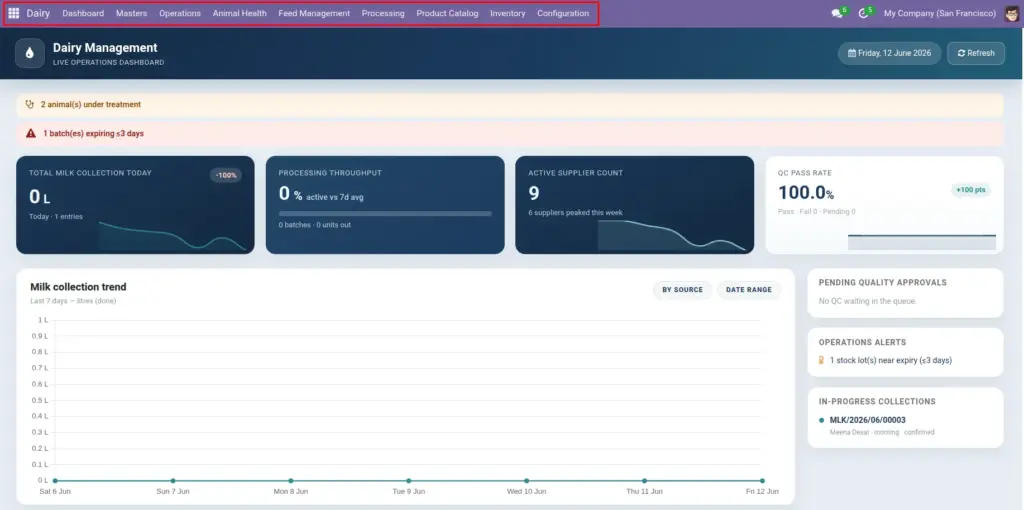
Learn what this app does and how your daily dairy work flows through it – from milk collection to finished products on the shelf.
Overview
Not installed yet?
If you have not installed the app on Odoo, read Setup Dairy Management first – then return here.
Dairy Management is your complete workspace for running a cooperative or commercial dairy. It helps you track every cow and buffalo, record milk from farmers morning and evening, test quality, pay farmers fairly based on fat and SNF, manage herd health, process milk into products like paneer and ghee, and keep cold storage stock under control.
Whether you run a village collection centre or a full processing plant, everything connects: an animal’s milk today becomes a processing batch tomorrow and a stock item on your shelf.
How It Works
The app is organised around your real workday:
- Morning: Open the Dashboard, record milk collections (or use barcode scanning), check quality alerts.
- Midday: Run quality tests, update health records, confirm feed given to animals.
- Processing shift: Create processing batches from collected milk, package finished goods, move stock to cold rooms.
- End of day: Review farmer payments due, check near-expiry alerts, plan tomorrow’s collection routes.
Step-by-Step Guide
Addon / Module
- Ask your administrator to set up Collection Routes, Animal Breeds, and Medicines under Dairy → Configuration.
- Register your Farmers with their milk rates and bank details.
- Add Animals with ear tags and print barcode labels for fast collection.
- Start recording Milk Collection each morning and evening.
- Use the Dashboard daily to see totals, quality grades, and alerts at a glance.
Fields Table
| Step | What you do | Where |
|---|---|---|
Dairy Menu |
Main menu in Odoo with sections: Dashboard, Masters, Operations, Animal Health, Feed, Processing, Inventory, Products, Configuration. |
Click “Dairy” in the top menu bar |
User Role |
Your access level – regular user or manager (can see bank details and configuration). |
Dairy User vs Dairy Manager |
Sample Data |
Demo records to explore the app before entering real data. |
Configuration → Import sample data |
Field Explanations
Below is a detailed explanation of each field listed in the table above.
Dairy Menu
Main menu in Odoo with sections: Dashboard, Masters, Operations, Animal Health, Feed, Processing, Inventory, Products, Configuration. For example: Click “Dairy” in the top menu bar.
User Role
Your access level – regular user or manager (can see bank details and configuration). For example: Dairy User vs Dairy Manager.
Sample Data
Demo records to explore the app before entering real data. For example: Configuration → Import sample data.
getting
Tips
- Start with sample data: Ask your manager to import sample data from Configuration. Explore the Dashboard and sample farmers before entering live records.
- Use the Dashboard every morning: It shows today’s milk total, quality pass rate, and overdue vaccinations – so you know what needs attention first.
Common Mistakes
- Skipping farmer setup – You cannot record milk without a farmer linked to each animal.
- Duplicate ear tags – Each animal must have a unique Tag / Ear ID; duplicates will be rejected.
- Entering future dates – Collection, health visit, and vaccination dates cannot be in the future.
Image