Overview
Why it matters: If people forget to stop timers or leave tasks open, hours on projects do not match what payroll should pay. Task timers and finish flows close the loop so timesheet-based payroll uses complete hours.
What this covers: Project tasks hold work tied to projects; Advance HR can add start/stop timesheet actions and status on the task form when enabled in settings. The Finish Timesheet wizard (or equivalent flow) prompts for a description and finalises the active line so the period is ready for payroll cut-off.
Requires the Project and Timesheets apps; align with timesheet line fields for work type and times.
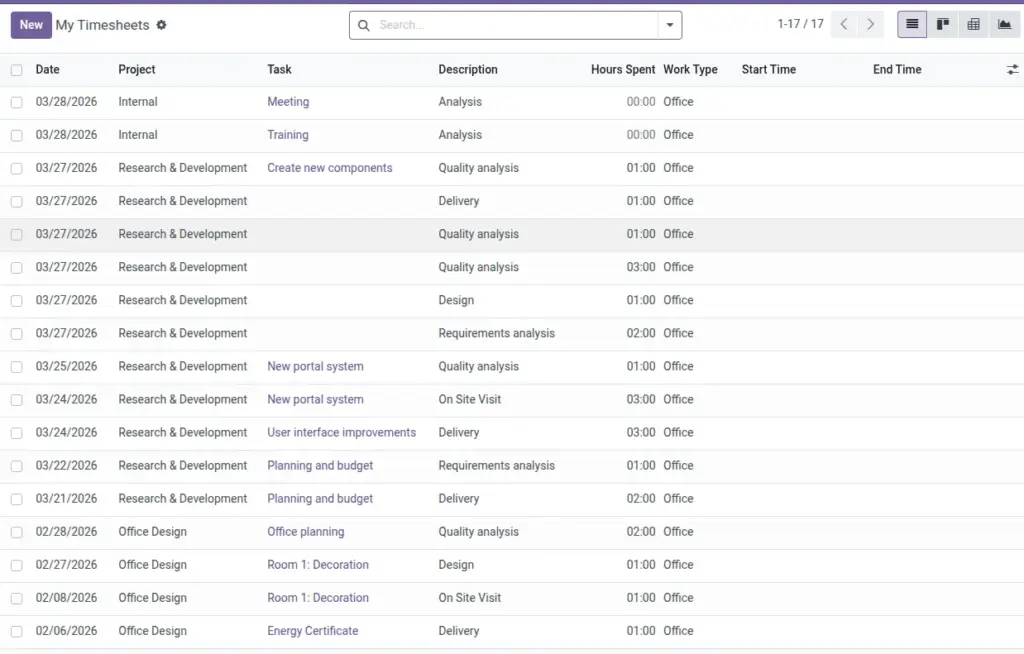
Task board and finish wizard to confirm month-end timesheets.
How It Works
Users log time on tasks. Before payroll, run the finish wizard to lock or confirm entries so the month’s hours are correct.
Step-by-Step Guide
- Review open tasks and make sure time has been logged.
- Run the Timesheet Finish wizard for the period.
- Address any missing entries flagged by the wizard.
Fields Table
| Field / control | Description | Example |
|---|---|---|
Timesheet Status |
Task timer state. |
Running |
Current Timesheet |
Active analytic line while timer runs. |
TS-00421 |
Timesheet Start Time |
When the current stint began. |
09:05 |
Allocated Hours |
Planned effort on the task. |
40.0 |
Date Deadline |
Target date (may be required if setting on). |
2026-03-31 |
Finish wizard — Description |
Text captured when closing a timer session. |
Bugfix #442 |
Field labels explained
Timesheet Status
Shows whether the task timer is idle, running, paused, or done—only running tasks accumulate live time.
Current Timesheet
Pointer to the open account.analytic.line updated by start/stop.
Timesheet Start Time
Used with stop time to compute duration; must align with company policy on breaks.
Allocated Hours
Planning field; compare to logged hours for capacity management.
Date Deadline
May be mandatory when settings require dates on tasks.
Finish wizard — Description
Audit trail of what was done during the session—helps managers approve time.
Tips
- Encourage daily timesheet logging to avoid end-of-month rush.
- Use project reports to spot outliers early.
Common Mistakes
- Skipping the finish step and discovering missing hours during payroll.
- Leaving tasks open after completion, confusing effort totals.