Overview
Why it matters: Audits, work permits, and visa checks require proof that documents exist and are still valid. Keeping scans and dates in one place avoids expired IDs going unnoticed and speeds up HR responses to regulators or managers.
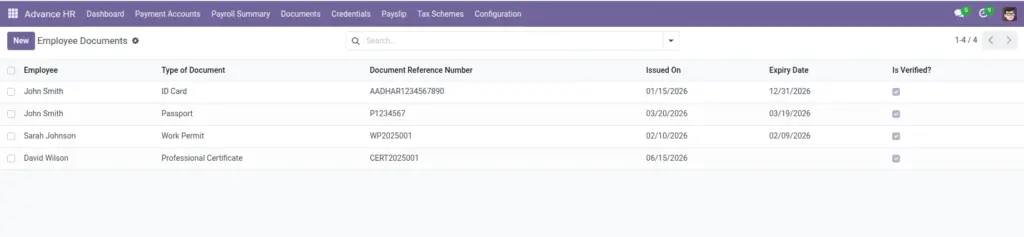
What this covers: For each document (passport, contract, licence, etc.) you store type, reference number, issue and expiry dates, an attachment, and whether HR has verified it. Expiry dates support renewal planning; verification flags show what was checked against originals.
Document types are usually configured under Configuration Masters so labels stay consistent across employees.
How It Works
Create a document record per item (e.g., Passport). Upload a scan, set expiry (if any), and mark as verified after checking authenticity.
Step-by-Step Guide
- Open the employee’s Documents tab.
- Click New and choose the Document Type.
- Enter the Document Reference Number.
- Set Issued On and Expiry Date (if applicable).
- Upload the file and mark “Is Verified?” when approved.
Fields Table
| Field Name | Description | Example |
|---|---|---|
Employee |
Who the document belongs to. of Document |
Ravi Kumar |
Type of Document |
Kind of document. |
Passport |
Document Reference Number |
Official identifier. |
P1234567 |
Issued On |
Issue date. |
2024-02-10 |
Expiry Date |
End date if applicable. |
2034-02-09 |
Upload Document |
Attach file or scan. |
passport.pdf |
Is Verified? |
Mark after validation. |
Yes |
Additional Notes |
Any comments. |
Re-verify before travel |
Field labels explained
Employee
Person this document belongs to; every record is per employee.
Type of Document
Category from Document type (passport, visa, contract, etc.) for consistent reporting.
Document Reference Number
Official number on the paper document (passport no., licence no.) for verification.
Issued On
Start date of validity when the authority issued the document.
Expiry Date
Last valid day; leave empty only if the document does not expire.
Upload Document
Attachment (PDF/image) stored in Odoo for audit and HR review.
Is Verified?
HR confirms the copy matches the original; use only after a real check.
Additional Notes
Free text for renewal reminders, visa conditions, or audit comments.
Tips
- Use expiry to plan renewals proactively.
- Only mark “Verified” after an official check.
Common Mistakes
- Skipping attachments—keeps auditors happy to have proof.
- Not setting expiry for documents that do expire.