Overview
Why it matters: Pay should not go from draft to bank without review. A formal lifecycle (draft → lock → approve → paid) separates preparation, control, and execution, and can freeze amounts once paid for audit.
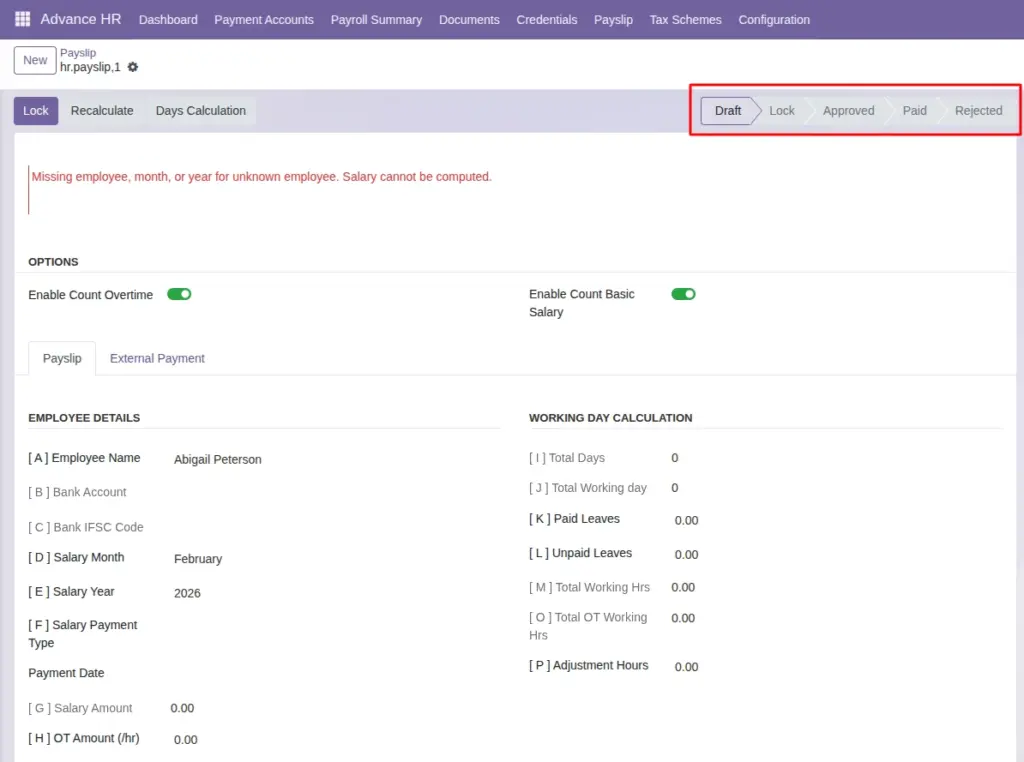
What this covers: Status buttons on the payslip control the flow: Recalculate and day tools while in draft; Lock to hand off for approval; Approve then Paid when payment is released; Reject or Reset to draft when corrections are needed. Employees usually only see their own slips when Paid, per security.
Extra actions such as Year End Unused Leaves help close the year without leaving entitlements unclear.
Status flow
- Draft: Numbers can be recalculated; use Days Calculation / review tools.
- Lock: Ready for review; use Approve next.
- Approved: Ready for payroll execution; use Paid when the transfer is done.
- Paid: Finalized; values may be frozen for audit. Use Reject from earlier states if policy allows correction.
- Rejected: Can Reset to Draft to fix and run again.
Fields Table
Payslip status (field on the form)
| Status value | Meaning |
|---|---|
Draft |
Editable; recalculation and day review allowed. |
Lock |
Figures fixed for reviewer; awaiting approval. |
Approved |
Authorised for payment; awaiting Paid. |
Paid |
Payment executed; amounts may be frozen. |
Rejected |
Not paid; reset to draft to correct. |
Header actions (buttons)
| Action | When to use |
|---|---|
Recalculate |
While draft—after changing timesheets, salary, or rules. |
Days Calculation |
Open day-level review / wizard for the period. |
Lock |
Freeze draft figures for approver review. |
Approve |
Manager sign-off after lock. |
Paid |
Confirm payment released; may freeze stored amounts. |
Year End Unused Leaves |
Summary of unused paid leave for the year (where configured). |
Field labels explained
Payslip status
Stored state driving which buttons appear; only forward moves when policy allows (e.g. cannot Approve from Draft without Lock if that is your rule).
Recalculate
Re-runs payroll computations from current master data—use after any change to time, salary, or tax inputs.
Days Calculation
Opens the day-by-day view or wizard tied to this payslip period.
Lock
Signals “ready for review”; often restricts edits to approvers only.
Approve
Formal approval before payment—may map to a second signer in your process.
Paid
Confirms disbursement; may persist frozen values for audits.
Year End Unused Leaves
Informational or adjustment action for leave balances—depends on module configuration.
Related
See Generate Payslips, Payslip Days Review, and Payslip Report (PDF).
Common mistakes
- Marking Paid before bank and tax checks are complete.
- Editing underlying time entries after lock without rejecting or resetting.