Overview
Why it matters: Payslip “working days” and leave balances go wrong if holidays and leave types are ambiguous. Clear leave types (paid vs unpaid) and holiday exclusion rules (weekends, public holidays, second Saturdays, etc.) ensure the system excludes or counts days the same way HR does.
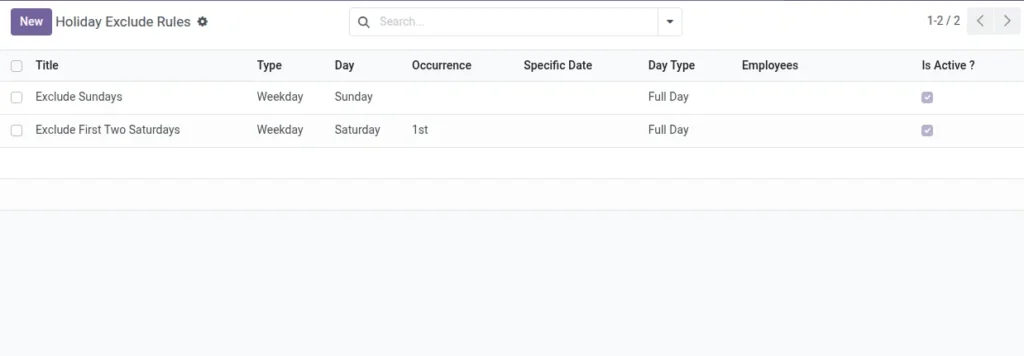
What this covers: Leave types define how leave requests affect pay. Holiday exclude rules mark days as non-working (full or half) by weekday pattern (e.g. every Sunday) or specific dates, optionally scoped to certain employees. Together they feed payslip day calculations and paid leave logic.
Skipping this setup is a common cause of inflated working days or missed public holidays.
How It Works
During payslip day calculation, the system excludes days from Holiday Exclusion Rules and adds paid leaves to worked days when relevant.
Step-by-Step Guide
- Define paid and unpaid Leave Types in Leave settings.
- Create Holiday Rules: choose Weekday or Specific Date, and Full/Half day.
- Optionally restrict rules to specific employees, else leave blank for all.
Fields Table
| Field Name | Description | Example |
|---|---|---|
Title |
Rule name. |
Second Saturday Off |
Is Active? |
Enable/disable rule. |
Yes |
Rule Type |
Weekday or Specific Date. |
Weekday |
Day |
Which weekday (if Weekday type). |
Saturday |
Occurrence |
All, 1st, 2nd, 3rd, 4th, 5th. |
2nd |
Specific Date |
Date (if Date type). |
2025-12-25 |
Day Type |
Full or Half day off. |
Full |
Employees |
Limit to some employees. |
Left blank |
Field labels explained
Holiday exclude rule (typical labels)
Title
Internal name so HR recognises the rule in lists (e.g. “Christmas”, “2nd Saturday”).
Is Active?
Turns the rule off without deleting it—useful after calendar changes.
Rule Type Weekday
uses a repeating weekday pattern; Specific Date targets one calendar day.
Day
For weekday rules: which day of the week (Monday–Sunday).
Occurrence
Which instance of that weekday in the month (first, second, …, or every week).
Specific Date
For one-off public holidays when rule type is date-based.
Day Type
Whether the exclusion removes a full day or half day from working-day calculations.
Employees
Empty = company-wide; otherwise only listed people are affected (e.g. shift-specific holidays).
Leave types are configured in the Time Off app; mark paid vs unpaid there so payroll can treat them correctly.
Tips
- Use occurrences to mark “Second Saturday Off”.
- Set company-wide holidays with no specific employees selected.
Common Mistakes
- Adding duplicate holiday rules for the same day.
- Forgetting to mark paid leave types as paid.