Overview
Why it matters: Overtime cost and labour compliance depend on clear rules—daily thresholds, caps, and whether weekend work is allowed. Without a defined policy, payslip OT either disagrees with HR policy or invites disputes.
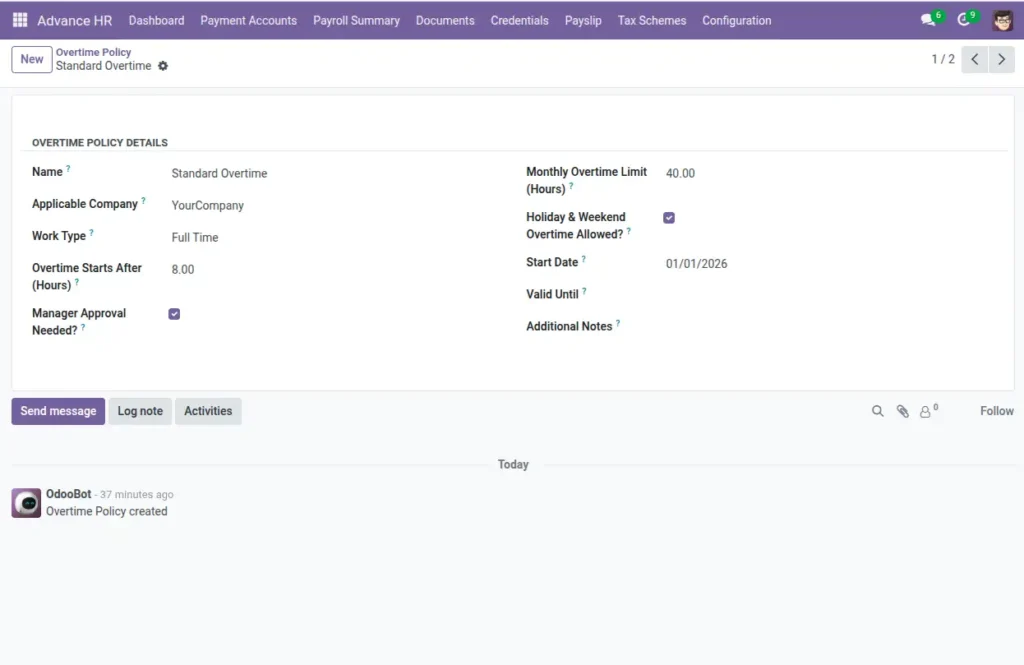
What this covers: An Overtime Policy records when OT starts (e.g. after 8 hours), if a manager must approve it, monthly hour caps, and flags for holiday/weekend OT. You assign a policy on the employee; payslip calculations use it together with hours settings.
Align thresholds with your full/half day hours so “extra” hours are interpreted consistently.
How It Works
Applies to employees via their profile’s Overtime Rules. Payslip calculations will use these settings when counting overtime hours.
Step-by-Step Guide
- Create a new Overtime Policy with a clear name.
- Set “Overtime Starts After (Hours)” to your daily threshold.
- Choose if “Manager Approval” is needed.
- Define a monthly limit and whether OT is allowed on holidays/weekends.
- Set start and end dates if temporary.
Fields Table
| Field Name | Description | Example |
|---|---|---|
Name |
Policy name. |
Standard Overtime |
Applicable Company |
Company the policy applies to. |
My Company |
Work Type |
Optional scope by work type. |
Full-time |
Overtime Starts After (Hours) |
Daily threshold. |
8.0 |
Manager Approval Needed? |
Yes/No. |
Yes |
Monthly Overtime Limit (Hours) |
Cap per month. |
40.0 |
Holiday & Weekend Overtime Allowed? |
Yes/No. |
No |
Start Date |
Effective from. |
2025-01-01 |
Valid Until |
End date (optional). |
— |
Additional Notes |
Comments. |
Requires pre-approval |
Field labels explained
Name
Short label for picking this policy on employees (e.g. “Factory OT”, “Office OT”).
Applicable Company
In multi-company databases, scopes the policy to one legal entity.
Work Type
Optional filter so different rules apply to full-time vs part-time cohorts.
Overtime Starts After (Hours)
Daily clock hours after which extra time counts as OT for that day.
Manager Approval Needed?
Whether OT must be approved before pay—policy and labour law dependent.
Monthly Overtime Limit (Hours)
Hard or soft cap on OT hours in a calendar month.
Holiday & Weekend Overtime Allowed?
Whether OT can be earned on non-working days; often higher cost or restricted.
Start Date / Valid Until
Policy effective window—use for temporary rule changes or law updates.
Additional Notes
Free text for escalation rules or collective agreement references.
Tips
- Align thresholds with Full Day Hours to avoid confusion.
- Use end dates for temporary policy changes.
Common Mistakes
- Forgetting to link the policy to employees.
- Allowing weekend OT but not updating pay rates accordingly.