Overview
Why it matters: Different teams capture time differently—projects via timesheets, shops via attendance devices, small teams via manual totals. If payroll pulls hours from the wrong source, payslips disagree with what managers expect. These settings declare the system of record for total hours and OT.
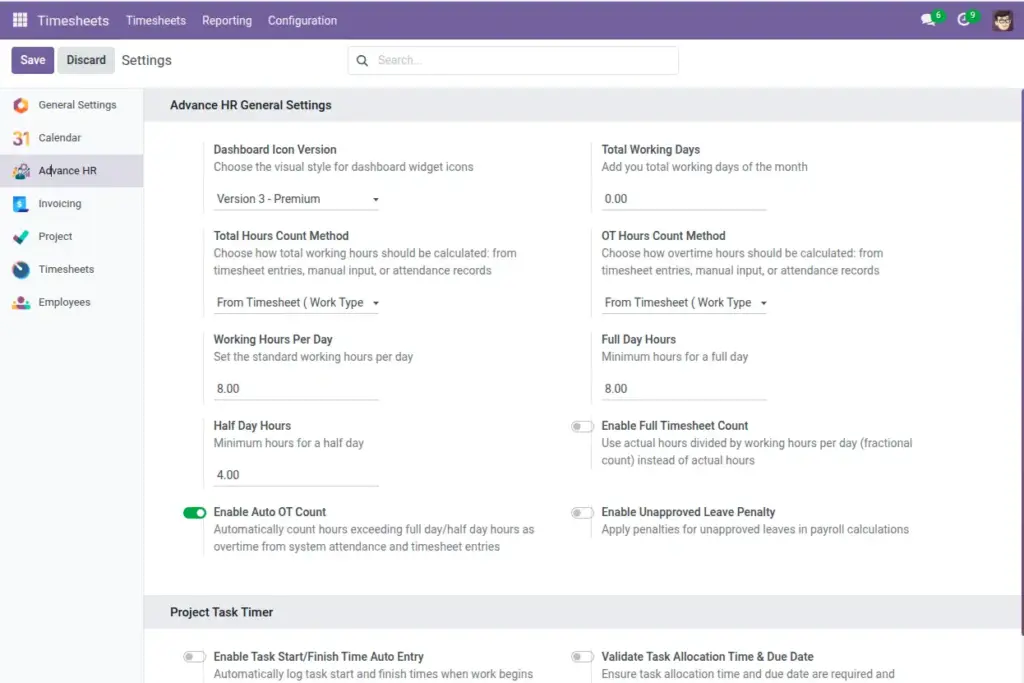
What this covers: Under HR/company settings (and Advance HR Settings) you choose total hours count method and OT hours count method (timesheet, attendance, or manual). You set full/half day hour thresholds, working hours per day for converting hours to days, and options such as auto OT when hours exceed thresholds.
Change these carefully mid-period—results affect every payslip that month.
How It Works
For timesheets, entries marked as overtime are separated from normal hours. For attendance, check-in/out durations are used. For manual, you input totals at payslip level.
Step-by-Step Guide
- Open HR Settings and find Advance HR options.
- Set “Total Hours Count Method” to Timesheet, Attendance, or Manual.
- Set “OT Hours Count Method”.
- Turn on “Enable Auto OT Count” to add extra hours beyond thresholds automatically.
- Confirm “Full Day Hours”, “Half Day Hours”, and “Working Hours Per Day”.
Fields Table
| Field Name | Description | Example |
|---|---|---|
Total Hours Count Method |
Source of total hours. |
Timesheet |
OT Hours Count Method |
Source of overtime hours. |
Attendance |
Enable Auto OT Count |
Auto add extra hours past thresholds. |
Yes |
Full Day Hours |
Full day threshold. |
8.0 |
Half Day Hours |
Half day threshold. |
4.0 |
Working Hours Per Day |
Used to convert hours to days. |
8.0 |
Field labels explained
Total Hours Count Method
Authoritative source for normal working hours in the period: project timesheets, attendance punches, or manual entry.
OT Hours Count Method Where overtime
hours are read from—can match total hours or differ (e.g. OT from attendance only).
Enable Auto OT Count
When on, hours beyond full/half thresholds may be classified as OT automatically instead of manual tagging.
Full Day Hours / Half Day Hours
Convert logged hours into day fractions and trigger OT splits when auto OT is used.
Working Hours Per Day
Divisor for turning hour totals into “equivalent days” on payslips and some reports.
Tips
- Use timesheets when work is tied to projects and tasks.
- Use attendance for shift-based environments with biometric devices.
Common Mistakes
- Forgetting to enable Auto OT when you rely on excess hours logic.
- Not aligning thresholds with your overtime policy.