Overview
Why it matters: Gross-to-net pay involves many moving parts (allowances, PF, loans, bonuses). Encoding them as structured lines with formulas and reusable groups stops one-off spreadsheet errors and makes raises or package changes repeatable for whole teams.
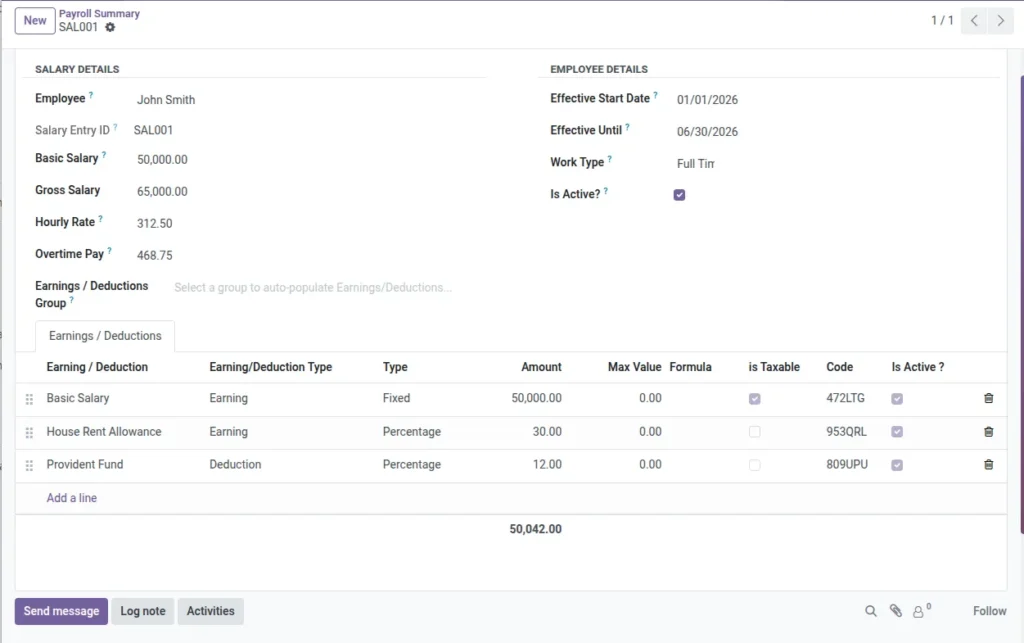
What this covers: A salary entry per employee holds base pay, effective dates, and lines for each earning or deduction—fixed amount, percentage of base, or formula referencing other lines by code. Earnings/Deductions Groups act as templates to load standard packages (e.g. HRA, statutory deductions) in one click.
Overlapping active salary ranges for the same person are blocked so the system never applies two conflicting packages at once.
How It Works
Choose an Earnings/Deductions Group to auto-fill lines (HRA, PF, etc.). Codes on each line let formulas refer to other lines. Overlaps in salary date ranges for the same employee are blocked.
Step-by-Step Guide
- Create a Salary Entry for an employee with Base and Effective dates.
- Optionally select an Earnings/Deductions Group to auto-add lines.
- For formula lines, keep the Code intact so references work.
- Save and review the Gross/Hourly/Ot rates if needed.
Fields Table
| Field Name | Description | Example |
|---|---|---|
Salary Entry ID |
Auto-generated identifier. |
SE-00124 |
Employee |
Employee for this entry. |
John Lee |
Basic Salary |
Fixed monthly base. |
€2,500 |
Gross Salary |
Total before tax. |
€3,000 |
Hourly Rate |
Auto-calculated from gross and working days. |
€18.75 |
Overtime Pay |
Rate for overtime. |
€25.00 |
Effective Start Date |
Start of validity. |
2025-01-01 |
Effective Until |
End date (optional). |
2025-12-31 |
Work Type |
Full-time/Part-time/etc. |
Full-time |
Earnings/Deductions Group |
Template for lines. |
Standard Salary |
Earning/Deduction Type |
Fixed, Percentage, or Formula. |
Percentage |
Code |
Unique code for formula references. |
123ABC |
Formula |
Expression using codes. |
[Q] * 0.1 |
Sequence |
Order of calculation. |
10 |
Is Active? |
Toggle to use. |
Yes |
Field labels explained
Salary Entry ID
System reference for this salary package version; cited in audits and support.
Employee
Who this pay package applies to; one active window per employee at a time.
Basic Salary
Core fixed component before variable earnings—often the anchor for percentages.
Gross Salary
Total cash compensation before statutory deductions and tax (definition may follow your policy).
Hourly Rate / Overtime Pay
Derived or entered rates used when converting hours to money for normal and OT time.
Effective Start Date / Effective Until
alidity window; new raises typically mean a new line or updated end date.
Work Type
May align the entry with full-time/part-time rules from the employee or masters.
Earnings/Deductions Group
Template that loads a standard set of lines (HRA, PF, etc.) in one action.
Earning/Deduction Type
Whether the line is fixed amount, percent of base, or computed from a Formula.
Code
Stable identifier other lines reference in formulas—do not rename casually.
Formula
Expression referencing other codes (e.g. percentage of “BASIC”) evaluated at payroll time.
Sequence
Calculation order when one line depends on another’s result.
Is Active?
Excludes a line from calculation without deleting historical data.
Tips
- Use groups to standardize packages across roles.
- Do not change template codes; formulas depend on them.
Common Mistakes
- Overlapping salary date ranges for the same employee (blocked by system).
- Leaving formula codes empty or editing them freely.