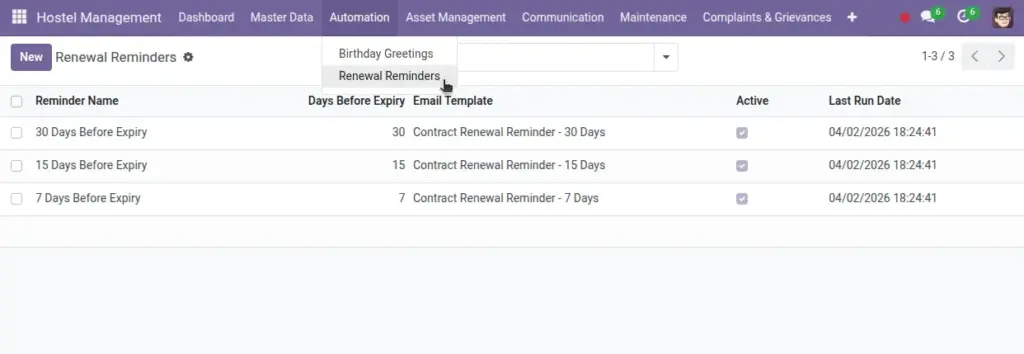
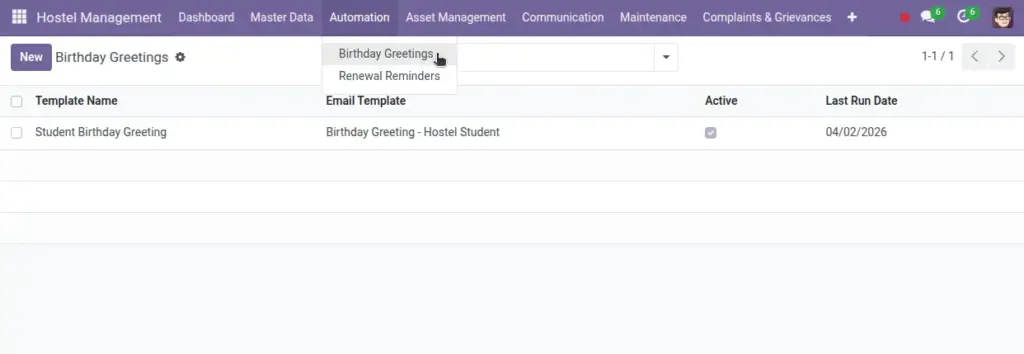
Save time with birthday greetings and contract renewal reminders.
Overview
Automation sends scheduled communications without manual work—like birthday greetings and contract renewal reminders—using your templates and timing rules. It reduces routine effort and ensures students receive timely updates.
- Birthday greetings: Daily email to students whose birthday is today.
- Renewal reminders: Emails N days before contract end, with flexible timing.
- Control: Activate/deactivate per template; review last run for verification.
How It Works
- Birthday Greetings: sends emails to students whose birthday is today.
- Renewal Reminders: emails students N days before contract end.
Step‑by‑Step Guide
- Go to Control → Automation.
- Create a Birthday Greeting: select an Email Template and activate it.
- Create a Renewal Reminder: set days before expiry and a contract email template.
Fields Table
| Field Name | Description | Example |
|---|---|---|
Template Name |
Label for greeting |
Birthday Wish |
Email Template |
Mail template used |
Happy Birthday |
Active |
Enable sending |
Checked |
Days Before Expiry |
For renewals |
7 |
Last Run Date |
When last executed |
2026‑06‑10 |
Field name explanation : Renewal reminders look for active contracts ending on target date.
Fields explanation
- Template Name: Label for the automation rule.
- Email Template: The mail body/style used for sending.
- Active: Toggle to enable/disable sending.
- Days Before Expiry: For renewals, how many days ahead to notify.
- Last Run Date: Timestamp of the last execution for verification.
Tips
- Keep templates friendly and concise. Include contact info.
Common Mistakes
- Missing student emails prevents sending — ensure profiles have valid emails.
Image