Define standard charges for damage, violations, or other reasons used at check‑out.
Overview
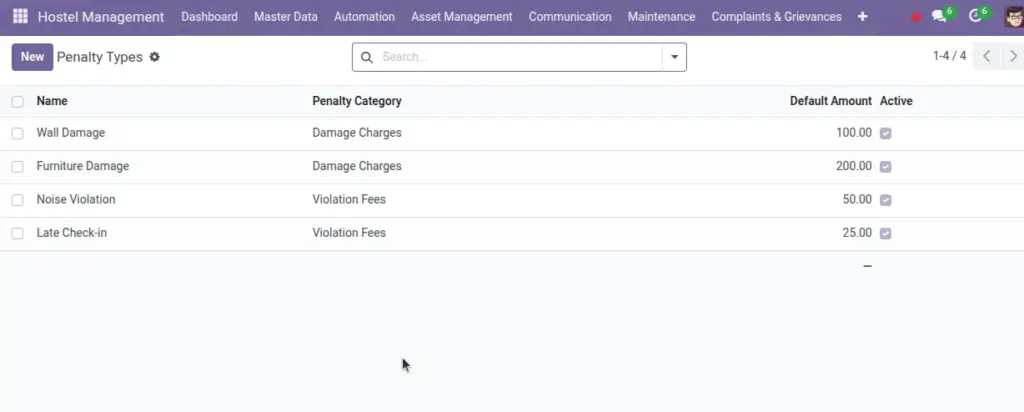
Penalty Types define standardized charges used across workflows (check‑out, inspections). By pre‑setting names, categories, and default amounts, they make data entry consistent and reporting reliable, while still allowing case‑by‑case adjustments.
- Categories: Damage vs Violation vs Other → drives reporting and policy handling.
- Defaults: Suggest amounts to save time; override where appropriate.
- Governance: Keep the list simple and reviewed to ensure fairness and clarity.
How It Works
- Create penalty types by category (Damage, Violation, Other).
- During check‑out, add penalty lines using these types.
- Invoices are generated for penalties when you check out.
Step‑by‑Step Guide
- Go to Finance & Control → Penalty Types → New.
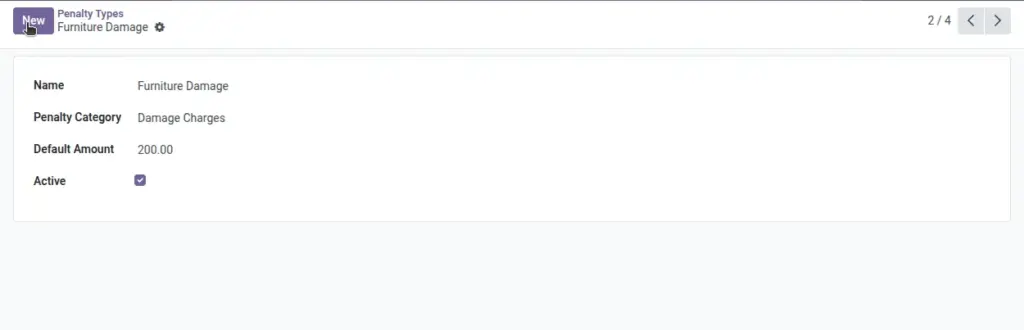
- Enter Name, Category, and Default Amount (optional).
- Save. Use at check‑out when recording penalties.
Fields Table
| Field Name | Description | Example |
|---|---|---|
Name |
Penalty type label |
Broken Furniture |
Default Amount |
Pre‑filled charge |
₹ 500 |
Category |
Damage / Violation / Other |
Damage |
Active |
Use or archive |
Checked |
Currency |
Monetary currency |
INR |
Field name explanation : Category supports reporting like “Damage Charges Report”.
Fields explanation
- Name: Clear label used at check‑out/inspections (e.g., Broken Furniture).
- Default Amount: Suggested charge; can be overridden during entry.
- Category: Damage/Violation/Other — drives which report includes it.
- Active: Archive to stop future use without deleting.
- Currency: Ensures monetary consistency with invoices.
Tips
- Keep a short, clear list so staff choose quickly during check‑out.
Common Mistakes
- Leaving the type inactive by mistake — ensure “Active” is checked.
Image