Connect a student to a specific bed with dates, rent, and deposit.
Overview
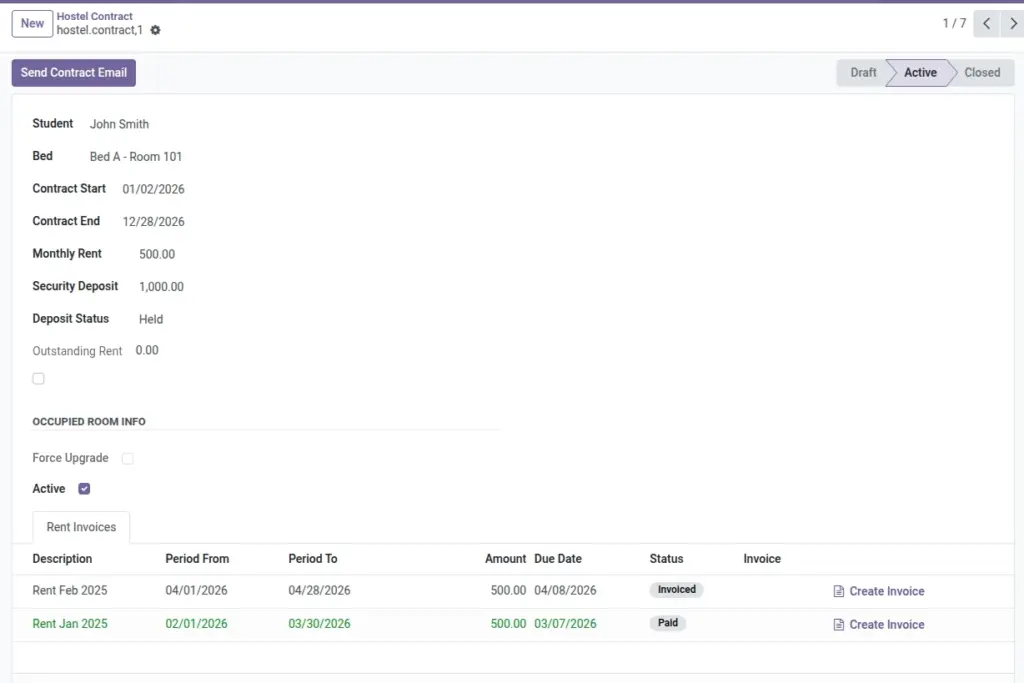
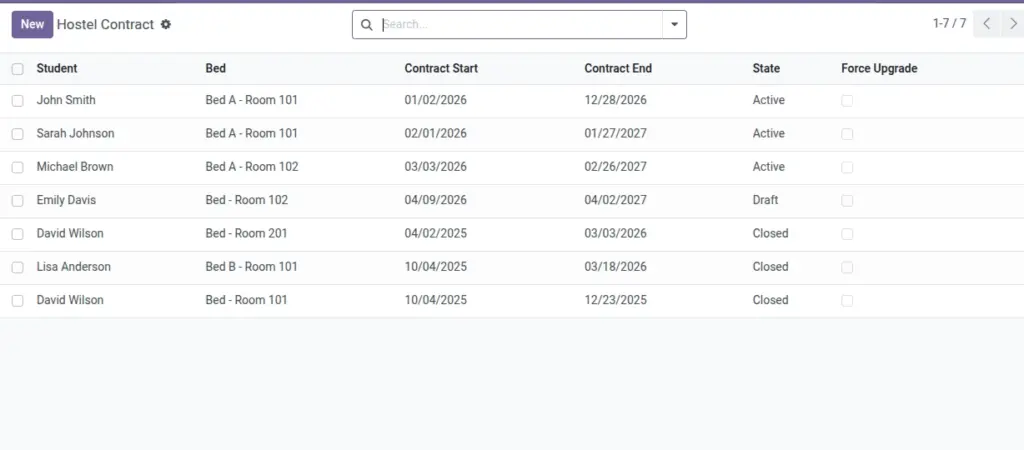
Contracts formalize a student’s allocation to a specific bed for defined dates, with rent and deposit terms. They power occupancy status, invoice generation, and historical traces, and they auto‑link to the bed’s room/unit/building for accurate reporting.
- Lifecycle: Draft → Active (on Check‑In) → Closed (on Check‑Out).
- Billing: Monthly rent invoices generated on schedule; dues tracked automatically.
- Traceability: Feeds Occupancy History and enforces no double‑booking per bed.
How It Works
- Create a Contract in Draft.
- Check‑In activates it; Check‑Out closes it.
- Monthly Rent Invoices can be generated automatically.
Step‑by‑Step Guide
- Go to Operations → Contracts → New.
- Select Student and Bed. Dates are required.
- Set Monthly Rent and Security Deposit.
- Save. Use “Send Contract Email” if needed.
Fields Table
| Field Name | Description | Example |
|---|---|---|
Student |
Resident linked to this bed |
Priya Sharma |
Bed |
Allocated bed |
B2 (Room 201-A) |
Contract Start / End |
Stay period |
01‑Jun to 31‑Aug |
Monthly Rent |
Monthly charge |
₹ 5,000 |
Security Deposit |
Refundable deposit |
₹ 10,000 |
Deposit Status |
Held or Refunded |
Held |
State |
Draft / Active / Closed |
Active |
Outstanding Rent |
Unpaid rent total |
₹ 5,000 |
Field name explanation : Bed decides Room/Unit/Building via relationships. No need to select them again.
Fields explanation
- Student: Resident assigned to the bed; must be marked as Student.
- Bed: Allocation target; room/unit/building derive automatically.
- Contract Start / End: Stay dates; required for occupancy and invoicing.
- Monthly Rent: Base charge used by rent invoices.
- Security Deposit: Refundable amount tracked against damages/dues.
- Deposit Status: Indicates whether deposit is still held or already refunded.
- State: Draft → Active (on Check‑In) → Closed (on Check‑Out).
- Outstanding Rent: Sum of unpaid posted rent invoices.
Tips
- Use email templates in Settings to send branded contract emails.
- Avoid overlapping active contracts for the same bed (system blocks this).
Common Mistakes
- Leaving dates empty prevents invoicing and check‑in.
Image