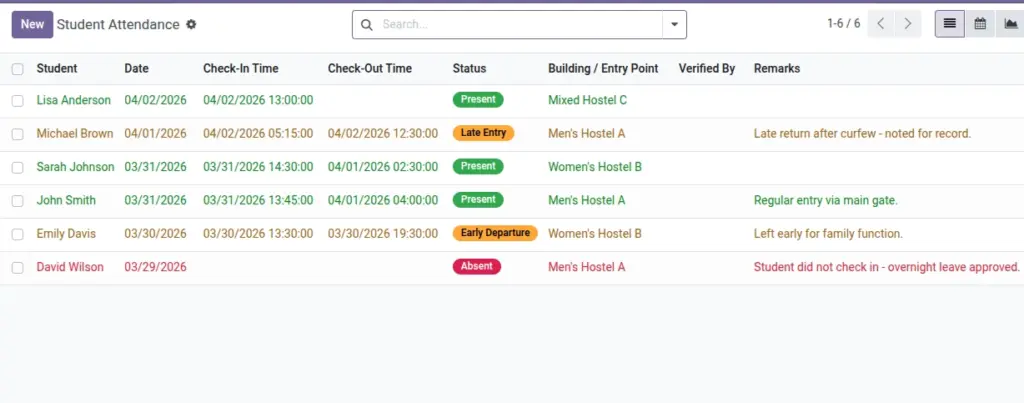
Record daily presence with support for late entries and absences.
Overview
The Attendance module records daily presence and timing exceptions for each student. It supports check‑in/out timestamps, computed or manual statuses, and optional caregiver notifications—allowing wardens to monitor punctuality and patterns over time.
- Statuses: Present, Absent, Late, Early Departure—with rules configurable in Settings (grace minutes, cut‑offs).
- Data capture: Manual entry, imports, or integration with gate scanners (if enabled).
- Follow‑ups: Trigger communications for repeated absences or late entries.
How It Works
- Status can be auto‑computed from check‑in times and “Late grace minutes”.
- When absent and enabled, guardians can be notified automatically.
Step‑by‑Step Guide
- Go to Operations → Student Attendance → New.
- Select Student and Date. Add check‑in/out if available.
- Save. Status updates based on your Settings.
Fields Table
| Field Name | Description | Example |
|---|---|---|
Student |
Who the record belongs to |
Anil Kumar |
Date |
Attendance date |
2026‑06‑10 |
Check‑In / Out Time |
Timestamps |
09:10 / 18:05 |
Status |
Present / Absent / Late / Early Departure |
Present |
Building |
Entry point (optional) |
North Wing |
Verified By |
Staff who verified |
Warden |
Remarks |
Notes |
Gate delay due to rain |
Field name explanation : Status can be manual or computed from Settings.
Fields explanation
- Student: Person whose presence is tracked for the date.
- Date: Attendance date; one record per student per day.
- Check‑In / Out Time: Optional timestamps for presence and duration.
- Status: Present/Absent/Late/Early Departure; can be manual or computed by rules.
- Building: Entry point; useful for guard logs and traffic analysis.
- Verified By: Staff who confirmed/recorded the entry.
- Remarks: Context like delays or exceptions.
Tips
- Use imports to update large attendance lists after events.
Common Mistakes
- Checkout time before check‑in will be rejected.
Image