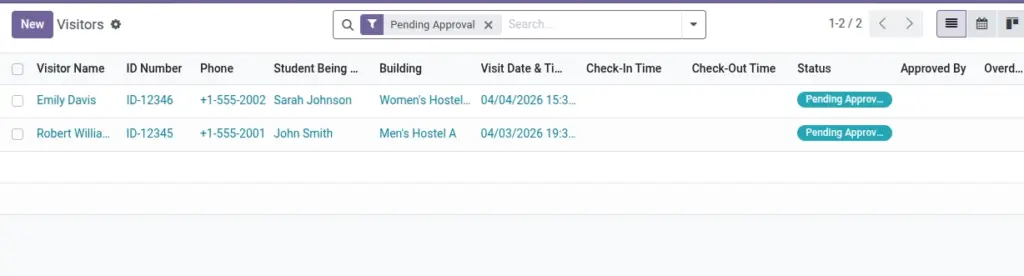
Request approval, check in visitors, track overstay, and check out.
Overview
The Visitors module controls end‑to‑end guest access—from pre‑approval to gate entry logging to exit—while enforcing hostel rules on timings and allowed locations. It gives security and wardens clear visibility into who is on‑site, for whom, and for how long.
- Approvals: Configure whether visits require approval and who can approve them.
- Gate operations: Check‑In/Out capture ID details, host student, timestamps, and notes.
- Compliance: Overstay and restricted‑hour alerts; reports for audits and incident reviews.
How It Works
- Requests can be auto‑approved based on Settings.
- Check‑In/Out times calculate Actual Duration; overdue is highlighted.
- Email/SMS notifications can be enabled per policy.
Step‑by‑Step Guide
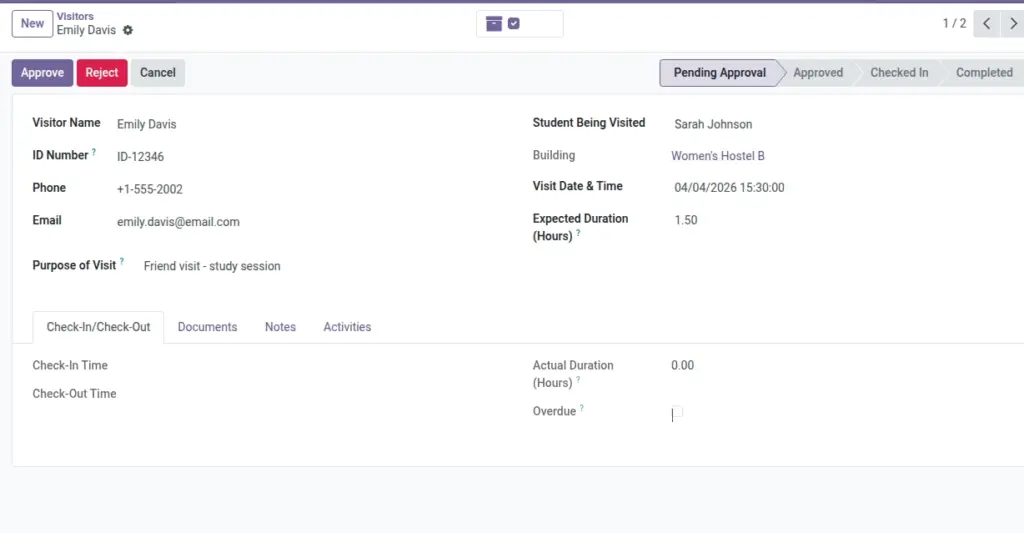
- Go to Operations → Visitors → New.
- Enter Visitor Name, Student, and Visit Date & Time.
- Submit for approval or approve directly (based on rules).
- On arrival, click Check‑In; on exit, click Check‑Out.
Fields Table
| Field Name | Description | Example |
|---|---|---|
Visitor Name |
Full name |
Rahul Verma |
Student |
Who they are meeting |
Priya Sharma |
Visit Date & Time |
Planned arrival |
2026‑06‑10 16:00 |
Status |
Pending/Approved/Checked In/Completed |
Approved |
Expected Duration (Hours) |
Planned stay length |
1.5 |
Actual Duration |
Computed from check‑in/out |
1.7 |
Overdue |
Flag if stay exceeds allowed time |
Yes |
Approval |
Approver & time |
Warden — 16:05 |
Notifications |
Email/SMS to student |
Sent |
Field name explanation : “Overdue” checks expected duration + allowed extra minutes from Settings.
Fields explanation
- Visitor Name: Full legal name for gate verification.
- Student: Host resident; determines building from active contract.
- Visit Date & Time: Planned arrival; used with policies for approval blocks.
- Status: Pending/Approved/Checked In/Completed — controls available actions.
- Expected Duration (Hours): Planned stay length for overstay detection.
- Actual Duration: Computed from check‑in/out; highlights discrepancies.
- Overdue: Flag when actual exceeds allowed time; triggers alerts.
- Approval: Approver identity and timestamp.
- Notifications: Audit of emails/SMS sent to the student.
Tips
- Use the photo and ID document fields to speed up gate verification.
Common Mistakes
- Setting past visit time without proper status (system blocks it).
Image