
Setup Hostel Management
Install the add‑on, update apps list, and assign access rights.

This guide helps hostel administrators and staff manage daily operations efficiently using the Odoo Hostel Management system. It covers key activities such as room allocation, check-ins and check-outs, fee tracking, visitor management, and additional services. With a centralized and user-friendly interface, users can maintain records, monitor occupancy, track payments, and generate reports with ease. This documentation provides step-by-step guidance to help you understand the workflow and use the system effectively.

By Akash Soni March 26, 2026
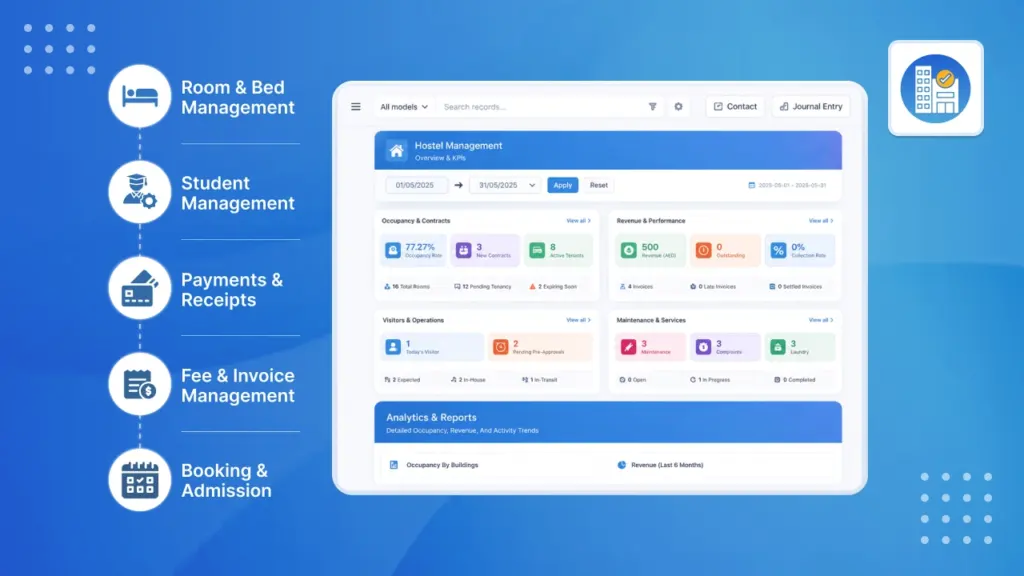
Install the add‑on, update apps list, and assign access rights.
Live overview of activity, occupancy, invoices, and quick links.
Set up buildings allowed for male, female, or mixed residents.
Floors or blocks within buildings to help organize rooms.
Create room types (single, twin, studio) and readiness status.
Manage bed inventory and see vacancy automatically.
Link students to beds with dates, rent, and deposits.
Record arrivals and departures, signatures, photos, and penalties.
Approve, check in, and check out visitors with rules and alerts.
Mark presence, late entries, and track daily logs.
Store IDs and visas; get expiry alerts before check‑in.
Publish menus and control bookings with cut‑off times.
Track requests, quantities, fees, and delivery dates.
Submit, assign, and complete work orders with priorities.
Handle student complaints with notifications and escalation.
Track hostel assets, categories, condition, and lifecycle.
Organize assets for reporting and budgeting.
Post notices by building or to all students.
Group notices by topic like Safety or Events.
Send messages or emails to targeted student groups.
Create monthly rent, track overdue, and penalties.
Define damage or violation charges for check‑out.
Schedule and record inspection findings and checklists.
Generate occupancy, damage, and violation summaries.
List of students currently staying today.
Summary of damage-related penalties.
Summary of violation-related penalties.
Birthday greetings and contract renewal reminders.
Birthday greetings and contract renewal reminders.
Student profiles and staff records with documents.
Timeline of who occupied which bed, and when.
Quick answers and where to get assistance.
Control user access, roles, and approval permissions.

Live vacancy, bed allocation, and no double‑booking safeguards.
Monthly rent invoices, overdue tracking, and standardized penalties.

Announcements and targeted group messages via email/notifications.

Requests with priorities, assignments, costs, and service history.

Mess menus and bookings, laundry requests, and delivery tracking.

Document expiries, visitor approvals, and policy‑enforced check‑ins.

In‑house lists, damage/violation summaries, exports to PDF/Excel.

Birthday greetings and renewal reminders on your schedule.