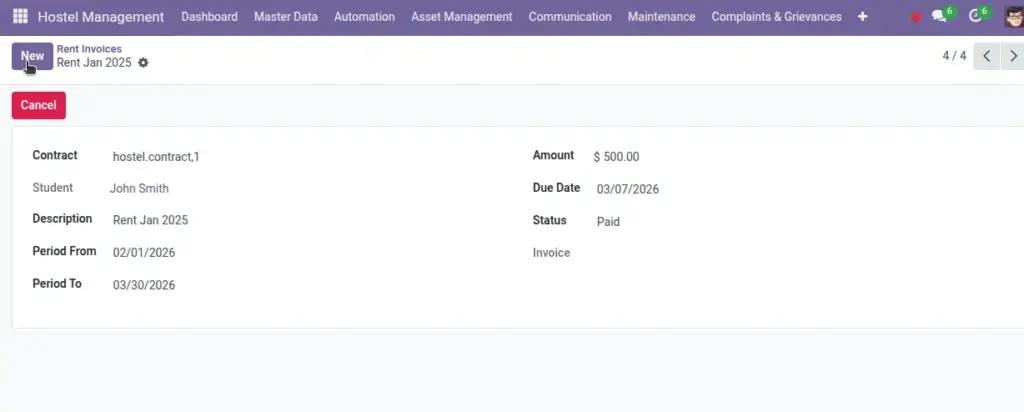
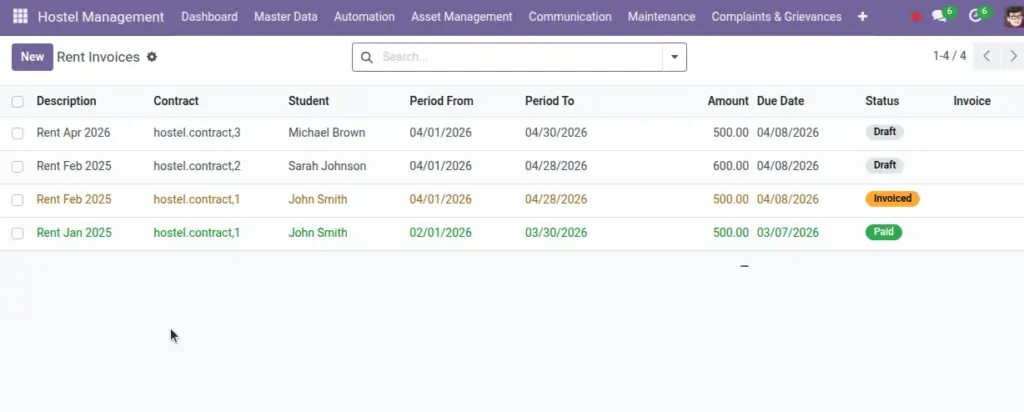
Create monthly rent, track overdue, and add penalties based on rules.
Overview
Rent Invoices convert active Contracts into periodic billing. They reflect the agreed rent, apply due dates, and (optionally) late penalties. Each record links to the accounting invoice for posting, payment, and reconciliation—keeping finance and operations in sync.
- Generation: Monthly drafts via scheduler or on‑demand; one per active contract per period.
- Controls: Configurable due dates, penalties (fixed/percent), and cancellation rules.
- Accounting: Create and post the customer invoice; status updates to Paid when settled.
How It Works
- Draft invoices are created monthly (via scheduler).
- Create customer invoice to post and collect.
- State becomes Paid when the accounting invoice is paid; Overdue adds penalties.
Step‑by‑Step Guide
- Go to Finance → Rent Invoices.
- Open a draft and click “Create Invoice”.
- Review and post the accounting invoice to send to the student.
Fields Table
| Field Name | Description | Example |
|---|---|---|
Contract |
Source contract |
Priya — B2 |
Period From / To |
Billing window |
Jun 1–30 |
Amount |
Rent charge |
₹ 5,000 |
Due Date |
Payment deadline |
Jun 8 |
Invoice |
Linked accounting record |
INV/2026/0042 |
Status |
Draft/Invoiced/Paid/Overdue/Cancelled |
Overdue |
Penalty Amount |
Late fee |
₹ 250 |
Total with Penalty |
Amount + penalty |
₹ 5,250 |
Field name explanation : Penalties can be a fixed amount or a percent of due amount.
Fields explanation
- Contract: Source agreement; ensures billing aligns to the correct student/bed.
- Period From / To: Billing window; one invoice per contract per period.
- Amount: Base rent for the period as per contract.
- Due Date: Payment deadline used for overdue detection.
- Invoice: Link to the accounting invoice; status is tracked there.
- Status: Draft/Invoiced/Paid/Overdue/Cancelled — operational state of the rent document.
- Penalty Amount: Late fee based on configured rule (fixed or percent).
- Total with Penalty: Sum of base Amount and Penalty Amount.
Tips
- Generate on the 1st or your chosen day to keep billing predictable.
Common Mistakes
- Posting invoices for non‑active contracts — the system prevents this.
Image