Capture student complaints, assign, resolve, and notify stakeholders.
Overview
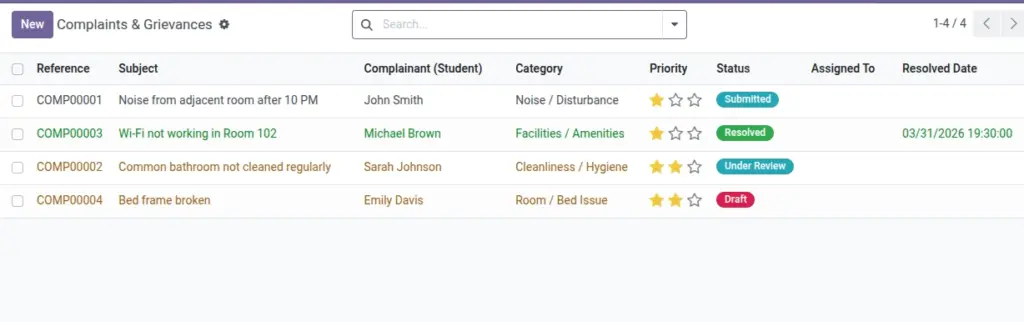
Complaints & Grievances provides a structured channel for students to raise issues and for staff to track, resolve, and communicate outcomes. It supports categories, priority, optional anonymity, and timed escalations for service quality and accountability.
- Scope: Noise, cleanliness, facilities, conduct, or any service concern.
- Transparency: Status updates and timestamps provide clear progress to stakeholders.
- Policy: Enable anonymity and auto‑notifications; configure SLAs and escalation timers.
How It Works
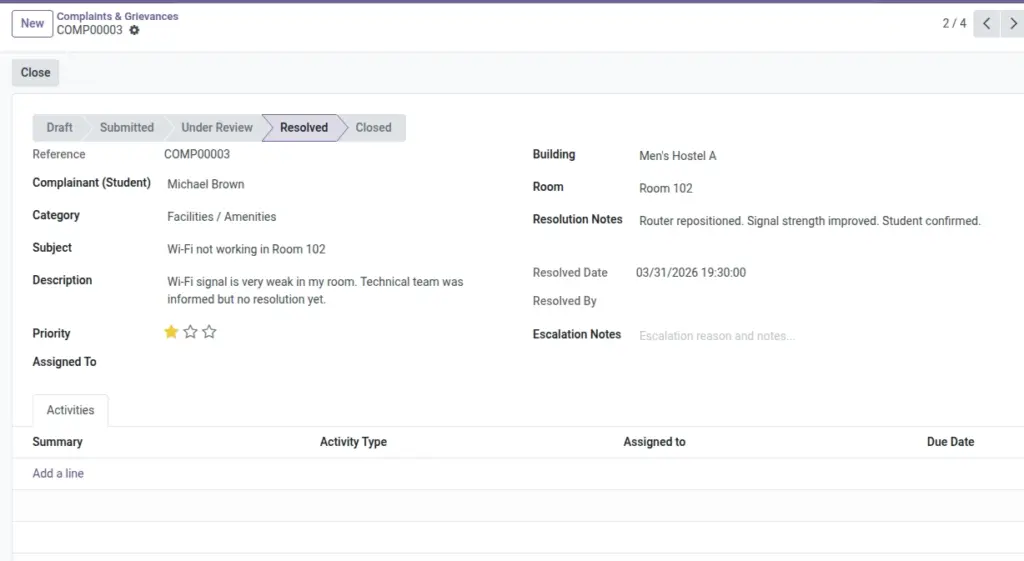
- Statuses: Draft → Submitted → Under Review → Resolved → Closed (or Escalated/Cancelled).
- Notify students and managers automatically if enabled.
Step‑by‑Step Guide
- Go to Services → Complaints → New.
- Select Student (unless anonymous mode is enabled), Category, Subject, and Description.
- Submit and move to Under Review. Assign to a staff member if needed.
- Resolve and Close with notes. Escalate if overdue by policy.
Fields Table
| Field Name | Description | Example |
|---|---|---|
Reference |
Auto number |
COMP/2026/0045 |
Student |
Complainant |
Neha Gupta |
Category |
Type of issue |
Cleanliness |
Subject |
Short title |
Unclean washroom |
Description |
Full details |
Needs deep cleaning |
Priority |
Low/Medium/High/Urgent |
High |
Status |
Workflow state |
Under Review |
Assigned To |
Responsible staff |
Janitor Team |
Resolved Date/By |
When and who |
2026‑06‑12 / Supervisor |
Field name explanation : Anonymous complaints can be allowed from Settings.
Fields explanation
- Reference: Auto number for traceability.
- Student: Complainant (hidden in anonymous mode).
- Category: Issue type for routing and analytics.
- Subject: Short summary displayed in lists.
- Description: Detailed account to guide resolution.
- Priority: Urgency signal for service levels.
- Status: Workflow state; may branch to Escalated/Cancelled.
- Assigned To: Current owner driving resolution.
- Resolved Date/By: Closure info for SLA tracking.
Tips
- Use clear categories to improve reporting later.
Common Mistakes
- Closing without notes — always record the resolution.
Image