Overview
Why it matters: Tax errors are expensive: back payments, employee trust issues, and audit findings. Modelling schemes in Odoo means deductions follow the same logic every month instead of ad-hoc spreadsheets, and you can document effective dates when rules change.
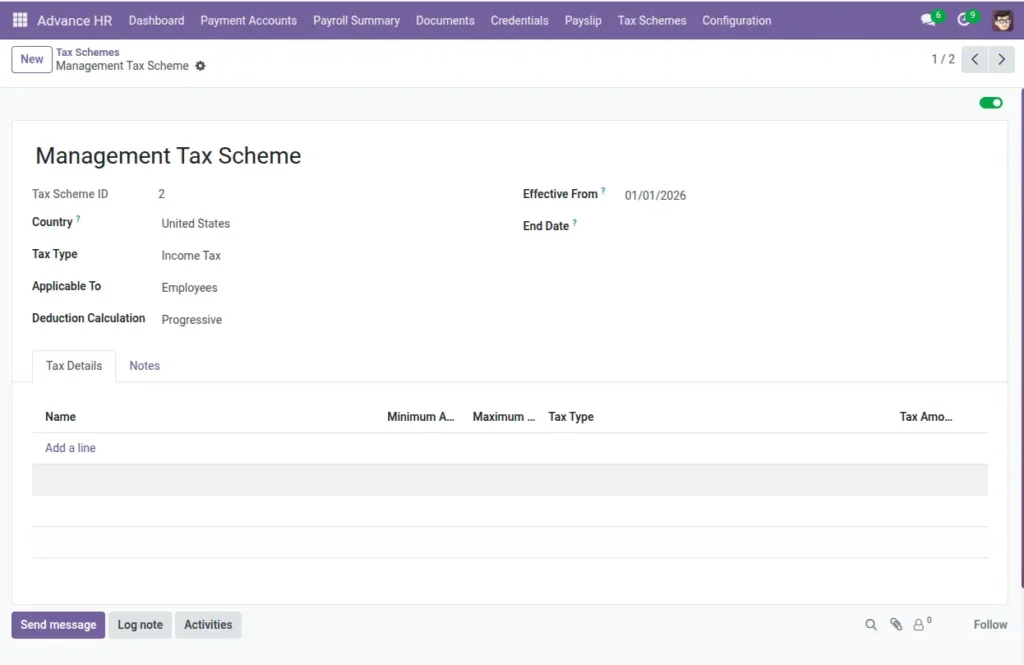
What this covers: A Tax Scheme describes how to deduct (income tax, social security, etc.): country, who it applies to, flat or percentage base, and either a simple rate or progressive brackets for slab-wise calculation. Payroll groups attach to a scheme so the right rules run for each employee population.
See also Payroll Groups & Tax Schemes for linking schemes to employees.
How It Works
You create a Tax Scheme and optionally attach Tax Brackets. Payroll Groups then link to a Tax Scheme. When payslips are generated, amounts are calculated using the scheme’s method and any brackets configured.
Step-by-Step Guide: Create a Tax Scheme
- Go to Payroll Setup → Tax Schemes.
- Click New and enter a clear name (e.g., “India Income Tax”).
- Select the Country and Tax Type (Income Tax, Social Security, PF, etc.).
- Choose who it is Applicable To (Employees, Contractors, or Both).
- Pick the Type (Fixed or Percentage) and fill the Tax Amount if using a flat rate.
- Set the Deduction Calculation to Flat Rate or Progressive.
- Set Effective From and (optional) End Date.
- Save. If using progressive tax, add brackets in the next section.
Step-by-Step Guide: Add Tax Brackets (Progressive)
- Open the Tax Scheme and find the Brackets section.
- Click Add a line to create a bracket with Min Amount and (optional) Max Amount.
- Choose Tax Type for the bracket (Fixed or Percentage), then enter Tax Amount.
- Repeat for all slabs (e.g., 0–250,000 at 0%, 250,001–500,000 at 5%, etc.).
- Save. The system applies the correct bracket during payroll based on salary.
Fields Table
Tax scheme (header)
| Field Name | Description | Example |
|---|---|---|
Name |
Clear title of the scheme. |
India Income Tax |
Country |
Where the scheme applies. |
India |
Tax Type |
Type of deduction. |
Income Tax |
Applicable To |
Who is affected. |
Employees |
Type |
Fixed or Percentage. |
Percentage |
Tax Amount |
Flat amount or percent (if not using brackets). |
10 (means 10%) |
Deduction Calculation |
Flat Rate or Progressive. |
Progressive |
Effective From |
Start date of the scheme. |
2025-04-01 |
End Date |
End date, if any. |
— |
Notes |
Compliance or special instructions. |
Per FY2025 circular |
Min Amount |
Minimum salary amount for scheme scope. |
|
Max Amount |
Maximum salary amount for scheme scope. |
— |
Active |
Enable/disable usage. |
Yes |
Tax bracket (lines)
| Field Name | Description | Example |
|---|---|---|
Name |
Label for the bracket. |
Slab A |
Minimum Amount |
Start of the slab. |
|
Maximum Amount |
End of the slab (optional). |
250000 |
Tax Type |
Fixed or Percentage for this slab. |
Percentage |
Tax Amount |
Amount or percent for this slab. |
5 (means 5%) |
Active |
Whether used in calculations. |
Yes |
Field labels explained
Tax scheme (header) fields
Name
Human-readable title for administrators choosing a scheme on payroll groups.
Country
Legal jurisdiction; must match the payroll group’s country when linking.
Tax Type
Which deduction this is—income tax, social security, health levy, etc.—for reporting clarity.
Applicable To
Restricts whether employees, contractors, or both are subject to this scheme.
Type / Tax Amount
For non-bracket modes: flat amount or percentage applied to the defined base.
Deduction Calculation Flat rate
uses a single rate; Progressive uses bracket lines below.
Effective From / End Date
Legal validity window—use for fiscal year changes.
Notes
Internal compliance notes (circular references, filing codes).
Min Amount / Max Amount
Optional salary bounds where this scheme applies (outside scope may use another scheme or zero).
Active
Disables the scheme from selection without deleting past links.
Tax bracket (line) fields
Name
Label for the slab row (e.g. “Slab 1”) in lists and debugging.
Minimum Amount / Maximum Amount
Inclusive bounds of taxable income for this slab; leave max empty for “and above”.
Tax Type / Tax Amount
Per-slab rate type—often percentage of the slice or fixed amount per slab rules.
Active
Lets you retire a slab when law changes while keeping history.
Tips
- Match the scheme’s Country with your Payroll Group country—only matching pairs can be linked.
- Use Progressive calculation with well-defined brackets for tiered taxation.
- Set Effective From at the start of a fiscal month to avoid mid-cycle confusion.
Common Mistakes
- Setting a percentage outside 0–100% (not allowed).
- End Date before Effective From (not allowed).
- Overlapping brackets (two brackets covering the same range).
- Linking a scheme with a different country than the payroll group.