Overview
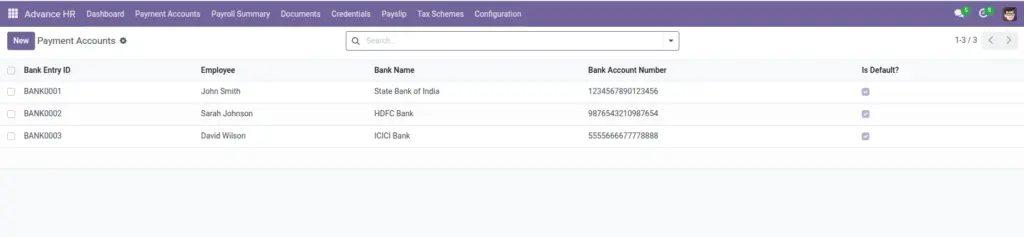
Why it matters: Salary runs depend on knowing exactly where to send money. Storing bank details in Odoo removes last-minute spreadsheet lookups and reduces mis-transfers, especially when you pay many people in one batch.
What this covers: Each employee can have several bank records; exactly one should be the default payout account. The application blocks two defaults for the same person so payroll always has a single authoritative target. Optional fields (IFSC/SWIFT, branch) help with compliance and international transfers.
This menu is for banking for pay only—not application logins; use Employee Credentials for those.
How It Works
When you create a bank account, it gets a unique ID. If you mark it as default, any previous default is blocked to keep one clear payout destination.
Step-by-Step Guide
- Go to the employee’s Bank Accounts.
- Click New and enter bank name, account number, and branch.
- Select Account Type (Savings or Current).
- Tick “Is Default?” if this is the main payout account.
- Save.
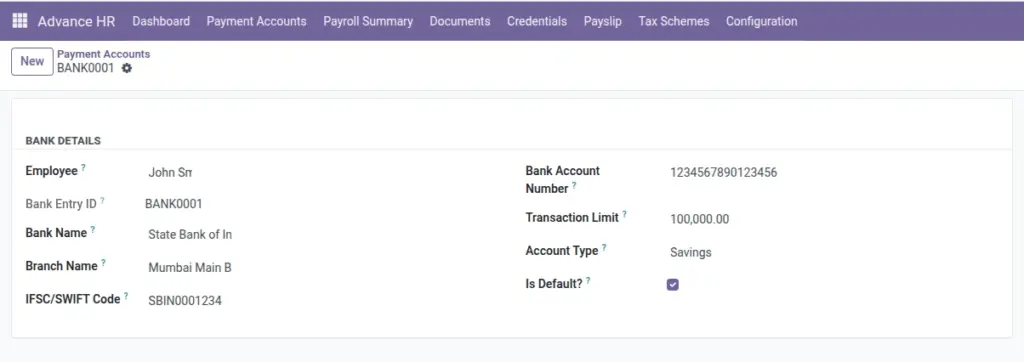
Fields Table
| Field Name | Description | Example |
|---|---|---|
Bank Entry ID |
Unique ID, auto-generated. |
BANK-00021 |
Employee |
Owner of the account. |
Maria Smith |
Bank Name |
Bank where the account exists. |
First National Bank |
Bank Account Number |
Payment account number. |
1234567890 |
IFSC/SWIFT Code |
Branch identifier for transfers. |
HDFC0001234 |
Branch Name |
Bank branch name. |
Downtown Branch |
Account Type |
Savings or Current. |
Savings |
Is Default? |
Main payout account toggle. |
Yes |
Transaction Limit |
Optional cap per transfer. |
€5,000 |
Field labels explained
Bank Entry ID
Internal reference number for this bank line; useful in support tickets and audit logs.
Employee Owner
of the account—must be the person receiving salary into this bank.
Bank Name
Legal name of the financial institution (as on the cheque or statement).
Bank Account Number
Domestic account identifier; double-check digits to avoid failed transfers.
IFSC / SWIFT Code
Branch or bank routing: IFSC for India, SWIFT/BIC for international wires—required by many payment files.
Branch Name
Human-readable branch for verification when the code alone is ambiguous.
Account Type
Savings vs current—some banks or policies require a specific type for salary credit.
Is Default?
When enabled, payroll pays this account; only one default per employee is allowed.
Transaction Limit
Optional cap per transfer if your process enforces splitting large payments.
Tips
- Use “Is Default?” to avoid manual selection during payroll.
- Fill IFSC/SWIFT for smoother international transfers.
Common Mistakes
- Creating two default accounts for one employee (blocked by system).
- Typos in account number causing rejected transfers.