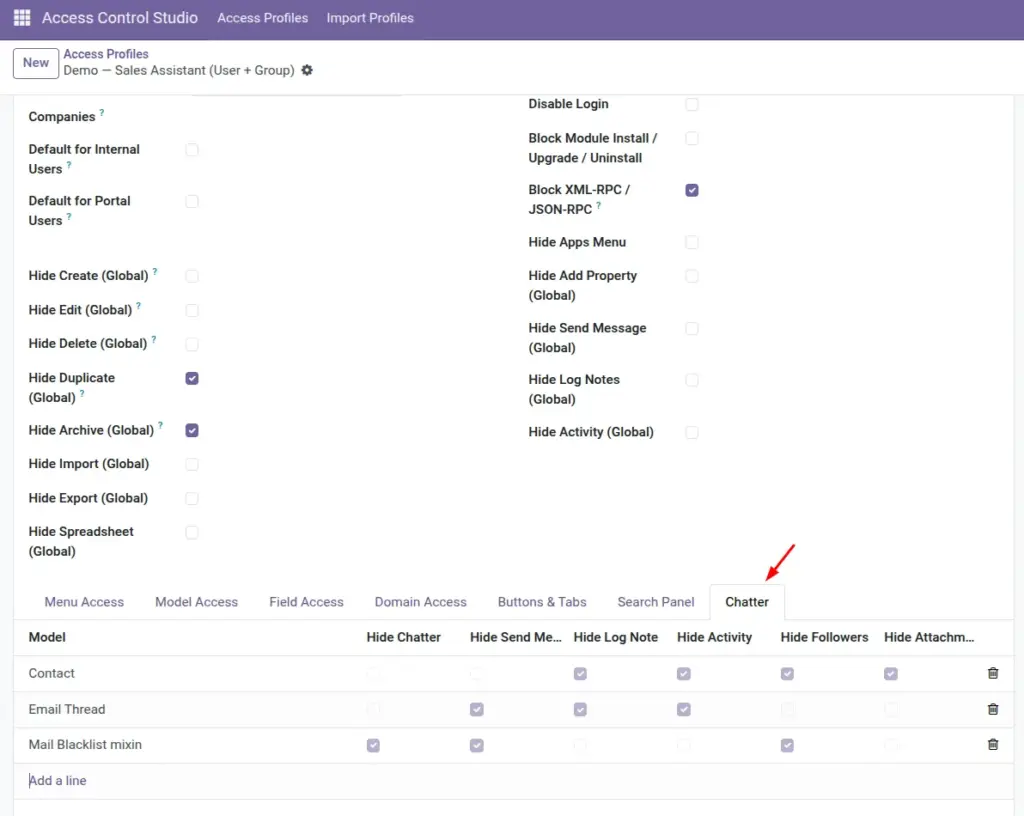
Control the message history on records – hide the whole chatter, or only send message, log notes, activities, followers, or attachments.
Overview
Chatter is the panel usually on the right of a form where people send messages, log notes, schedule activities, manage followers, and see attachments.
You can hide chatter everywhere with the profile’s Hide Chatter global flag, use global chatter toggles, or fine-tune per model on the Chatter tab.
How It Works
Global flags apply to all models. Chatter tab lines override/refine by model: for example, allow chatter on Tasks but hide it on Employees.
Restrictions apply in the UI and are enforced so users cannot simply bypass a hidden control.
Step-by-Step Guide
- Decide whether the role needs messaging at all. If not, enable Hide Chatter on the profile.
- Or use Global Hide Send Message / Log Notes / Activity for a lighter touch.
- For exceptions, open the Chatter tab, add a model line, and tick the specific hides.
- Save and open a form with chatter as the test user.
Fields Table
These are the settings you will see for this feature, explained in everyday language.
| Field Name | Description | Example |
|---|---|---|
Hide Chatter (profile flag) |
Hides chatter everywhere. |
Read-only auditors |
Hide Send Message (Global) |
No outbound messages globally. |
Silent viewers |
Hide Log Notes (Global) |
No internal notes globally. |
Silent viewers |
Hide Activity (Global) |
No activities globally. |
Silent viewers |
Model (Chatter tab) |
Model-specific chatter rules. |
Employee |
Hide Chatter |
Hide entire chatter on that model. |
On Employees |
Hide Send Message |
Block send message on that model. |
On Invoices |
Hide Log Note |
Block log notes on that model. |
On Invoices |
Hide Activity |
Block activities on that model. |
On Contacts |
Hide Followers |
Hide followers section. |
Reduce noise |
Hide Attachments |
Hide attachment handling in chatter. |
Protect files |
Field Explanations
Each field from the table above is explained in more detail here.
Hide Chatter (profile flag)
Nuclear option for roles that should never use messaging from records.
Hide Send Message (Global)
Keeps history visible (unless fully hidden) but stops new messages.
Hide Log Notes (Global)
Stops internal notes everywhere.
Hide Activity (Global)
Stops scheduling to-dos from chatter.
Model (Chatter tab)
Use when only some apps need chatter limits.
Hide Chatter
Per-model full hide.
Hide Send Message
Per-model outbound message block.
Hide Log Note
Per-model note block.
Hide Activity
Per-model activity block.
Hide Followers
Useful when follower lists reveal internal people you want private.
Hide Attachments
Use when files should only be managed by another role.
Tips
- Sales often needs chatter; HR salary forms often should not – split by model lines.
- Hiding attachments in chatter does not replace document security policies; combine with field and model rules.
- Tell users where they should communicate if chatter is removed (email, helpdesk, etc.).
Common mistakes
- Hiding chatter globally then wondering why team collaboration on Tasks disappeared – use per-model lines.
- Hiding followers but leaving send message on – messages may still notify people unexpectedly.
- Assuming hidden attachments deletes files – it hides the UI; manage real file rights separately if needed.
Image