Simplify how people search and group lists – hide filters, favorites, custom filters, or the left search panel for a cleaner screen.
Overview
Above every list, Odoo offers search, filters, Group By, favorites, and sometimes a left-hand search panel. Some roles only need a simple search box.
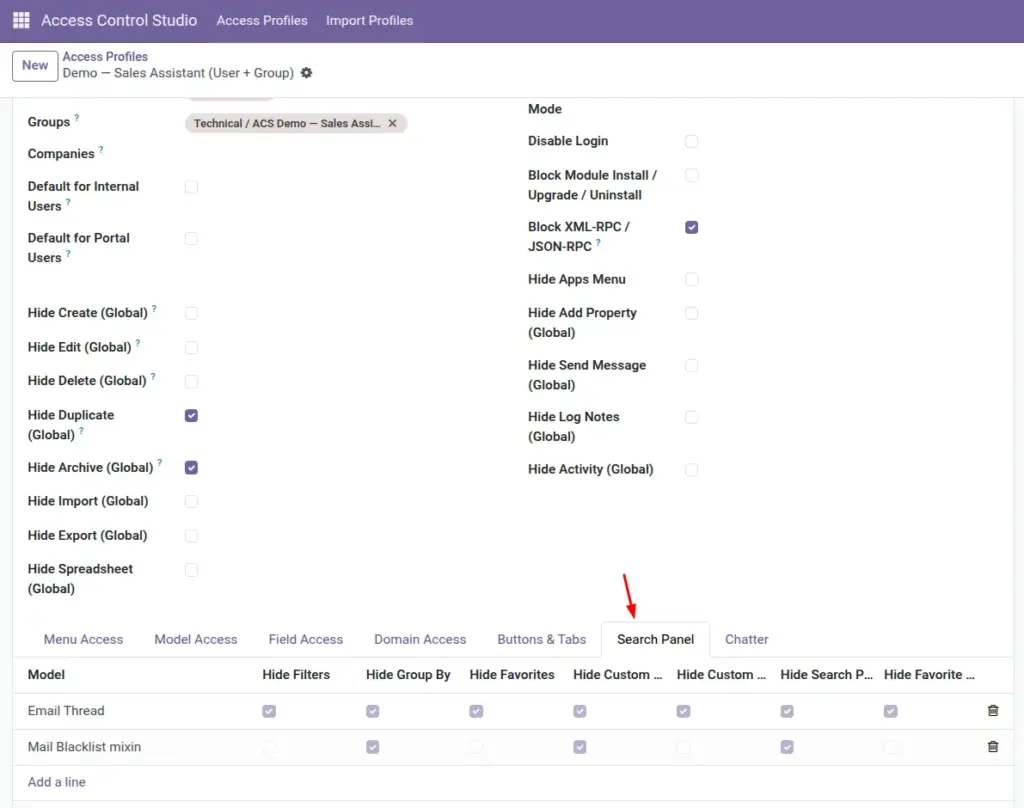
On the Search Panel tab you can turn those extras off globally (leave Model empty) or for one model only.
How It Works
Each line can target one model or, if Model is empty, apply to all lists. Toggles remove parts of the search UI for matched users so they focus on ready-made views you prepared for them.
Step-by-Step Guide
- Open the profile → Search Panel tab.
- Add a line. Leave Model empty for a global rule, or pick a model for a targeted rule.
- Enable the hides you want: Filters, Group By, Favorites, Custom Filter, Custom Group By, Search Panel, Favorite Delete.
- Save and open a list view as the target user.
Fields Table
These are the settings you will see for this feature, explained in everyday language.
| Field Name | Description | Example |
|---|---|---|
Model |
Optional. Empty = apply everywhere. |
Contact or blank |
Technical Name |
Filled when a model is set. |
res.partner |
Hide Filters |
Removes filter menu options. |
Simplify inventory lists |
Hide Group By |
Removes Group By. |
Floor staff lists |
Hide Favorites |
Hides saved favorite searches. |
Prevent switching to other views |
Hide Custom Filter |
Blocks building custom filters. |
Keep search simple |
Hide Custom Group By |
Blocks custom grouping. |
Keep search simple |
Hide Search Panel |
Hides the left search panel sidebar. |
More space on small screens |
Hide Favorite Delete |
Stops deleting favorite searches. |
Protect shared favorites |
Field Explanations
Each field from the table above is explained in more detail here.
Model
Use blank for company-wide simplification; set a model when only one app confuses users.
Technical Name
Reference only.
Hide Filters
Users still can type in the search bar, but preset filter menus go away.
Hide Group By
Prevents regrouping lists in ways that may expose patterns you do not want shared.
Hide Favorites
Good when favorites were created for managers only.
Hide Custom Filter
Stops power-user filter building.
Hide Custom Group By
Stops ad-hoc grouping.
Hide Search Panel
Removes the facet sidebar some apps show on the left.
Hide Favorite Delete
Allows using favorites but not removing them.
Tips
- For shop-floor users, hide Custom Filter and Group By first.
- Keep one unrestricted manager profile so someone can still build filters for the team.
- Combine with Hidden Views on Model Access for a truly simple UI.
Common mistakes
- Hiding all search tools when users still need to find records by name – leave the main search box available.
- Applying a harsh global search rule when only one app was problematic.
- Forgetting to test mobile/small screens after hiding the search panel.
Image