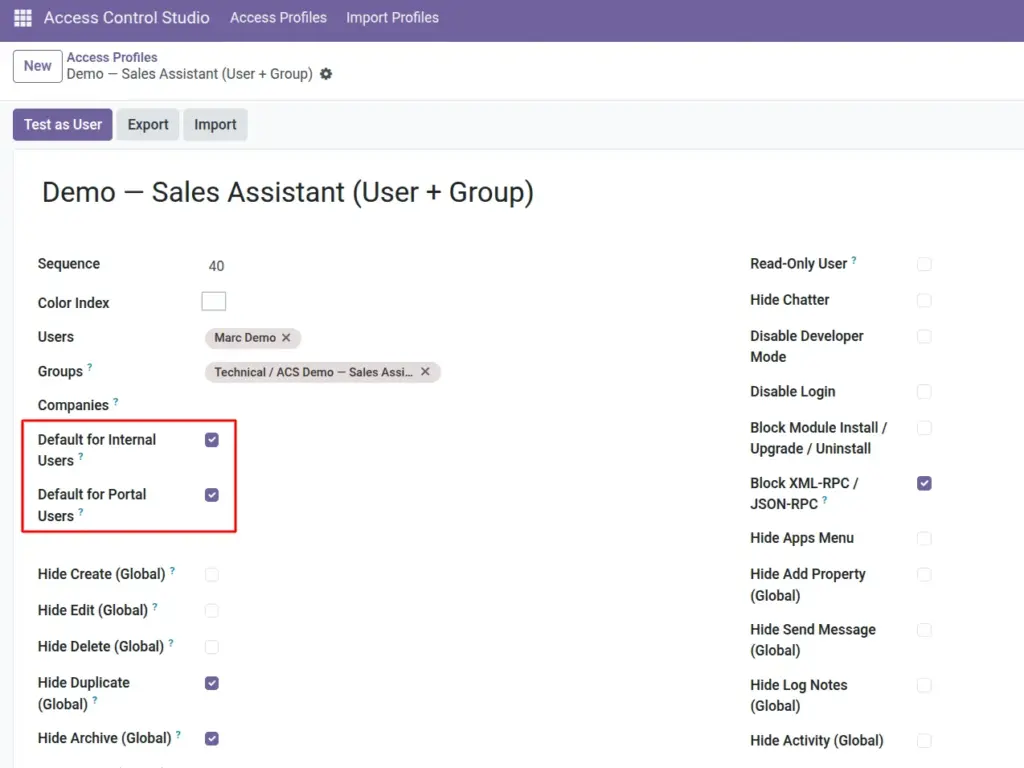
Automatically apply a baseline Access Profile when a new internal employee or portal user is created.
Overview
When HR adds employees often, you should not rely on someone remembering to assign ACS profiles. Mark one profile as Default for Internal Users and/or one as Default for Portal Users.
The module also ships inactive starter templates you can study: Internal Starter and Portal Starter.
How It Works
Only one active profile can be the internal default, and only one the portal default. When a matching new user is created, they are added to that profile’s Users list and inherit its rules immediately.
Step-by-Step Guide
- Create (or open) your baseline profile with the minimum safe rules for every new hire.
- Enable Default for Internal Users (for employees) or Default for Portal Users (for portal customers).
- Ensure the profile is Active and saved.
- Create a test user of that type and confirm they appear on the profile and see the expected limits.
- Add stricter profiles later for specific teams (Sales Limited, etc.) on top of or instead of the baseline as your process requires.
Fields Table
These are the settings you will see for this feature, explained in everyday language.
| Field Name | Description | Example |
|---|---|---|
Default for Internal Users |
Auto-assign new internal users to this profile. |
Staff Baseline |
Default for Portal Users |
Auto-assign new portal users to this profile. |
Portal Lockdown |
Template – Internal Starter |
Sample inactive template for internal lockdown ideas. |
Use as reference |
Template – Portal Starter |
Sample inactive template for portal lockdown ideas. |
Use as reference |
Field Explanations
Each field from the table above is explained in more detail here.
Default for Internal Users
Perfect for “everyone starts with no Apps menu / no export” policies.
Default for Portal Users
Portal users often need a tight profile; set this before inviting customers.
Template – Internal Starter
Ships inactive – duplicate ideas into your own active profile rather than turning templates on blindly.
Template – Portal Starter
Same idea for portal: learn from it, then build your real profile.
Tips
- Keep the default profile modest; put specialized restrictions on role profiles.
- Review defaults whenever you change hiring or portal onboarding.
- Document which profile is the default in your internal IT wiki.
Common mistakes
- Enabling default on a highly restrictive experimental profile – every new hire gets locked down.
- Trying to set two internal defaults – only one is allowed.
- Activating starter templates without reviewing Block RPC and other strong flags.
Image