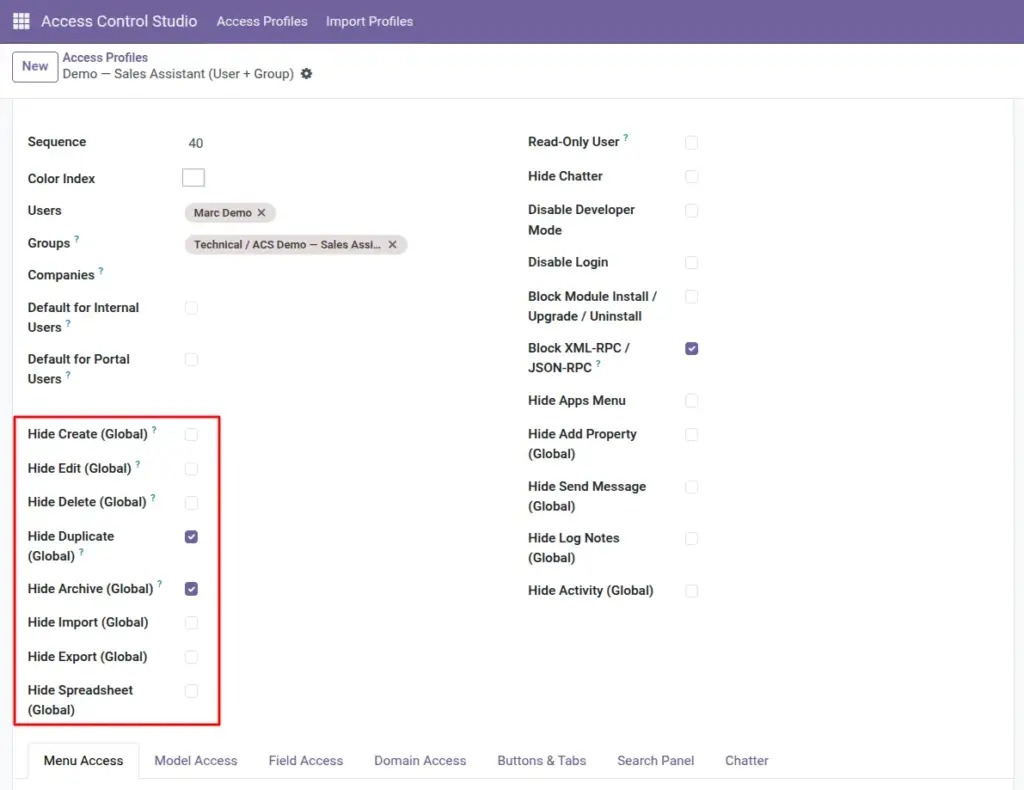
Global switches apply across Odoo for everyone on the profile – ideal for read-only roles, locking down login, or blocking imports everywhere.
Overview
At the top of an Access Profile you will find broad settings that affect the whole system for matched users, not just one app or form.
Use these when a role should be limited everywhere (for example auditors who may view but never change data), or when you need company-wide safety (block external API access, hide the Apps menu).
More specific tabs (Model Access, Field Access, and so on) can still add finer rules on top.
How It Works
When a matched user opens Odoo:
- Read-Only User blocks create, edit, and delete on normal records (temporary pop-up wizards are excluded so basic dialogs still work).
- Global “Hide Create / Edit / Delete / …” switches remove those actions across models.
- Flags like Disable Login or Block XML-RPC / JSON-RPC stop access at the gate for that person.
- Global chatter switches hide messaging tools everywhere; per-model Chatter rules can refine this later.
Step-by-Step Guide
- Open the Access Profile you want to harden.
- On the right side of the form, enable the user-level flags you need (Read-Only, Hide Chatter, Disable Developer Mode, and so on).
- Below, turn on any Global Hide options (Create, Edit, Delete, Duplicate, Archive, Import, Export, Spreadsheet, Add Property).
- Optionally enable global chatter hides: Send Message, Log Notes, Activity.
- Save the profile, then use Test as User with a non-admin test account to verify.
Fields Table
These are the settings you will see for this feature, explained in everyday language.
| Field Name | Description | Example |
|---|---|---|
Read-Only User |
Blocks create, edit, and delete on regular records. |
External auditor |
Hide Chatter |
Hides the message panel everywhere. |
Users who should not message from records |
Disable Developer Mode |
Stops the user from turning on developer/debug mode. |
Non-technical staff |
Disable Login |
User cannot sign in at all. |
Former employee pending cleanup |
Block Module Install / Upgrade / Uninstall |
Cannot install or change apps. |
Everyone except IT |
Block XML-RPC / JSON-RPC |
Blocks external API access; normal Odoo web UI still works. |
On by default for safer profiles |
Hide Apps Menu |
Hides the top Apps switcher. |
Portal-like internal users |
Hide Create (Global) |
No Create button / create action on models. |
View-only staff |
Hide Edit (Global) |
No editing records. |
View-only staff |
Hide Delete (Global) |
No deleting records. |
Most staff |
Hide Duplicate (Global) |
No duplicate action. |
Prevent cloning sensitive docs |
Hide Archive (Global) |
No archive / unarchive. |
Controlled data retention |
Hide Import (Global) |
No spreadsheet/CSV import. |
Prevent bulk uploads |
Hide Export (Global) |
No data export. |
Protect customer lists |
Hide Spreadsheet (Global) |
Blocks spreadsheet insert/refresh where applicable. |
Limit Excel-like tools |
Hide Add Property (Global) |
Hides adding custom properties on records. |
Keep forms consistent |
Hide Send Message (Global) |
No “Send message” in chatter. |
Quiet read-only roles |
Hide Log Notes (Global) |
No internal log notes. |
Quiet read-only roles |
Hide Activity (Global) |
No scheduling activities from chatter. |
View-only roles |
Field Explanations
Each field from the table above is explained in more detail here.
Read-Only User
Strongest simple switch for “look but don’t touch.” Prefer this over ticking every Hide Edit box when the whole role is view-only.
Hide Chatter
Removes the side conversation panel. Use when messaging is not part of the job.
Disable Developer Mode
Keeps technical menus and tools away from business users.
Disable Login
Use carefully. You cannot apply this to yourself unless you are an ACS Administrator.
Block Module Install / Upgrade / Uninstall
Stops casual app changes that can break the database.
Block XML-RPC / JSON-RPC
Stops scripts and external connectors using that user’s credentials. The browser Odoo client is unaffected.
Hide Apps Menu
Users stay inside the apps you already opened for them; they cannot jump around via the app grid as easily.
Hide Create (Global)
Use when nobody on this profile should create records anywhere. For one app only, use Model Access instead.
Hide Edit (Global)
Same idea for editing.
Hide Delete (Global)
Common safety setting even when create/edit are allowed.
Hide Duplicate (Global)
Stops “Duplicate” from cloning records that may contain sensitive data.
Hide Archive (Global)
Prevents soft-deleting / archiving records.
Hide Import (Global)
Important when import could overwrite or mass-create data.
Hide Export (Global)
Reduces risk of downloading full contact or payroll lists.
Hide Spreadsheet (Global)
Limits Odoo spreadsheet features that can expose data.
Hide Add Property (Global)
Keeps users from adding ad-hoc properties that clutter forms.
Hide Send Message (Global)
Global mute for outbound chatter messages.
Hide Log Notes (Global)
Blocks internal notes everywhere.
Hide Activity (Global)
Blocks activity scheduling from the chatter.
Tips
- Prefer Global switches for company-wide role policies; use Model Access when only Contacts or Sales should be limited.
- Leave Block XML-RPC on unless the user truly needs an external integration.
- Pair Hide Export with field-level hides for sensitive columns.
Common mistakes
- Enabling Disable Login on your own user without an Administrator fallback.
- Turning on every global hide and also dozens of model lines – redundant and harder to maintain.
- Expecting Read-Only User to block temporary wizard pop-ups – those are intentionally excluded.
Image