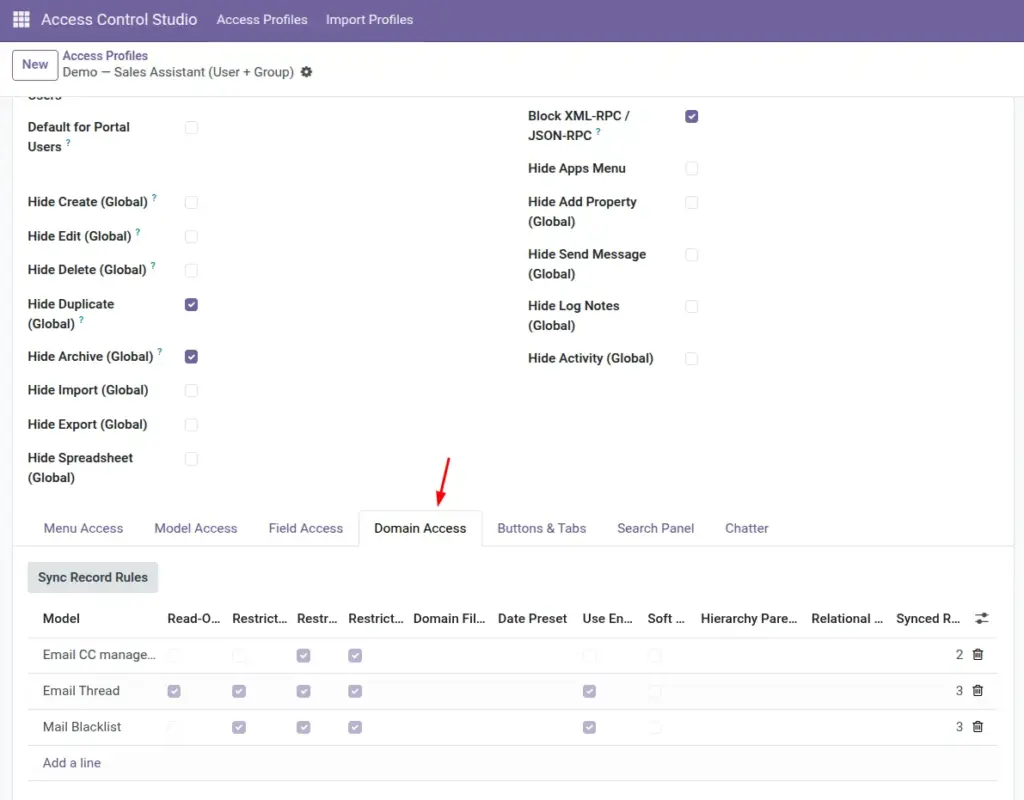
Domain Access filters the list of records – for example, only today’s documents, only my customers, or only records linked to my team.
Overview
Sometimes the issue is not the menu or the field – it is that people see too many records. Domain Access limits which rows appear and can also restrict creating, editing, or deleting outside that filter.
These rules sync into Odoo’s record rules so protection stays in place even outside the normal screen.
Helpers include date presets (Today, This Week, This Month, This Year) and a USER_ID placeholder for “my records” style filters.
How It Works
Each Domain Access line targets a model and defines a Domain Filter and/or a Date Preset. You can mark Restrict Create / Edit / Delete or set the whole model read-only under that rule.
Click Sync Record Rules if you need to refresh synced rules (saving also syncs).
Advanced options (soft restrict, hierarchy parent, relational field) help special cases – use them with someone who understands Odoo domains if you are unsure.
Step-by-Step Guide
- Open the profile → Domain Access.
- Add a line and choose the Model.
- Either pick a Date Preset (limits by creation date) and/or enter a Domain Filter.
- If you use USER_ID in the domain, enable Use Environment User so it becomes the logged-in person.
- Tick Restrict Create / Edit / Delete or Read-Only Model if they should not change data outside the allowed set.
- Save (or click Sync Record Rules), then test as that user and confirm the list is shorter.
Fields Table
These are the settings you will see for this feature, explained in everyday language.
| Field Name | Description | Example |
|---|---|---|
Model |
Record type to filter. |
Sales Order |
Technical Name |
System model name. |
sale.order |
Restrict Create |
Limit creating records under this rule context. |
Cannot create outside allowed set |
Restrict Edit |
Limit editing. |
Cannot edit others’ records |
Restrict Delete |
Limit deleting. |
Cannot delete historical orders |
Read-Only Model |
Blocks create/edit/delete via synced rules. |
Audit profile |
Domain Filter |
Odoo domain that limits visibility. |
[(‘user_id’,’=’,USER_ID)] |
Date Preset |
Quick filter on create date: Today / Week / Month / Year. |
This Month |
Use Environment User |
Replace USER_ID with the current user. |
Checked for “my records” |
Soft Restrict |
Advanced: restrict without breaking related reads (Pro). |
When lists break related forms |
Relational Field |
Apply the domain on a related model via a field. |
Partner on the order |
Hierarchy Parent Field |
Technical parent field for hierarchy expansion (Pro). |
parent_id |
Synced Rules |
How many Odoo record rules were created. |
2 |
Synced Record Rules |
The actual synced rules (admin detail). |
Visible to admins |
Field Explanations
Each field from the table above is explained in more detail here.
Model
Choose what list you want to shrink (orders, tasks, contacts…).
Technical Name
Reference only.
Restrict Create
Use when people should only add records in allowed situations.
Restrict Edit
Stops changing records that fall outside the intended scope.
Restrict Delete
Extra safety on deletion.
Read-Only Model
Convenience flag when the role should only view matching records.
Domain Filter
The heart of the rule. Example meaning: only records where Salesperson = me. Ask a technical colleague for complex domains.
Date Preset
Fast option when people should only see recent documents.
Use Environment User
Turn on whenever your domain includes USER_ID.
Soft Restrict
Special mode for tricky related-record screens – leave off unless advised.
Relational Field
Lets the filter apply through a link (for example, constrain by related customer).
Hierarchy Parent Field
For tree-style data (parent/child). Advanced.
Synced Rules
Non-zero means Odoo has active record rules from this line.
Synced Record Rules
Technical follow-up for administrators.
Tips
- Start with a Date Preset before writing complex domains.
- For “only my records,” use USER_ID + Use Environment User.
- After changes, reopen the list with Test as User – managers may still see everything.
Common mistakes
- Writing a domain so strict that the user sees an empty app and thinks Odoo is broken.
- Forgetting Use Environment User when USER_ID is in the domain.
- Stacking many overlapping domain lines from multiple profiles without testing the combined result.
Image