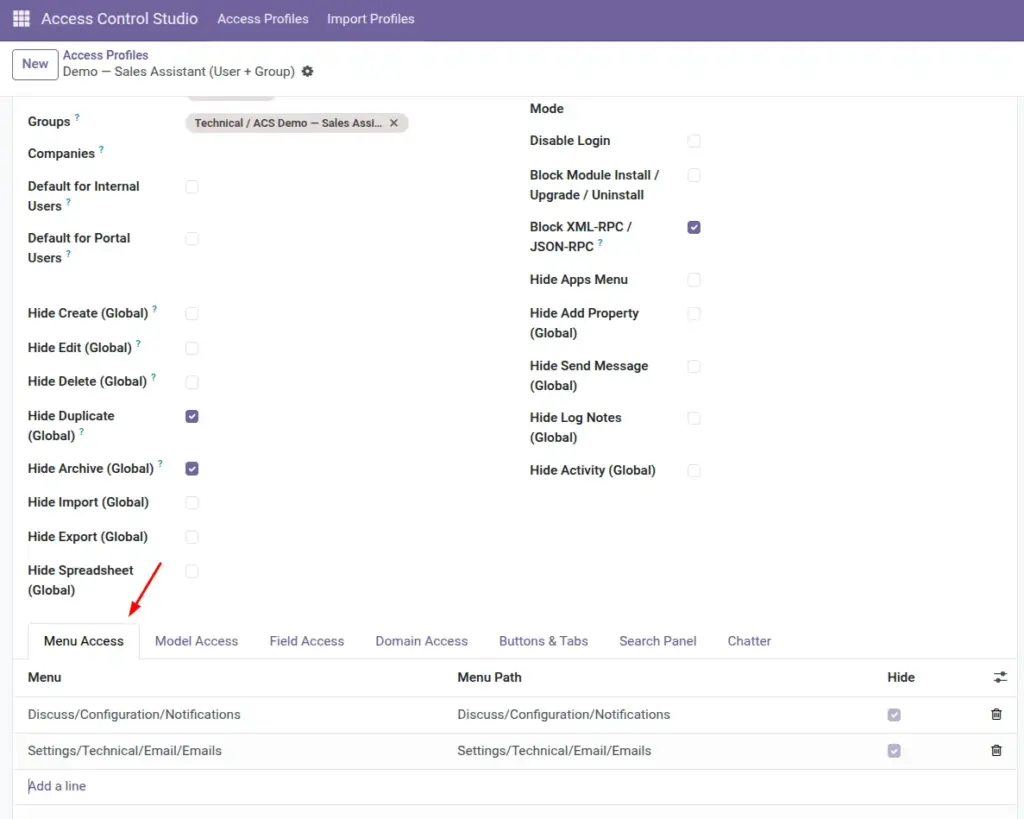
Use Menu Access to remove apps and submenu items from someone’s navigation – for example, hide Settings or Accounting from sales staff.
Overview
Menus are the items people click in Odoo’s main navigation and submenus (Sales, Customers, Reporting, Configuration, and so on).
With Menu Access, you pick which menus a profile should hide. The menu path is shown so you know exactly which entry disappears.
You can also turn on Hide Apps Menu in Global Restrictions to hide the top Apps switcher.
How It Works
When a user opens Odoo, menus listed on their profile with Hide enabled are removed from navigation (enforced properly, not just covered up).
Hiding a parent menu typically removes that whole branch from view. Hide only what you need so people can still reach their daily work.
Access Control Studio’s own menus are protected so a profile cannot hide ACS from managers who need it.
Step-by-Step Guide
- Open an Access Profile → tab Menu Access.
- Click Add a line.
- Choose the Menu to hide (search by name).
- Confirm Menu Path shows the correct place in the hierarchy.
- Leave Hide checked (default).
- Save. Ask the user to refresh, or use Test as User to verify the menu is gone.
Fields Table
These are the settings you will see for this feature, explained in everyday language.
| Field Name | Description | Example |
|---|---|---|
Menu |
The menu item to control. |
Accounting → Customers → Invoices |
Menu Path |
Full path of that menu (read-only). |
Invoicing/Customers/Invoices |
Hide |
When checked, the menu is hidden for this profile. |
Checked |
Field Explanations
Each field from the table above is explained in more detail here.
Menu
Search carefully – many menus share similar names. Use the path to confirm.
Menu Path
Shows where the item sits in Odoo so you do not hide the wrong entry.
Hide
Almost always leave this on. The line exists to hide that menu for the profile.
Tips
- Hide Configuration / Settings menus for business users who should not change setup.
- Combine menu hiding with Model Access – hiding a menu is UX; model rules stop actions if someone finds another path.
- Document why each menu is hidden in the profile’s chatter notes for future admins.
Common mistakes
- Hiding a top-level app when you only meant to hide one submenu.
- Assuming a hidden menu means data is fully protected – also restrict models and exports if needed.
- Forgetting users may still open bookmarks or links; pair with model/domain rules for sensitive apps.
Image