Overview
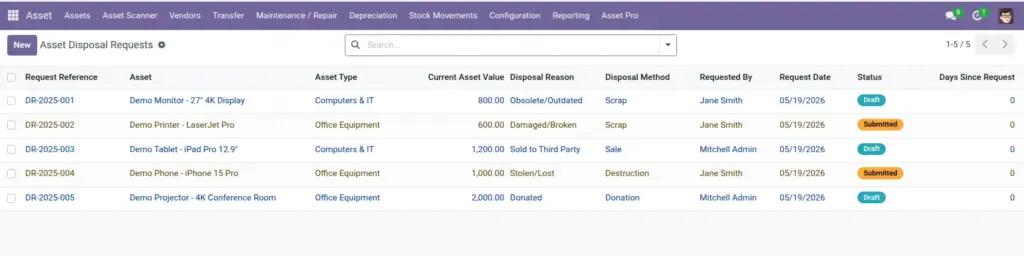
When equipment is obsolete, damaged beyond repair, sold, or donated, you process an Asset Disposal Request. This ensures finance and management approve before assets are removed from the books, and creates a permanent record of what happened and why.
Disposal methods include sale, scrap, donation, destruction, and return to supplier.
How It Works
A disposal request starts in Draft on the asset form or from the Disposal Requests menu. You specify the reason, method, expected sale price if applicable, and disposal costs. After submission and approval, the asset status changes to destroyed/disposed and the disposal date is recorded.
Step-by-Step Guide
- Open the asset to dispose or go to Asset Pro > Operations > Disposal Requests.
- Click New and select the Asset.
- Choose a Disposal Reason (obsolete, damaged, sold, donated, etc.) and add details.
- Select the Disposal Method and enter expected sale price or disposal cost if known.
- Submit for approval. Approvers review current value and reason.
- Once approved, confirm disposal. The asset is marked disposed and removed from active inventory.
Fields Table
| Field Name | Description | Example |
|---|---|---|
Request Reference |
Unique disposal request number. |
DSP/2025/0015 |
Asset |
Asset being retired. |
Old Printer HP-4400 |
Current Asset Value |
Book value at time of disposal. |
$120.00 |
Disposal Reason |
Why the asset is being retired. |
Obsolete/Outdated |
Disposal Method |
How the asset leaves the company. |
Scrap |
Expected Sale Price |
Anticipated revenue if selling. |
$0 |
Disposal Cost |
Cost to remove or destroy. |
$25.00 hauling fee |
Requested By |
Person initiating the request. |
Sarah Johnson |
Status |
Draft, Submitted, Approved, Disposed, or Rejected. |
Submitted |
Field Explanations
Request Reference
Use for finance journal entries and audit documentation.
Asset
Cannot dispose an asset that already has a pending disposal request.
Current Asset Value
Finance uses this to calculate gain or loss on disposal.
Disposal Reason
Pick the closest category. Add details in Reason Details for edge cases.
Reason Details
Always explain – “screen cracked beyond repair” is better than leaving blank.
Disposal Method
Sale requires expected sale price. Donation may need a receipt for tax purposes.
Expected Sale Price
Be realistic. Finance compares this to actual proceeds later.
Disposal Cost
Include transport, recycling fees, or data-wiping service costs.
Requested By
Auto-filled. Creates accountability for the request.
Status
Only Approved requests should be finalized. Rejected requests keep the asset active.
Tips (Pro Tips)
- Process disposal before physically removing equipment – auditors need the digital record first.
- Attach photos of damaged equipment in chatter notes for insurance claims.
- For sales, record the actual sale amount in finance after disposal is approved.
Common Mistakes
- Deleting asset records instead of disposing – you lose history and break audit trails.
- Disposing assets still assigned to employees without collecting them first.
- Skipping approval on high-value items – always route through your configured workflow.
Visual Reference