Overview
Many assets must meet safety, environmental, or industry regulations – fire extinguisher inspections, vehicle registrations, elevator certifications, and more. Compliance Tracking helps you define requirements, record inspections, and catch overdue items before they become violations.
The Compliance Dashboard gives managers a real-time view of compliance rates, overdue items, and open violations.
How It Works
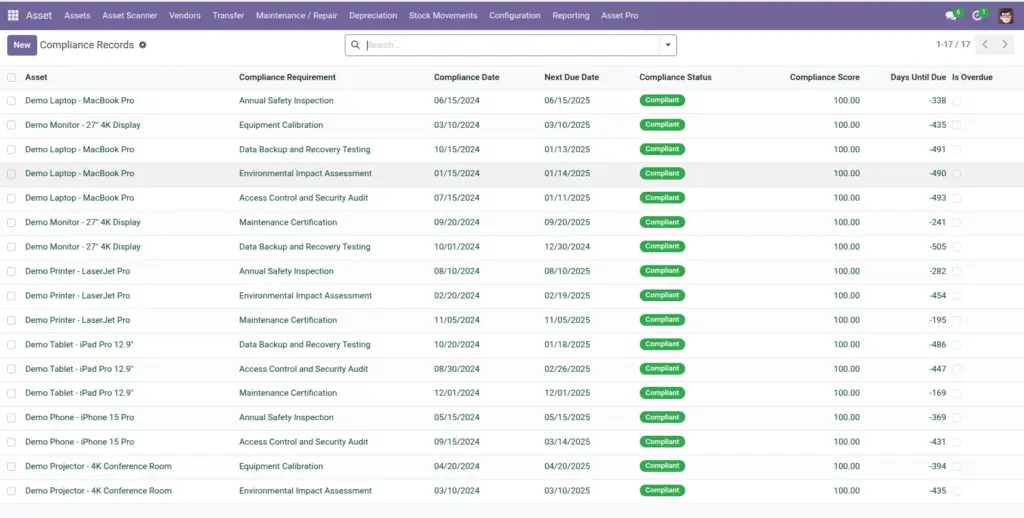
Compliance requirements define what must be done, how often, and what documents are needed. Each asset gets compliance records linked to applicable requirements. When an inspection is completed, you record the date, status, and evidence. Violations track issues that need corrective action.
Step-by-Step Guide
- Define requirements at Asset Pro > Compliance > Compliance Requirements.
- Assign requirements to assets or asset types as applicable.
- When an inspection is done, create a Compliance Record with date, status, and notes.
- Attach document references or evidence descriptions for auditors.
- If a violation occurs, log it with severity, corrective action plan, and responsible person.
- Review the Compliance Dashboard weekly for overdue items and critical violations.
Fields Table
| Field Name | Description | Example |
|---|---|---|
Requirement Name |
Name of the regulatory requirement. |
Annual Fire Safety Inspection |
Compliance Type |
Category: safety, environmental, financial, etc. |
Safety |
Frequency Type |
How often compliance is required. |
Yearly |
Grace Period (Days) |
Extra days after due date before marked overdue. |
30 |
Compliance Date |
Date the inspection or check was performed. |
2025-01-15 |
Next Due Date |
When the next compliance is due. |
2026-01-15 |
Status |
Compliant, Non-Compliant, Pending, or Expired. |
Compliant |
Violation Severity |
Minor, Major, or Critical. |
Major |
Corrective Action Required |
Steps to fix a violation. |
Replace faulty extinguisher in Room 204 |
Compliance Score |
Score for this record (0-1). |
0.95 |
Field Explanations
Requirement Name
Use official regulation names your auditors recognize.
Compliance Type
Filter dashboards and reports by type – safety vs. environmental, etc.
Frequency Type
Match the actual regulation – monthly, quarterly, annual.
Grace Period (Days)
Built-in buffer before alerts fire – adjust per regulation strictness.
Compliance Date
Record the actual inspection date, not when you entered the data.
Next Due Date
Auto-calculated from frequency. Watch this field on the dashboard.
Status
Keep current – expired fire extinguishers are a liability.
Violation Severity
Critical violations should trigger immediate escalation.
Corrective Action Required
Be specific with deadlines and responsible parties.
Compliance Score
Use for trend reporting – aim for improvement quarter over quarter.
Tips (Pro Tips)
- Set up requirements before assigning them to hundreds of assets – templates save time.
- Upload or reference inspection certificates in the evidence fields.
- Review the 30-day upcoming deadlines report every month.
Common Mistakes
- Recording compliance without evidence – fails audits when documentation is requested.
- Ignoring grace periods and marking items overdue too aggressively – causes alert fatigue.
- Closing violations without verifying corrective action was actually completed.
Visual Reference