Overview
Asset budgets help departments plan how much they will spend on new equipment, maintenance, and replacements each fiscal year. You set a total amount, break it into line items by category, and track committed versus actual spending as purchase requests come in.
Budgets move through approval states – Draft, Submitted, Approved, Active – so finance retains control before money is spent.
How It Works
Each budget covers a fiscal year or custom date range. Budget lines break spending into categories (IT, Vehicles, Facilities, etc.). As assets are purchased or expenses recorded, the system updates committed and actual amounts and calculates available balance.
When usage crosses the alert threshold (default 80%), managers receive warnings before the budget is exhausted.
Step-by-Step Guide
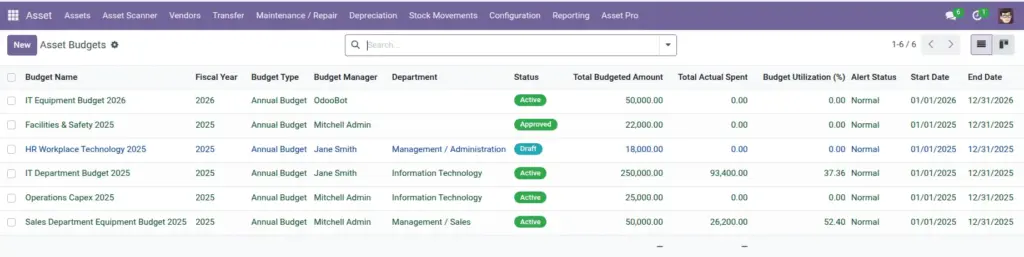
- Go to Asset Pro > Budget > Asset Budgets and click New.
- Enter a Budget Name, Fiscal Year, and date range.
- Select the Budget Manager and department if applicable.
- Add budget lines with category, planned amount, and description.
- Submit the budget for approval. Once approved, change status to Active.
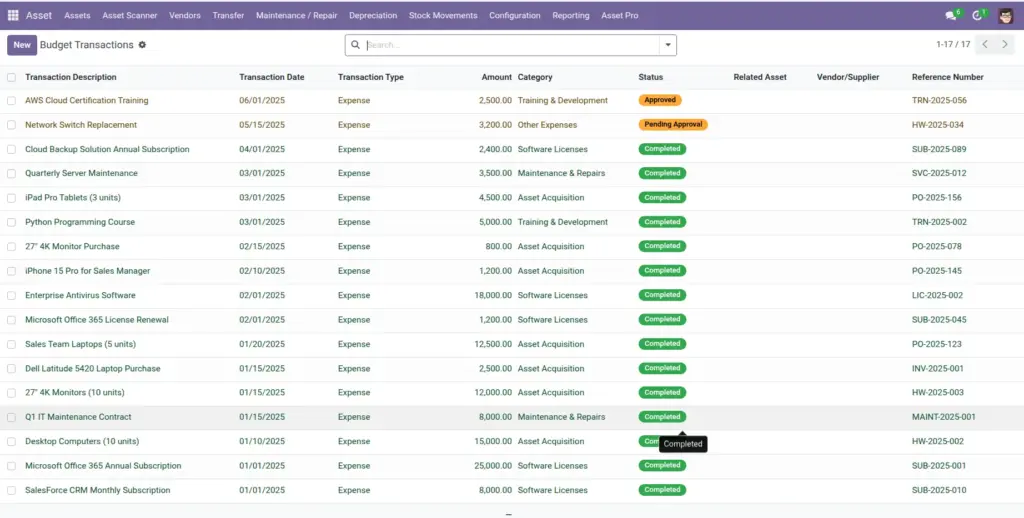
- Record spending at Asset Pro > Budget > Budget Transactions as purchases and expenses occur.
- Monitor utilization on the budget form or Budget Dashboard. Adjust lines if priorities shift mid-year.
Fields Table
| Field Name | Description | Example |
|---|---|---|
Budget Name |
Descriptive title for the budget. |
2025 IT Equipment Budget |
Fiscal Year |
Year this budget covers. |
2025 |
Budget Type |
Annual, quarterly, monthly, or custom period. |
Annual Budget |
Start Date / End Date |
Exact period the budget applies to. |
Jan 1 – Dec 31, 2025 |
Budget Manager |
Person accountable for this budget. |
Lisa Park – IT Director |
Total Budgeted Amount |
Sum of all budget lines. |
$250,000 |
Total Committed |
Amount reserved for pending purchases. |
$45,000 |
Total Actual Spent |
Amount already spent. |
$82,000 |
Total Available |
Remaining budget balance. |
$123,000 |
Alert Threshold (%) |
When to warn about high usage. |
80% |
Status |
Draft, Submitted, Approved, Active, Closed, or Cancelled. |
Active |
Budget Transaction |
Individual spend or commitment linked to a budget. |
Laptop purchase – $1,200 |
Transaction Type |
Whether money is committed or actually spent. |
Actual |
Transaction Amount |
Value of the purchase or expense. |
$1,200.00 |
Field Explanations
Budget Name
Include department and year so teams can find the right budget quickly.
Fiscal Year
Must align with your company’s financial calendar.
Budget Type
Annual is most common. Use quarterly for fast-moving departments.
Start Date / End Date
Custom periods work for project-based budgets.
Budget Manager
This person receives alerts and approves over-budget requests.
Total Budgeted Amount
Auto-calculated from lines – do not enter manually.
Total Committed
Includes approved but not yet purchased items. Watch this to avoid double-booking.
Total Actual Spent
Reflects completed purchases linked to this budget.
Total Available
The number decision-makers care about most – what is left to spend.
Alert Threshold (%)
Lower it to 70% if your team needs earlier warnings.
Status
Only Active budgets accept new commitments. Close budgets at year-end.
Budget Transaction
Create a transaction each time a purchase is approved or an invoice is paid against this budget.
Transaction Type
Committed = reserved but not paid. Actual = money already spent.
Transaction Amount
Enter the real invoice amount. Small errors compound across many purchases.
Tips (Pro Tips)
- Break budgets into clear line items – “Laptops”, “Monitors”, “Software” – not one lump sum.
- Review the Budget Dashboard monthly with department heads.
- Close last year’s budgets before creating new ones to keep reports clean.
Common Mistakes
- Activating a budget before approval – spending controls may not be enforced correctly.
- Ignoring committed amounts and only watching actual spent – you can still overspend.
- Creating duplicate budgets for the same department and year.
Visual Reference