Overview
Depreciation spreads the cost of an asset over its useful life. Asset Management Pro supports multiple methods – straight-line, declining balance, sum of years digits, units of production, and MACRS – so finance teams can match their accounting standards.
Current value is calculated automatically from the purchase amount and the method set on the asset type. You do not need to update values by hand.
How It Works
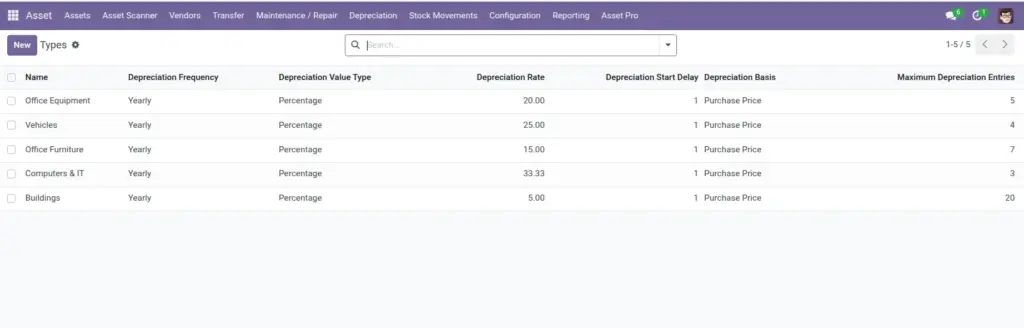
Each asset type defines an Advanced Depreciation Method and related settings (rate, useful life, MACRS class, etc.). When depreciation runs, the system uses the calculator to reduce the book value on schedule.
Default methods and rates can be set globally under Settings so new asset types inherit sensible defaults.
Step-by-Step Guide
- Go to Assets > Configuration > Asset Types and open a type (e.g., IT Equipment).
- Select the Advanced Depreciation Method that matches your accounting policy.
- Fill in method-specific fields (e.g., Declining Balance Rate, Useful Life Years, MACRS Class).
- Set the Depreciation Rate or fixed amount depending on your method.
- Save the asset type. All assets of this type will use these rules.
- Run or review depreciation entries from the asset form to confirm current value updates correctly.
Fields Table
| Field Name | Description | Example |
|---|---|---|
Advanced Depreciation Method |
Calculation method for this asset type. |
Straight Line |
Depreciation Rate (%) |
Annual or periodic rate for percentage methods. |
20% |
Declining Balance Rate (%) |
Multiplier for declining balance (200 = double). |
200% |
Useful Life (Years) |
Expected lifespan for sum-of-years method. |
5 |
Total Expected Units |
Production units for units-of-production method. |
100,000 hours |
MACRS Class |
IRS property class for MACRS depreciation. |
5-Year Property |
Purchase Amount |
Starting value before depreciation. |
$10,000 |
Current Value |
Remaining book value after depreciation. |
$6,400 |
Depreciation Frequency |
How often depreciation is calculated. |
Monthly |
Field Explanations
Advanced Depreciation Method
Choose the method your accountant recommends. Straight-line is the simplest for most office equipment.
Depreciation Rate (%)
For straight-line percentage method – 20% often means fully depreciated in 5 years.
Declining Balance Rate (%)
200% is double declining balance – front-loads more expense in early years.
Useful Life (Years)
Required for sum-of-years digits. Must match your accounting policy.
Total Expected Units
For manufacturing equipment – depreciation ties to actual usage hours or units.
MACRS Class
US tax method. Match the IRS class for the asset category (computers = 5-year, etc.).
Purchase Amount
Must be accurate – all calculations start from this number.
Current Value
Read-only calculated field. Shows remaining value on your balance sheet.
Depreciation Frequency
Monthly is typical. Align with your accounting period close schedule.
Tips (Pro Tips)
- Set up asset types with correct depreciation before bulk-importing assets – retroactive fixes are painful.
- Ask your accountant which method to use before configuring MACRS or declining balance.
- Review current value quarterly alongside physical asset audits.
Common Mistakes
- Mixing depreciation methods on the same asset type – pick one method per category.
- Entering purchase amount incorrectly – all future values will be wrong.
- Expecting current value to match resale market value – book value and market value differ.
Visual Reference