Overview
Regular maintenance keeps equipment running safely and avoids costly breakdowns. Asset Management Pro lets you schedule preventive maintenance on each asset – oil changes for vehicles, filter replacements for HVAC units, or software updates for servers.
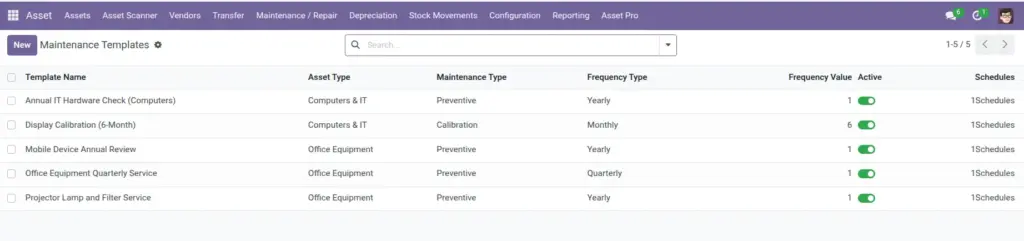
Reusable templates save time when many similar assets need the same maintenance routine.
How It Works
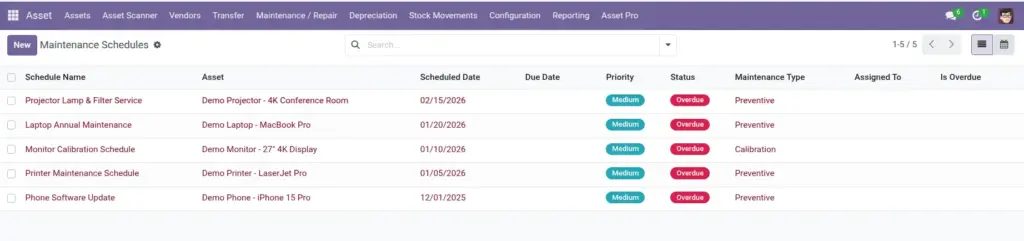
A maintenance schedule links to one asset and defines when work is due, what type of maintenance it is, and who is responsible. Schedules can be created manually or generated from templates. The system tracks status (Scheduled, In Progress, Completed, Overdue) and can auto-create the next occurrence after completion.
A daily cron job checks for overdue schedules and can send notifications to assigned technicians.
Step-by-Step Guide
- Optionally create a template at Asset Pro > Maintenance > Maintenance Templates.
- Go to Asset Pro > Maintenance > Maintenance Schedules and click New.
- Select the Asset and choose a Maintenance Template or fill in details manually.
- Set the Scheduled Date, Frequency Type (daily, weekly, monthly, etc.), and Maintenance Type.
- Assign a technician under Assigned To and set priority if urgent.
- Save and monitor status. Mark In Progress when work starts and Completed when finished.
Fields Table
| Field Name | Description | Example |
|---|---|---|
Schedule Name |
Title for this maintenance job. |
Forklift FL-07 – Quarterly Service |
Asset |
Equipment receiving maintenance. |
Forklift FL-07 |
Maintenance Template |
Reusable template used to create this schedule. |
Quarterly Forklift Service |
Scheduled Date |
When maintenance should be performed. |
2025-04-01 |
Due Date |
Latest acceptable completion date. |
2025-04-07 |
Frequency Type |
How often maintenance repeats. |
Quarterly |
Maintenance Type |
Preventive, corrective, inspection, etc. |
Preventive |
Priority |
Urgency level. |
High |
Assigned To |
Technician responsible for the work. |
Carlos Mendez |
Status |
Scheduled, In Progress, Completed, Overdue, or Cancelled. |
Scheduled |
Field Explanations
Schedule Name
Include the asset name so technicians know exactly which equipment to service.
Asset
Every schedule must link to one asset. Create separate schedules for each piece of equipment.
Maintenance Template
Saves time – define tasks once and apply to all similar assets.
Scheduled Date
Plan ahead. The system highlights schedules approaching or past this date.
Due Date
Grace period end date. After this, status may change to Overdue.
Frequency Type
Choose how often the maintenance repeats after completion.
Maintenance Type
Preventive for routine care; Corrective for breakdown fixes.
Priority
Use Urgent sparingly so technicians know what to tackle first.
Assigned To
Clear ownership prevents maintenance from being forgotten.
Status
Keep status current – overdue items appear on dashboards and reports.
Tips (Pro Tips)
- Create templates for asset types you maintain often – forklifts, HVAC, laptops, etc.
- Set due dates a few days after scheduled dates to allow scheduling flexibility.
- Review the overdue list every Monday as part of your facilities routine.
Common Mistakes
- Creating one-off schedules without frequency – next occurrence is never auto-generated.
- Leaving Assigned To empty – nobody knows who should perform the work.
- Marking completed without recording what was done – you lose maintenance history.
Visual Reference