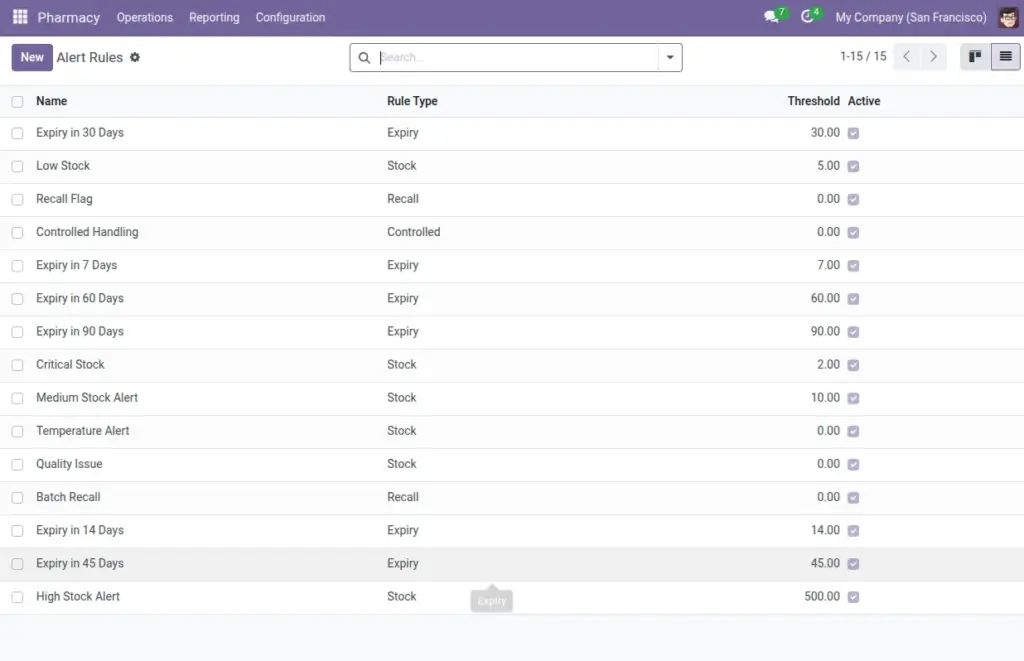
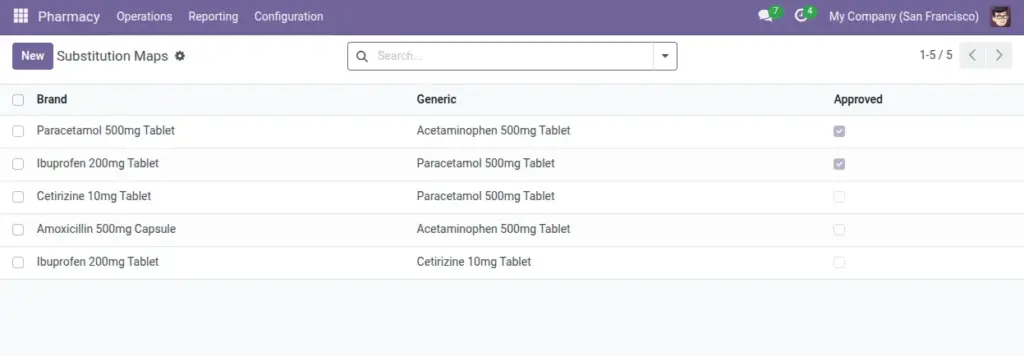
Create alert rules for expiry, stock, recalls, and controlled items. Manage approved substitutions.
Overview
Operational safety and continuity rely on timely alerts and clear substitution rules. Alert Rules notify your team about low stock, upcoming expiries, recalls, or controlled‑drug events, with optional scoping to company, hospital, branch, category, or a single drug. Substitution Maps define allowed brand‑to‑generic swaps and whether they are approved.
With these tools, pharmacists can act early and confidently offer safe alternatives when permitted, improving patient outcomes and reducing wait times.
How It Works
- Alert Rules can be scoped by company, hospital, branch, category, or a specific drug.
- Substitution Map pairs a brand with a generic and marks if approved.
Step-by-Step Guide
- Go to Pharmacy → Configuration → Alerts → New.
- Choose Rule Type (Expiry, Stock, Recall, Controlled) and set Threshold if needed.
- Scope it to a Hospital or Pharmacy for targeted alerts.
- Go to Pharmacy → Configuration → Substitutions (Substitution Map) → New.
- Select Brand and Generic, and tick Approved when ready.
Fields Table
| Field Name | Description | Example |
|---|---|---|
Rule Type |
Type of alert. |
Expiry |
Threshold |
Limit to trigger the alert (e.g., days, qty). |
30 |
Scope (Company/Hospital/Pharmacy) |
Where the rule applies. |
CGH → OP Branch |
Drug Category |
Apply to one category. |
Antibiotics |
Specific Drug |
Apply to a single drug. |
Amoxicillin 500mg |
Brand → Generic |
Allowed substitution mapping. |
Augmentin → Amoxicillin |
Approved |
Whether substitution is authorized. |
Yes |
Field Names Explained
Rule Type
The alert category (Expiry, Stock, Recall, Controlled).
Threshold
Limit that triggers the alert (e.g., days to expiry or min qty).
Scope (Company/Hospital/Pharmacy)
Where the alert applies.
Drug Category
Apply rule to a whole class of drugs.
Specific Drug
Target one drug when needed.
Brand → Generic
Mapping that defines allowed substitution direction.
Approved
Marks the substitution as authorized for use.
Tips
- Start with hospital-wide alerts, then add branch-specific ones for busy locations.
Common Mistakes
- Creating duplicate rules for the same scope causes confusion—consolidate where possible.
Image