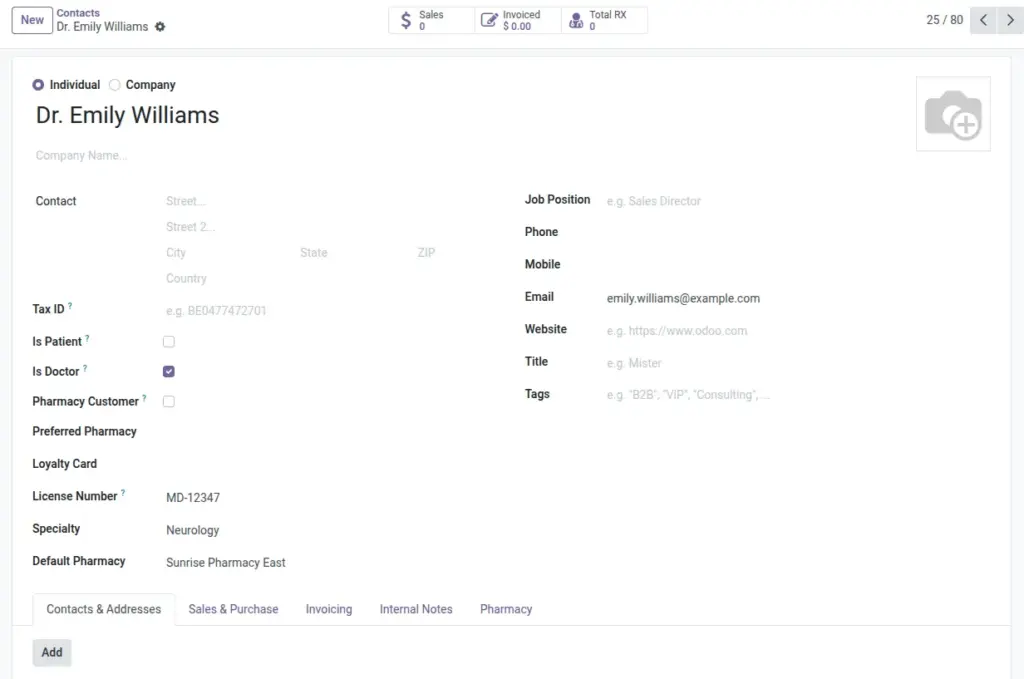
Mark contacts as prescribers and track their license, specialty, and default branch.
Overview
Any contact can be flagged as a doctor (prescriber) with an associated license number and specialty. The system tracks how many prescriptions each doctor writes in total and at their default pharmacy, helping you understand referral patterns and workload distribution.
Keeping doctor details centralized ensures clean prescription records, faster selection during entry, and fewer errors when a prescriber works across multiple branches within the same hospital network.
How It Works
- Set Is Doctor on a contact to enable doctor fields.
- License Number must be unique per company.
- Use Default Pharmacy for routing and KPI breakdowns.
Step-by-Step Guide
- Go to Contacts and open a doctor’s record.
- Tick Is Doctor. Enter License Number and Specialty.
- Set a Default Pharmacy if the doctor writes prescriptions from a specific branch.
- Save. Use smart buttons to see doctor’s prescriptions.
Fields Table
| Field Name | Description | Example |
|---|---|---|
Is Doctor |
Marks the contact as a prescriber. |
Yes |
License Number |
Doctor’s professional registration number. |
DOC-56721 |
Specialty |
Medical field of practice. |
Pediatrics |
Default Pharmacy |
Branch where the doctor mainly practices. |
CGH OP Pharmacy |
Field Names Explained
Is Doctor
Marks the contact as a prescriber so they can appear on RXs.
License Number
Must be unique per company; required for compliance.
Specialty
Medical field used for context and reporting.
Default Pharmacy
Branch where the doctor typically writes RXs.
Tips
- Keep license numbers consistent with regulator records to simplify audits.
Common Mistakes
- Forgetting to tick Is Doctor hides license and KPI fields.
Image