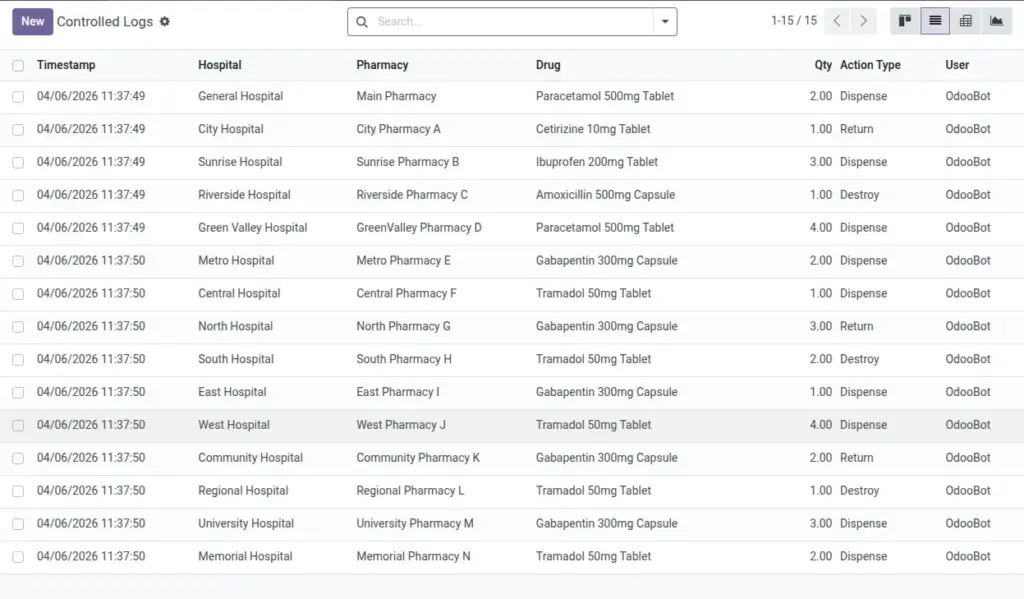
Record dispense, return, and destroy events for controlled substances with time, user, and notes.
Overview
Controlled substances require strict record‑keeping and fast retrieval during audits. The Controlled Drug Log captures essential details for every event—where it happened, which drug, how much, when, and why—whether or not the movement is tied to a prescription.
By standardizing these entries, you reduce compliance risk, make internal reviews faster, and ensure that any discrepancy can be investigated with reliable, time‑stamped data.
How It Works
- Each entry includes Hospital, Pharmacy, Drug, Qty, Action, and Timestamp.
- Actions can be Dispense, Return, or Destroy.
Step-by-Step Guide
- Go to Pharmacy → Reporting → Controlled Logs → New.
- Select Hospital, Pharmacy, and Drug.
- Enter Qty, select Action Type, and add Notes if needed.
- Save to record the log entry.
Fields Table
| Field Name | Description | Example |
|---|---|---|
Hospital |
Where the event occurred. |
City General |
Pharmacy |
Branch where it was handled. |
CGH OP |
Drug |
Controlled substance name. |
Morphine 10mg |
Qty |
Quantity involved (positive). |
1 |
Action Type |
Dispense, Return, or Destroy. |
Destroy |
Timestamp |
When it was recorded. |
2026-04-06 10:30 |
Notes |
Reason or additional details. |
Expired vial |
Field Names Explained
Hospital
Where the controlled event took place.
Pharmacy
Branch that handled the substance; must belong to the hospital.
Drug
The controlled substance name recorded on the log.
Qty
Quantity for the event; must be greater than zero.
Action Type
Classify as Dispense, Return, or Destroy.
Timestamp
Exact date/time of the action for audit traceability.
Notes
Extra context such as batch or witness details.
Tips
- Attach supporting documents (e.g., destruction certificates) to the related prescription or product if applicable.
Common Mistakes
- Logging with the wrong hospital/branch breaks compliance trails—double check before saving.
Image