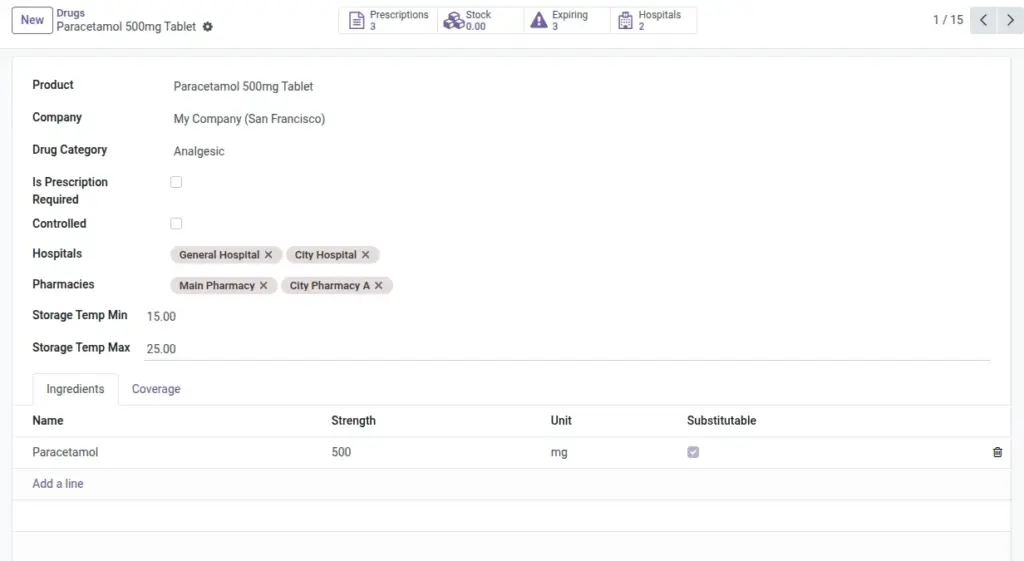
Create drug categories, record storage needs, ingredients, and set hospital/branch coverage.
Overview
Each drug record connects to a Product template so pricing, taxes, and inventory all work seamlessly. Categories help you group similar drugs (for example, all antibiotics) and apply consistent policies, while Ingredients capture what a drug contains and at what strength. For operational control, Hospital Coverage lines show where a drug is available and define minimum, target, and maximum levels per site.
With this setup, pharmacists see live quantities, get shortage warnings before stockouts, and can act early on lots that will expire soon. Linking drugs to the right product templates also ensures invoices reflect correct unit prices and units of measure.
How It Works
- Drug references a Product template for price and inventory.
- Ingredients store strength/unit and if substitution is allowed.
- Coverage sets target/min/max and shows shortages or expiring lots by hospital/branch.
Step-by-Step Guide
- Go to Pharmacy → Configuration → Drugs → New.
- Select the linked Product, choose a Category, and mark if Prescription Required or Controlled.
- Set Storage Temperatures if applicable.
- Add Ingredients with strength and unit; tick Substitutable when allowed.
- In Hospital Coverage, add hospitals/branches and fill min/target/max.
Fields Table
| Field Name | Description | Example |
|---|---|---|
Product |
Links the drug to pricing and stock. |
Amoxicillin 500mg |
Category |
Drug classification for grouping and rules. |
Antibiotics |
Prescription Required |
Whether a doctor’s prescription is needed. |
Yes |
Controlled |
Marks the drug as controlled substance. |
Yes |
Storage Temp (Min/Max) |
Recommended storage temperature range. |
2–8°C |
Ingredients |
Active ingredients with strength and unit. |
Amoxicillin 500 mg |
Hospitals/Pharmacies |
Where the drug is made available. |
City General / OP Pharmacy |
Coverage (Min/Target/Max) |
Stock policy thresholds. |
Min 50, Target 100, Max 200 |
Current Qty |
Live quantity at the selected hospital/branch. |
87 |
Has Expiring Lots |
Shows if lots expire within 30 days. |
Yes |
Field Names Explained
Product
The linked product template used for pricing, taxes, and inventory.
Category
Classification (e.g., Antibiotics) for grouping and policy rules.
Prescription Required
Marks drugs that can only be dispensed with a valid RX.
Controlled
Flags substances requiring extra record‑keeping and logs.
Storage Temp (Min/Max)
Recommended storage range for safe handling.
Ingredients
Active components with strength and unit; mark if substitutable.
Hospitals/Pharmacies
Sites where the drug is available to staff.
Coverage (Min/Target/Max)
Policy thresholds per site for reordering and caps.
Current Qty
Live on‑hand quantity aggregated from configured locations.
Has Expiring Lots
True when any lot expires within the next 30 days.
Tips
- Use Categories for compliance rules (e.g., all controlled drugs in one group).
- Fill Storage Temp for cold-chain items to track handling expectations.
Common Mistakes
- Creating a drug without a linked Product prevents stock and pricing from working.
- Forgetting Coverage results in no shortage alerts.
Image