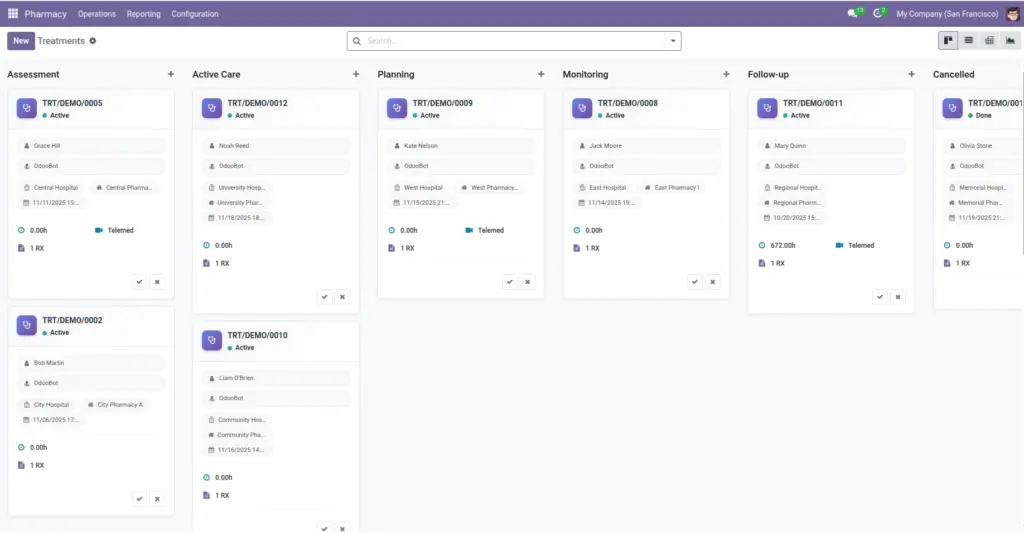
Track treatment stages, notes, telemedicine details, and linked prescriptions.
Overview
A treatment is an episode of care that groups clinical notes, status, stage, and related prescriptions. It gives teams a single place to understand why medicines were started, how care progressed, and when it concluded. Stages (like Active or Done) reflect workflow on the board, while the state communicates system status for reporting.
Treatments can also store telemedicine details and attachments so important context travels with the patient’s record, even when multiple branches are involved.
How It Works
- Stages define your workflow (e.g., Active → Done). One stage can be the default.
- Telemedicine fields store session links and tokens.
- Smart buttons count linked prescriptions.
Step-by-Step Guide
- Go to Pharmacy → Operations → Treatments → New.
- Select Patient, Hospital, and (optional) Pharmacy.
- Pick a Stage or keep the default.
- Add Notes and Attachments as needed.
- Link existing Prescriptions using the smart button or related field.
Fields Table
| Field Name | Description | Example |
|---|---|---|
Patient |
Who receives care. |
Jane Doe |
Hospital |
Where the episode is managed. |
City General |
Pharmacy |
Branch supporting the care. |
CGH OP |
Stage |
Current step in the workflow. |
Active |
State |
Draft, Active, Done, or Cancelled. |
Active |
Start/End |
Start and end date/time. |
2026-04-05 / 2026-04-12 |
Duration (Hours) |
Calculated from start/end. |
24 |
Telemedicine |
Session URL and tokens. |
https://… |
Prescriptions |
Linked prescriptions. |
RX/2026/0011, RX/2026/0012 |
Field Names Explained
Patient
The person receiving care during this episode.
Hospital
The hospital coordinating this treatment.
Pharmacy
Supporting branch for medication supply (optional).
Stage
Workflow column (e.g., Active, Done) on the kanban board.
State
System status (Draft/Active/Done/Cancelled) used in reports.
Start/End
Datetimes marking when the episode began and finished.
Duration (Hours)
Calculated length of the episode for analysis.
Telemedicine
Secure session URL and tokens for virtual visits.
Prescriptions
RX records linked to this episode of care.
Tips
- Create a Done (closed) stage to mark completed care and lock it clearly.
Common Mistakes
- Leaving the stage closed but state not set to Done—use the action button to sync.