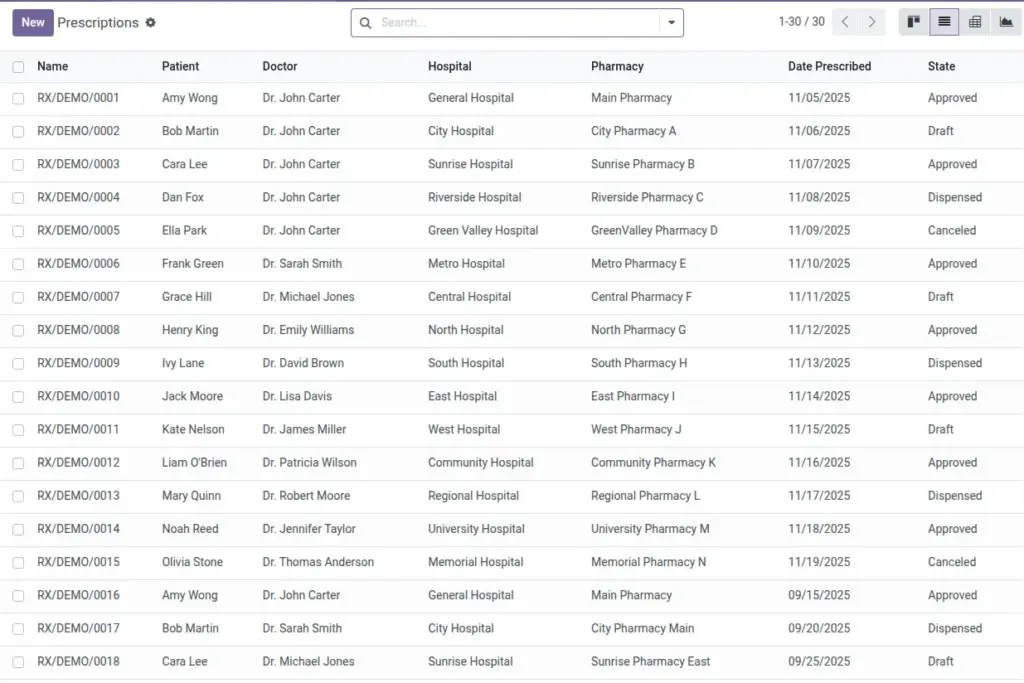
Create prescriptions, add drugs and quantities, approve, and dispense with delivery and invoicing.
Overview
A prescription records the patient, prescriber, hospital, optional dispensing branch, and the medications to be supplied. Each line shows the selected drug, dosage instructions, and the quantity prescribed versus what is ultimately dispensed. After approval, you can create a delivery picking to move stock to the patient and later generate an invoice when needed.
This keeps clinical intent and stock movement tightly linked, so pharmacists can trace every item from order to handover. The system also prevents over‑dispensing by blocking quantities that exceed what the prescriber intended.
How It Works
- After adding lines, Approve the prescription to allow dispensing.
- Dispensing can auto-create a Delivery picking to move stock to the patient.
- You can generate an Invoice using the product prices.
Step-by-Step Guide
- Go to Pharmacy → Operations → Prescriptions → New.
- Select Hospital, Pharmacy (optional), Patient, and Doctor.
- Add Lines: choose the drug, dosage, and quantity prescribed.
- Click Approve when ready.
- Click Create Delivery to generate a picking for stock movement.
- Click Dispense to mark quantities as dispensed (cannot exceed prescribed).
- Click Create Invoice if needed.
Fields Table
| Field Name | Description | Example |
|---|---|---|
Hospital |
Where the prescription was issued. |
City General |
Pharmacy |
Branch dispensing the drugs. |
CGH OP Pharmacy |
Patient |
Recipient of the prescription. |
Jane Doe |
Doctor |
Prescriber issuing the prescription. |
Dr. A. Kumar |
Date Prescribed |
When it was created. |
2026-04-06 |
State |
Draft, Approved, Dispensed, or Canceled. |
Approved |
Lines: Drug |
Selected medication. |
Amoxicillin 500mg |
Lines: Dosage |
Instructions shown to the patient. |
1 capsule 3x daily |
Lines: Qty Prescribed |
Intended quantity. |
30 |
Lines: Qty Dispensed |
What was actually given. |
30 |
Field Names Explained
Hospital
The issuing hospital; drives company context and reporting.
Pharmacy
Branch responsible for dispensing; affects stock routing.
Patient
Recipient of medication; ensure demographics are up to date.
Doctor
Prescriber; must be flagged as a doctor with a valid license.
Date Prescribed
Creation date of the RX; useful for audits and expiry policies.
State
Lifecycle status (Draft/Approved/Dispensed/Canceled) controlling actions.
Lines: Drug
Selected medication from the drug list (linked to a product).
Lines: Dosage
Clear patient‑facing instructions (e.g., 1 capsule 3x daily).
Lines: Qty Prescribed
Intended quantity from the prescriber.
Lines: Qty Dispensed
Actual given quantity; cannot exceed prescribed.
Tips
- Attach the scanned prescription in Attachments for audit and patient reference.
- Use Create Delivery before dispensing to keep stock traceability tight.
Common Mistakes
- Skipping Approve prevents dispensing.
- Leaving Lines empty results in no delivery moves.
Image