

Overview
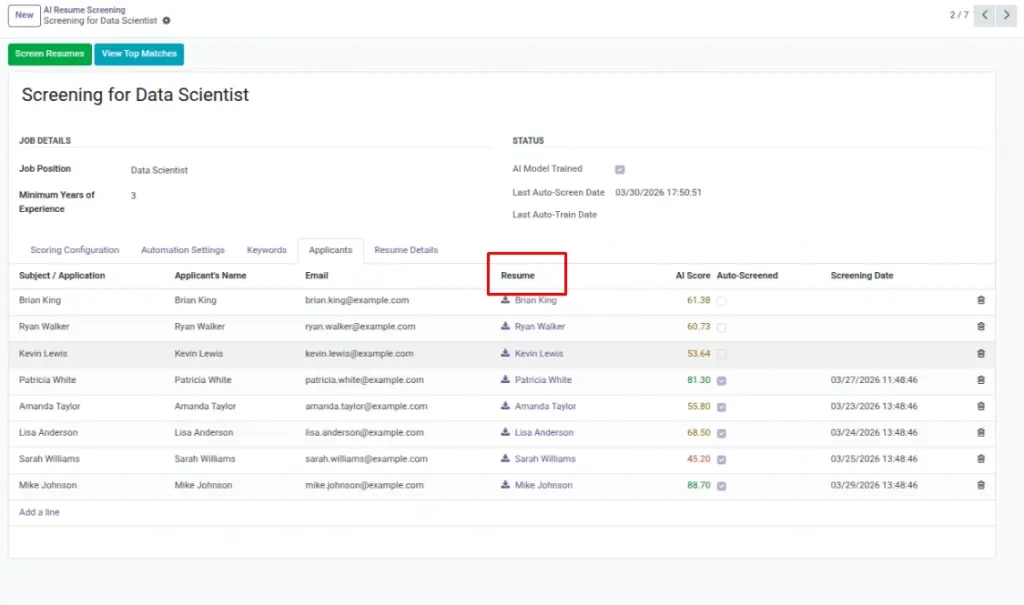
For volume hiring, importing applicants in bulk saves time. Prepare a clean CSV, align each applicant with the correct Job Position, and make sure resumes are text-based PDFs. After import, train (if needed) and run Screen Resumes to populate AI Scores so your team can sort and review efficiently.
How It Works
Use Odoo’s import wizard to load applicants (CSV/XLSX). Map columns like Applicant Name and Job Position, then attach resumes (during or after import). Once records exist and resumes are attached, train (if needed) and run Screen Resumes. The analyzer processes the resume text and writes AI Scores to applicants.
Step-by-Step Guide
- Prepare a CSV with applicant details linked to the job.
- Attach resumes where possible, or upload after importing applicants.
- Train (if not trained) and run Screen Resumes.
Fields Table
| Field Name | Description | Example |
|---|---|---|
Applicant Name |
Candidate’s full name. |
Alex Doe |
Job Position |
Target role for this applicant. |
Software Developer |
Resume Attachment |
PDF resume file attached to applicant. |
alex_doe_resume.pdf |
Field Explanations
Applicant Name
Candidate’s display name; ensure consistent formatting for clarity.
Job Position
Connects the applicant to the correct screening and scoring rules.
Resume Attachment
The PDF file; prefer text-based for accurate parsing and scoring.
Tips
- Import in batches of 200–500 for easier review.
- Run a quick sample screen on 10 applicants to validate setup.
Common Mistakes
- Mixing multiple roles in one batch—harder to manage screenings.
- Using image-only PDFs—scores won’t populate.
Image