

Overview
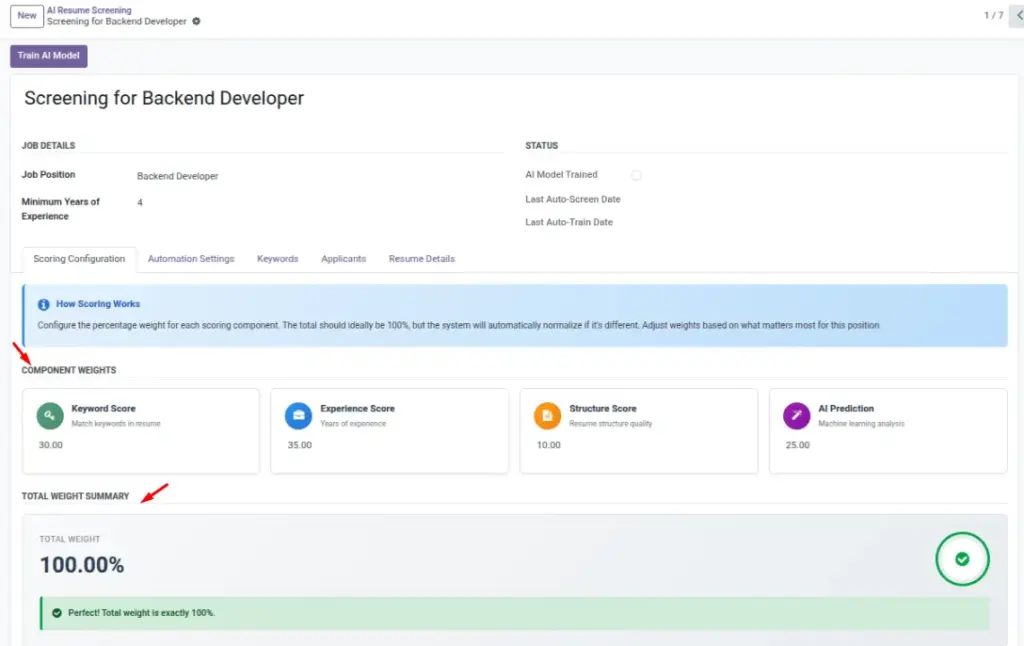
Weights tell the AI how much each component contributes to the final score. Typical parts are Keyword matches, Experience level, and Resume structure (ATS-friendliness). By adjusting weights, you fit the scoring to the role—technical roles may lean more on Keywords, while senior roles may consider Experience more heavily. Clear weights make the 0–100 score predictable and fair.
How It Works
The system analyzes resume text, measures how well it aligns with your criteria, then combines component scores using your weights. Conceptually, it’s a weighted sum: each part (e.g., Keywords, Experience, Structure) contributes a share, and the total is scaled to 0–100. Adjusting weights shifts emphasis without changing the underlying data—use this to align scoring with each role’s priorities.
Step-by-Step Guide
- Open your Screening and find the weight settings.
- Adjust one area at a time (e.g., increase Keywords from 40% to 50%).
- Save, re-train, and re-screen if needed.
Fields Table
| Field Name | Description | Example |
|---|---|---|
Keyword Score Weight (%) |
How much keywords matter in total score. |
40.0 |
Experience Score Weight (%) |
Weight for years of experience. |
20.0 |
Structure Score Weight (%) |
Weight for resume structure/ATS-friendliness. |
40.0 |
Field Explanations
Keyword Score Weight (%)
Percentage impact of keyword matches on the final score.
Experience Score Weight (%)
Percentage impact of years of experience.
Structure Score Weight (%)
Percentage impact of resume structure/ATS readiness.
Tips
- Keep weights adding to 100% for a predictable score.
- Test on a few real applicants after changes.
Common Mistakes
- Overweighting one factor—can hide good candidates with different strengths.
- Forgetting to retrain after changing weights.
Image