

Overview
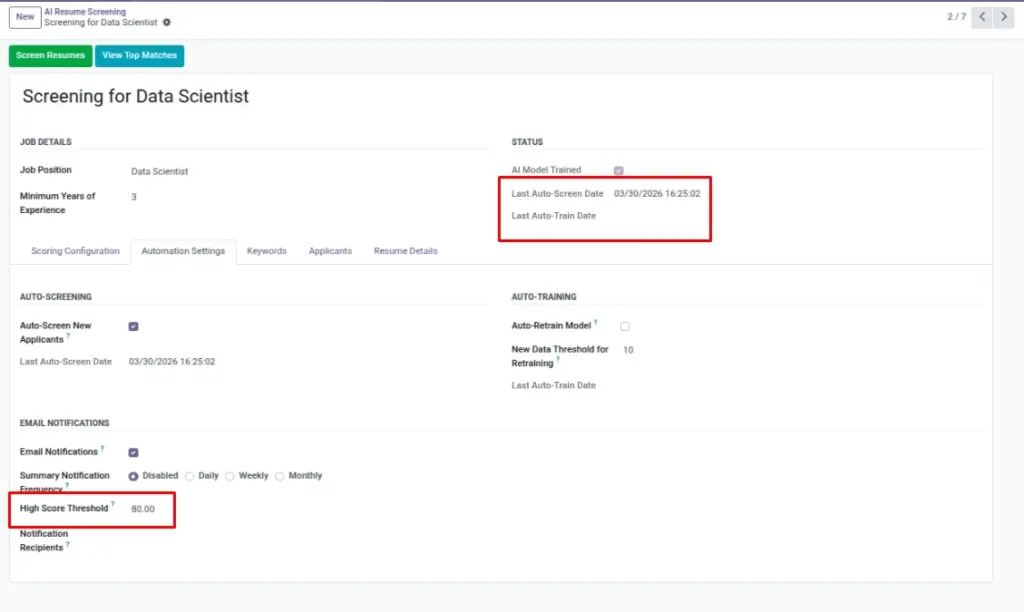
Automation keeps your pipeline fresh with minimal effort. Scheduled jobs can re-train models and screen new applicants on a timetable (e.g., nightly), ensuring scores are always up to date. Email alerts then notify HR when an applicant crosses your High Score Threshold, so you can act quickly while interest is high.
This is especially valuable for high-volume roles where resumes arrive daily. With automation, recruiters spend less time pressing buttons and more time talking to great candidates.
How It Works
A scheduled job (cron) runs in the background at set intervals. It can retrain the model (keeping it current) and screen new applicants so scores are always fresh. If an applicant’s score meets or exceeds your High Score Threshold, the system renders your chosen email template and sends it to your recipients. This ensures the team hears about strong candidates quickly—without manual steps.
Step-by-Step Guide
- Open your Screening and set the automation options (if available to you).
- Ensure email is configured in Odoo for notifications.
- Pick a High Score Threshold (e.g., 75).
Fields Table
| Field Name | Description | Example |
|---|---|---|
Last Auto Train Date |
Last time auto-training ran. |
2026-03-10 01:00 |
Last Auto Screen Date |
Last time auto-screening ran. |
2026-03-10 01:15
|
High Score Threshold |
Score required to trigger an email alert. |
75 |
Email Template |
Template used to notify the team. |
AI Resume High Score |
Field Explanations
Last Auto Train Date
The most recent time automatic training ran for this screening.
Last Auto Screen Date
The most recent time automatic screening ran.
High Score Threshold
The minimum score that triggers a notification email to your team.
Tips
- Align thresholds with hiring urgency (lower when hiring fast).
- Review email templates for clear subject lines (e.g., “High-scoring applicant for Developer”).
Common Mistakes
- Threshold too low → inbox noise.
- No email setup → alerts won’t send.
Image