

Overview
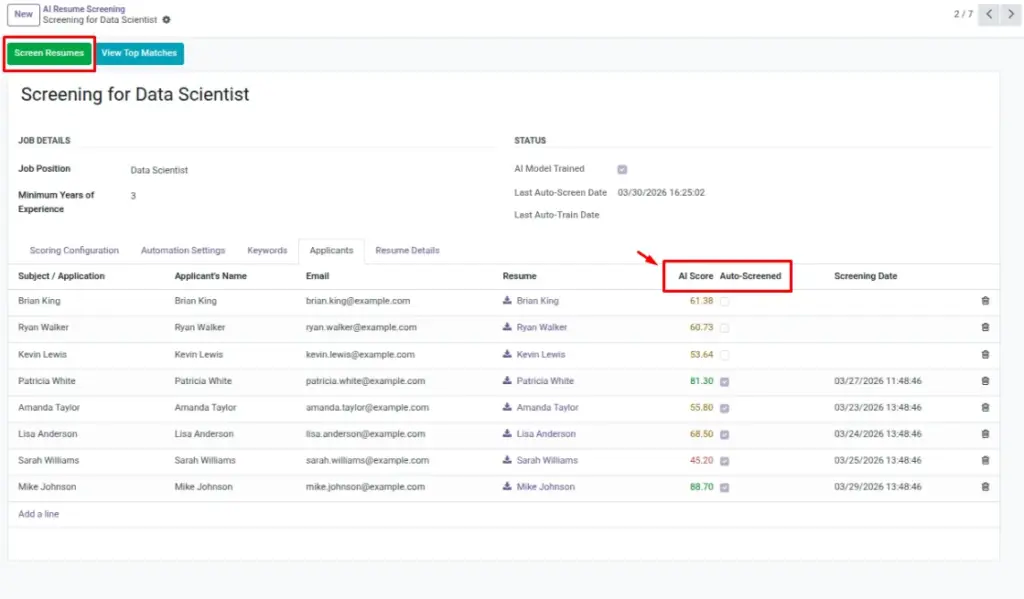
Screening uses your trained model to evaluate applicant resumes for the selected Job Position and return a single, easy-to-compare score (0–100). This compresses complex criteria—skills, experience, and structure— into one number so recruiters can prioritize their time. You may screen on-demand (click a button) or let scheduled automation handle new applicants as they arrive.
Results appear on each applicant record as AI Score. You can then sort and filter the applicant list to review top candidates first. Re-run screening whenever your criteria or model changes, or when a batch of new resumes comes in.
How It Works
The system looks for applicants linked to the Screening’s Job Position who have readable resume text and no current score (or a zero score). It loads the trained model and evaluates each resume, computing the AI Score. Scores are written back to the applicant records. Automation can run this on a schedule, updating scores as new applicants arrive.
Step-by-Step Guide
- Open a trained Screening.
- Click Screen Resumes.
- Wait a moment; applicants get scores.
- Open the Applicants list to sort by score.
Fields Table
| Field Name | Description | Example |
|---|---|---|
AI Score |
Overall score on the applicant (0–100). |
82 |
Last Auto Screen Date |
Last automatic screening time. |
2026-03-05 09:00 |
AI Model Trained |
Must be true before screening resumes. |
True |
Field Explanations
AI Score
The final 0–100 rating for each applicant based on your screening settings.
Last Auto Screen Date
The most recent time automatic screening processed applicants for this screening.
Tips
- Enable automation if you receive many applicants daily.
- Re-screen after updating keywords or weights.
Common Mistakes
- Screening before training: system blocks with a helpful message.
- Expecting scores for image-only PDFs (no text to analyze).
Image