

Overview
The AI Resume Analyzer adds a workspace in Odoo to help you quickly score applicants for each job. It reads PDF resumes, extracts text, and gives a score from 0 to 100 based on your criteria (keywords, experience, structure). You create a Screening for each job role, train its model once, and then screen applicants manually or automatically. The goal is to surface the most relevant candidates faster so recruiters spend time where it matters—reviewing great profiles and conducting interviews.
This guide orients you to the menu location, basic flow (create → train → screen), and where to see scores in applicants lists. As you learn the system, you’ll fine-tune keywords and weights to match your company’s hiring style.
How It Works
The flow is simple:
- create a Screening tied to a Job Position,
- train the AI model so it knows your criteria, and
- screen applicants to generate scores. Once trained, you can screen on demand or let automation run on a schedule. Scores appear on applicant records, so you can sort and focus on top matches.
Why this helps: You focus on the most promising candidates first, instead of reading every resume in full.
Step-by-Step Guide
- Go to Recruitment → AI Resume Screening.
- Click Create to add a new screening for a job.
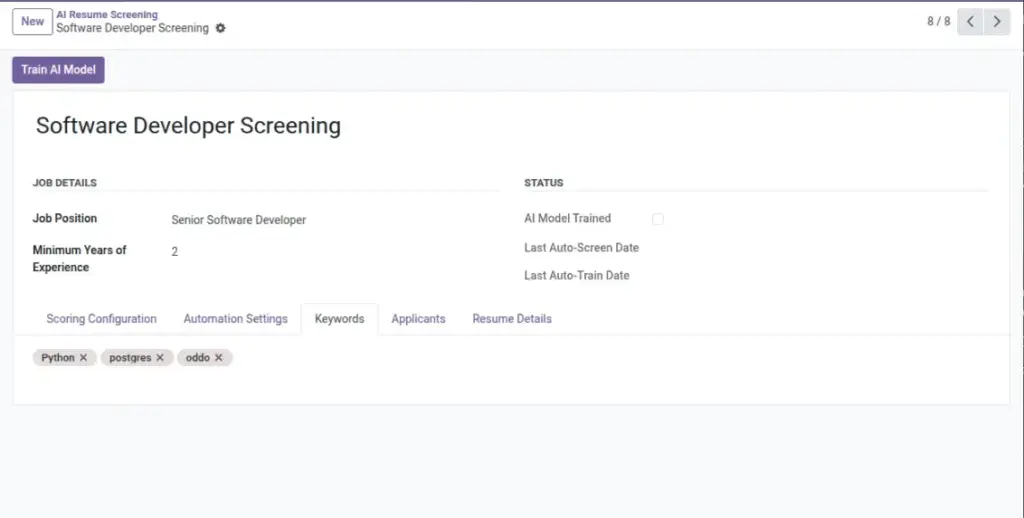
- Train the AI model (once) using the button at the top.
- Upload or link applicants with PDF resumes to the job.
- Click Screen Resumes or let automation handle it for you.
Fields Table
| Field Name | Description | Example |
|---|---|---|
Screening Name |
What you call this screening setup |
“Software Developer Screening” |
Job Position |
The Odoo job this screening applies to. |
Software Developer |
Keywords |
Important skills or tools to match in resumes. |
Python, Odoo, PostgreSQL |
Minimum Years of Experience |
The baseline experience to expect. |
2 |
Field explanations
Screening Name
A short, clear title that your team recognizes (e.g., “Developer Screening Q2”).
Job Position
The specific Odoo job (hr.job) this screening belongs to; ties applicants to scoring.
Keywords
Core skills/tools to influence scoring for this role (e.g., Python, Odoo, Git).
Minimum Years of Experience
Baseline experience; applicants below may score lower.
Tips
- Start with one role, then expand to others.
- Use simple keywords first (e.g., “Python”, not “advanced Python scripting”).
- Re-train the model if your hiring needs change.
Common Mistakes
- Forgetting to train before screening.
- Using too many narrow keywords (leads to low scores).
- Uploading image-only PDFs without text (no content to analyze).
Image