

Overview
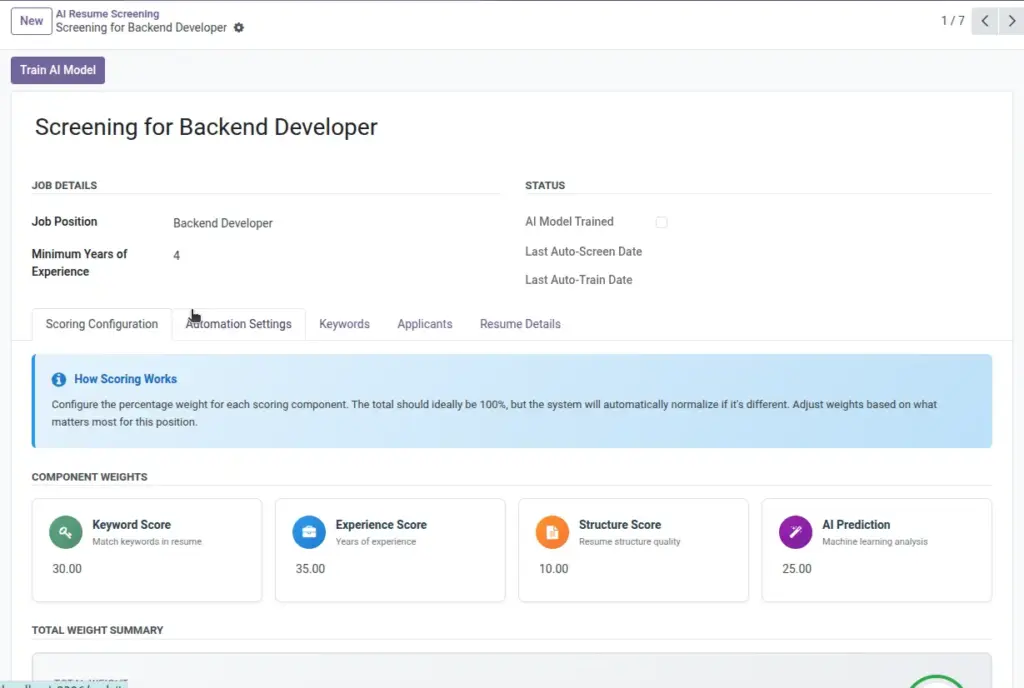
A Screening is the “control center” for one job role. It binds a Job Position with the AI criteria you care about, so the system can evaluate every applicant for that role in a consistent, fair, and repeatable way. Within a Screening, you define the Job Position, core Keywords (skills/tools you value), and a baseline of Minimum Years of Experience. The Screening also holds the trained AI model and tracks when you last trained or screened. Creating one Screening per role (e.g., Software Developer, Data Scientist) gives you clear separation of criteria and scores across roles, making it easier to compare candidates within the same job.
Practically, this means recruiters do not have to memorize evaluation rules for each job. Instead, you open the Screening for that role and use the built-in buttons: Train AI Model (once or when rules change) and Screen Resumes (manually or via automation). Each applicant attached to the related Job Position can then be scored on a 0–100 scale using your chosen criteria.
How It Works
Each Screening links one Job Position to its AI setup. After saving, it appears in kanban/list views. When you train, the system produces a model file stored on the Screening. Screening then applies that model to applicants of the linked job who have readable resume text. The Screening records the most recent training and screening times to help you confirm that automation is running as expected.
Step-by-Step Guide
- Open Recruitment → AI Resume Screening.
- Click Create.
- Fill Screening Name and select Job Position.
- Add initial Keywords (you can refine later).
- Set Minimum Years of Experience if relevant.
- Save. You’re ready to train next.
Fields Table
| Field Name | Description | Example |
|---|---|---|
Screening Name |
Label for this screening. |
“Developer Screening Q2” |
Job Position |
Connects to an Odoo job (hr.job). |
Software Developer |
Keywords |
Skills/tools the AI should look for. |
Python, Odoo, Git |
Minimum Years of Experience |
Baseline experience threshold. |
3 |
AI Model Trained |
Shows whether the model is ready. |
True |
Model Data |
Stored model file for this screening. |
Binary attachment |
Last Auto Train Date |
Last time auto-training ran. |
2026-03-10 01:00 |
Last Auto Screen Date |
Last time auto-screening ran. |
2026-03-10 01:15 |
Field Explanations
Screening Name
A human-friendly title for this screening configuration. Keep it short and specific.
Job Position
The Odoo job (hr.job) the screening applies to. Scores will appear for applicants linked to this job.
Keywords
A curated list of skills, tools, or certifications that positively affect the AI score.
Minimum Years of Experience
The baseline experience expected. Applicants below this may score lower.
AI Model Trained
Indicates whether the model is currently trained and ready for screening.
Model Data
The internal model file stored on the screening (managed by the system).
Last Auto Train Date
The most recent time the system automatically ran training for this screening.
Last Auto Screen Date
The most recent time the system automatically screened new applicants.
Tips
- Keep 5–15 keywords to start; adjust after first results.
- Set experience realistically to avoid filtering out rising talent.
Common Mistakes
- Picking the wrong job position (scores won’t show where you expect).
- Adding only niche keywords—balance specific and general skills.
Image