

Overview
The analyzer needs selectable text to understand a resume. If a PDF is just an image (a scan or photo), the system can’t detect keywords or experience, and scores may be missing or low. Text-based PDFs exported from Word or Google Docs work best and are the industry standard for applicant tracking systems (ATS).
How It Works
The analyzer attempts to extract selectable text from each PDF. If a text layer exists, it reads content and looks for your keywords and experience indicators. If the PDF is only an image (no text layer), the analyzer can’t find matches. Using OCR can add a text layer, but quality varies—ask for original text-based exports when possible.
Step-by-Step Guide
- Open a resume and try to select its text. If you can’t, it’s an image.
- Ask the candidate for a text-based PDF export (from Word/Google Docs).
- Optionally run OCR to convert images into text before upload.
Fields Table
| Field Name | Description | Example |
|---|---|---|
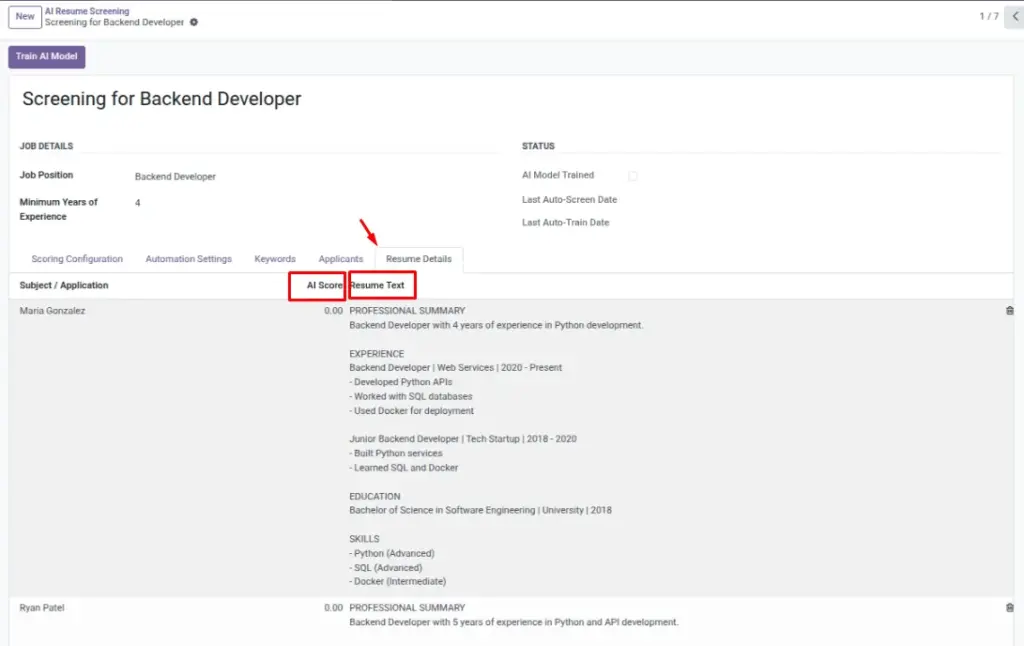
Resume Text |
Extracted content used for scoring. |
“Python developer with 5 years…”“Python developer with 5 years…” |
AI Score |
Depends on readable content. |
78 |
Field Explanations
Resume Text
The extracted text used for scoring. Empty/garbled text results in weak scoring.
AI Score
Depends on readable content; improves when resumes contain real, parsable text.
Tips
- Ask for simple, clean layouts; avoid heavy graphics.
- Prefer standard fonts and headings for better parsing.
Common Mistakes
- Uploading photos or scans of resumes instead of text PDFs.
- Low-quality OCR results that miss key words.
Image