

Overview
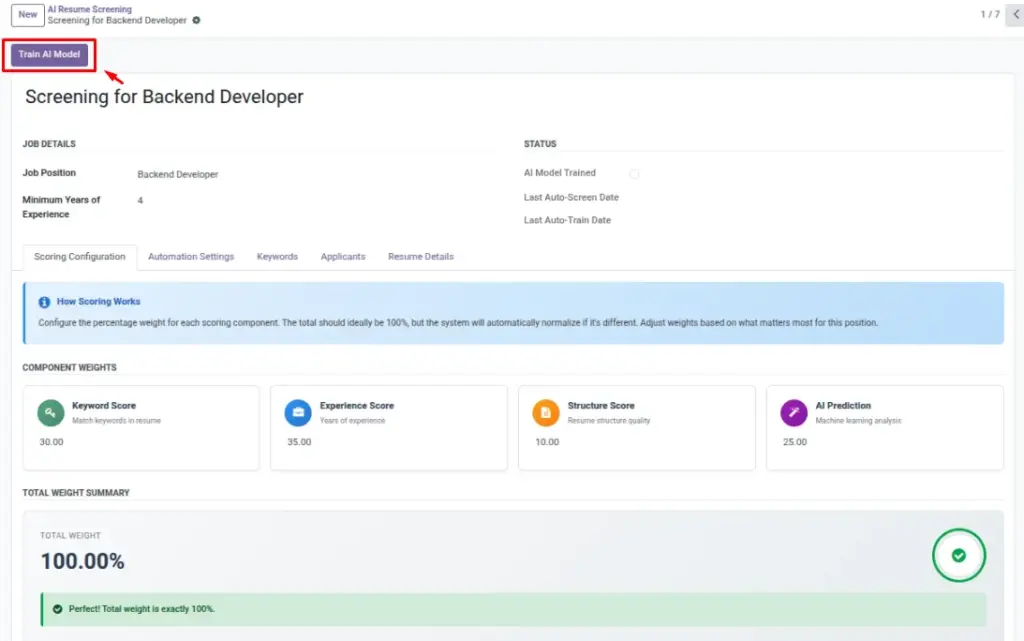
Training prepares a role-specific AI model that lives on your Screening. It learns from your configuration (keywords, experience baseline, structure preferences) so it can consistently translate your hiring criteria into a 0–100 score. Think of training as “teaching the system what matters” before you ask it to score resumes. You can safely re-train whenever your priorities change (for example, new tools, different experience expectations).
Once training succeeds, the Screening shows AI Model Trained = True. From that point, screening runs quickly because the heavy learning step is already done. If you modify key inputs later (like keywords or weights), re-train so the model reflects those updates.
How It Works
When you click Train AI Model, the system analyzes your Screening’s inputs (keywords, experience baseline, and other parameters) and builds a compact model file saved to the Screening. This enables fast scoring later. Once complete, the AI Model Trained indicator turns on. Re-train any time your criteria changes so the model reflects your latest expectations.
Step-by-Step Guide
- Open a Screening record.
- Click Train AI Model in the header.
- Wait a few seconds; the status will turn on when ready.
- Optional: Adjust keywords or experience and train again later.
Fields Table
| Field Name | Description | Example |
|---|---|---|
AI Model Trained |
Shows if the model is ready. |
True |
Last Auto Train Date |
Last time the system trained automatically. |
2026-03-01 10:15 |
Model Data |
Stored model file used for screening. |
Binary attachment |
Field Explanations
AI Model Trained
True/False indicator that the model exists and is ready to score.
Model Data
The stored model file used during screening (managed automatically).
Last Auto Train Date
Timestamp of the last automatic training job for this screening.
Tips
- Train during off-hours if you manage many roles.
- Re-train after major changes to keywords or job requirements.
Common Mistakes
- Starting screening without training—scores won’t generate.
- Assuming one-time training fits all future changes—re-train as needed.
Image